Petto works fully for free; Premium gives about twice the room on modules with a limit and a few extra touches. Here is what it adds, how its server slots work and what happens when it ends.
Petto is free, and Free is not a demo: moderation, automod, anti-nuke, verification, logging, tickets, leveling, giveaways, forms, appeals, backups, the dashboard and the rest of the modules work without paying. Premium is never needed. It gives about twice the room on the modules that have a limit and a few small touches on top, and it does not lock away anything important.See the current plans and prices at petto.sbs/premium. The plans are the same and only differ in how many servers they cover: 1, 3 or 5.
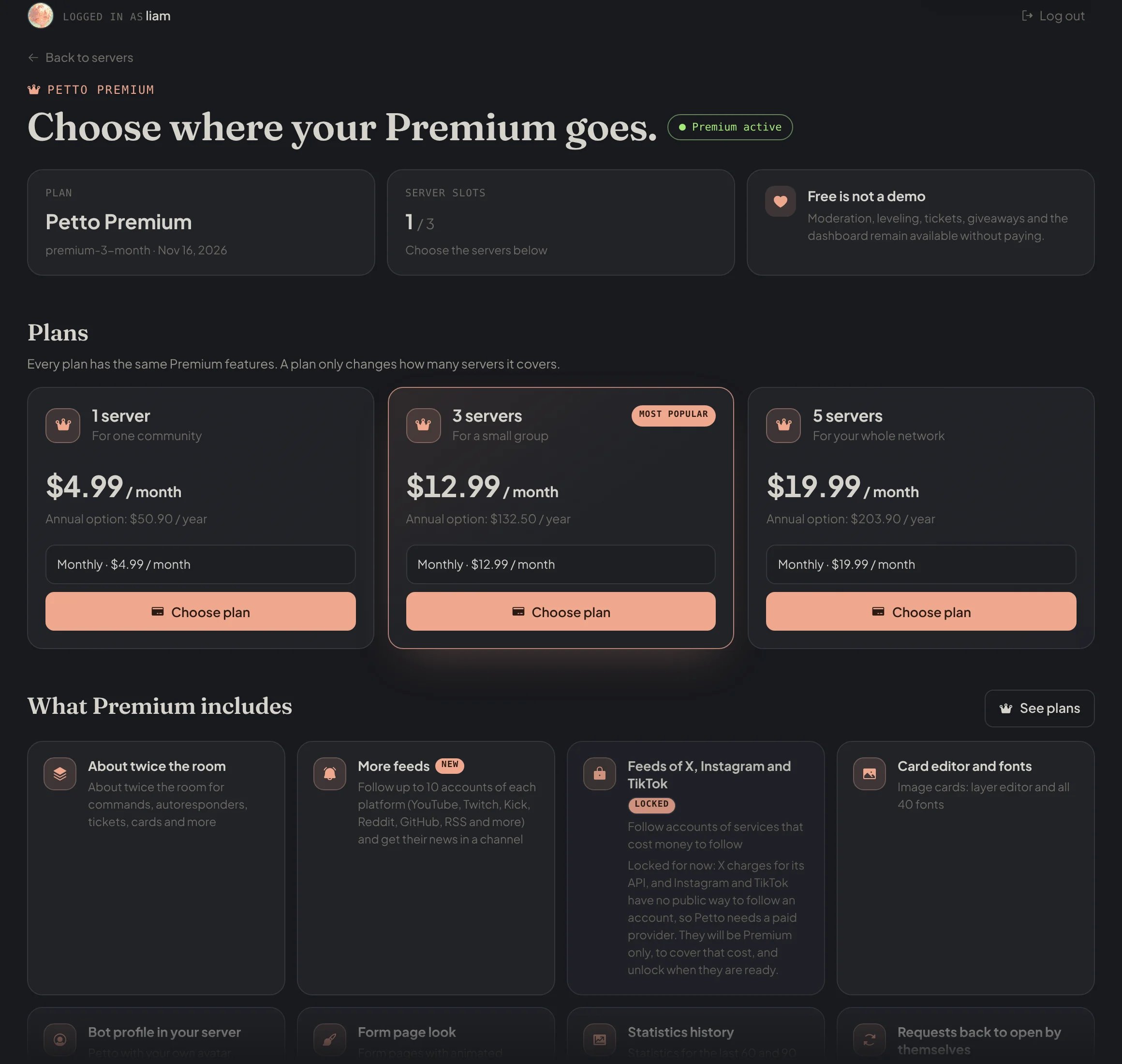
petto.sbs/dash/premium: your plan, your server slots and the plans.
Moderation, automod, anti-nuke, anti-scam, verification, logging of every event (each category to the channel you want), level rewards (as many as you want), backups, forms, appeals and the embed builder.
The commands and the dashboard count the same numbers: when a server reaches one, !ticket, !giveawaypreset, !customcommand, !autoresponder, !counter and the rest say so and how far Premium goes. Nothing is deleted when a server is over a limit (after Premium ends, for example); it just can’t add more until it is under it.Discord’s own limits still apply inside each item: a ticket panel shows at most 5 buttons or 25 dropdown options, a message at most 5 buttons per row, an embed at most 25 fields. Forms have the same limits for every server, with or without Premium.
Premium belongs to your account, and you use it on servers through slots:
1
Get Premium
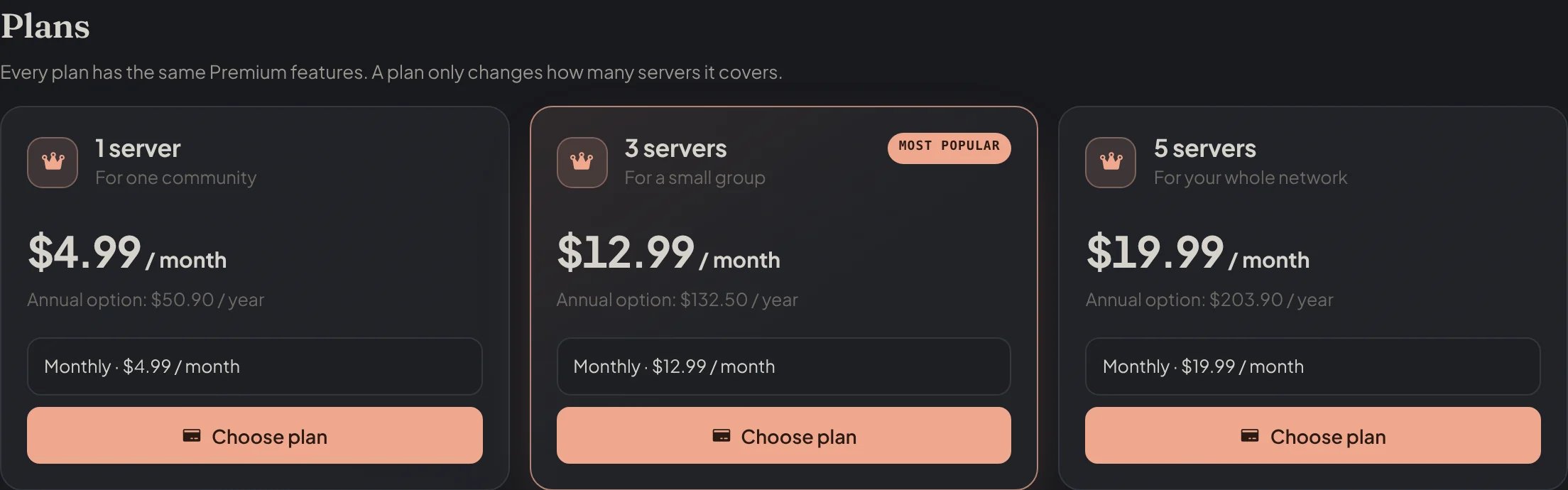
Choose a plan at petto.sbs/premium. Payments go through Polar; the plans are the same and only differ in the number of servers.
petto.sbs/dash/premium: the three plans, monthly or yearly.
2
Choose the servers
In petto.sbs/dash/premium, pick the servers where your slots go. You can only pick servers where you have Manage Server or Administrator and where Petto is.
petto.sbs/dash/premium: your servers: Select server uses a slot there.
3
Move them when you want
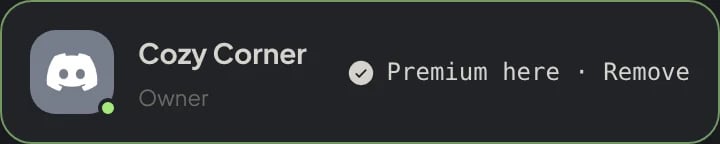
A slot can be released from one server and used on another at any time from the same page.
petto.sbs/dash/premium: Premium here · Remove releases the slot, to use it on another server.
Every admin of a server sees on the dashboard whether that server has Premium.
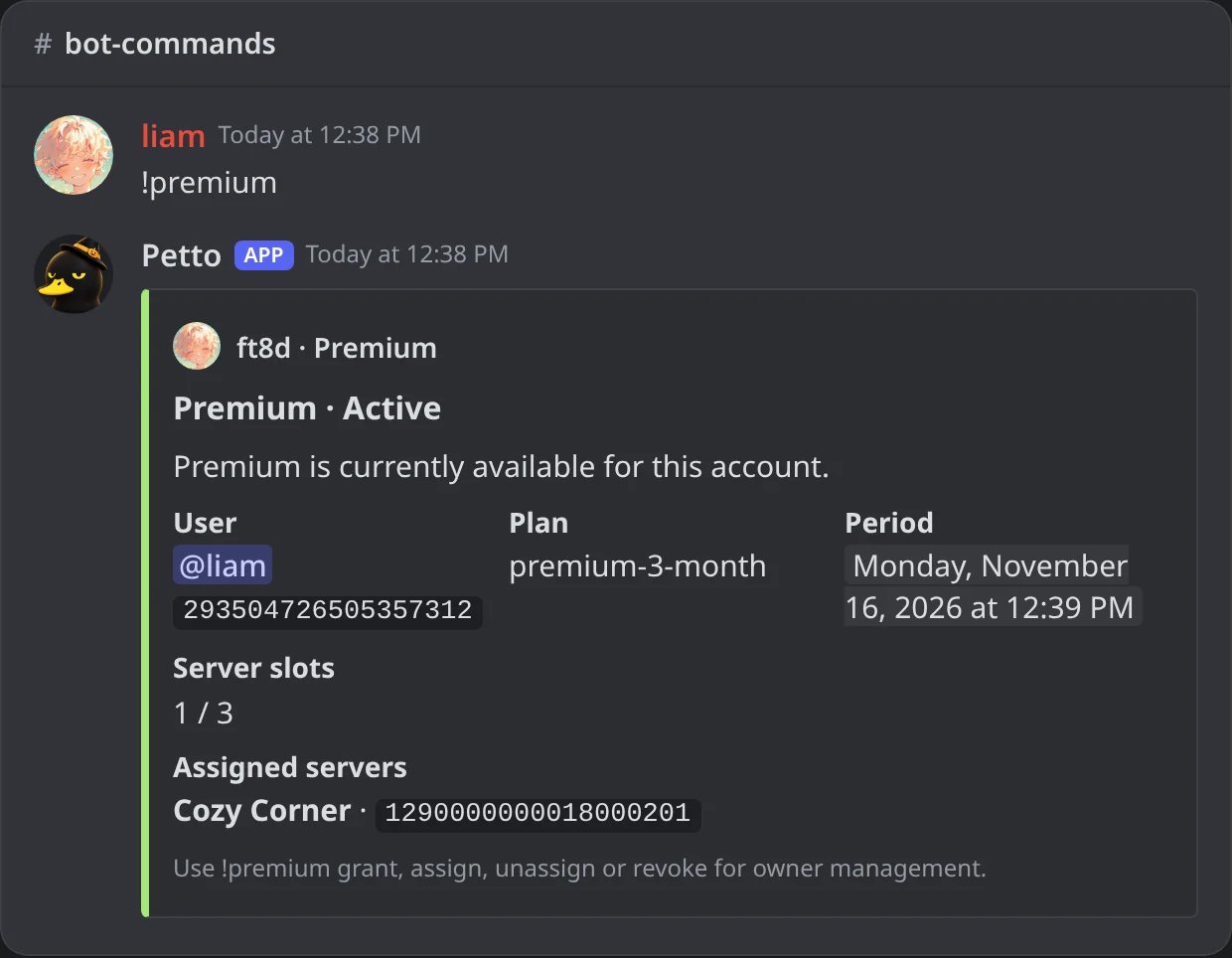
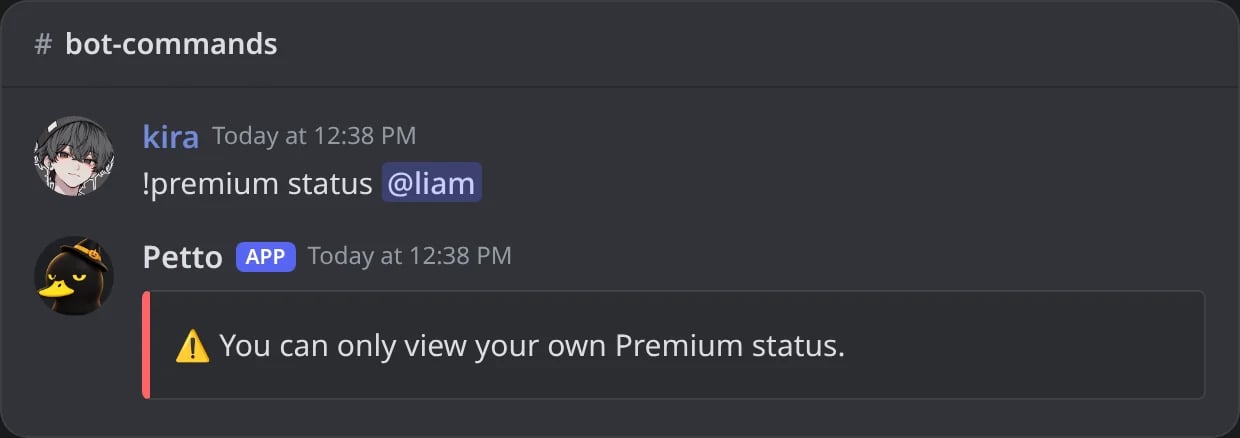
!premium (alias !prem) shows your Premium: the state, the plan, until when it lasts, your slots and the servers they are on. You can only see your own.
In Discord: !premium: liam's Premium, its plan, until when, the slots and their servers.
In Discord: someone else's Premium cannot be looked up.
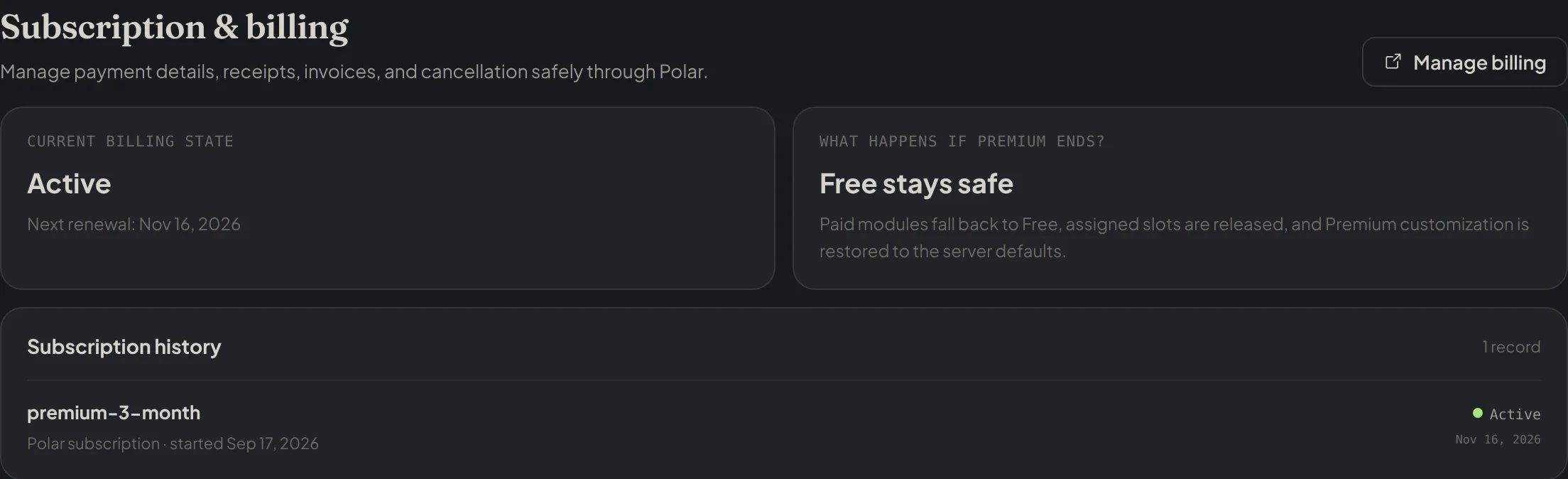
Receipts, invoices, the payment method and cancelling are in the Subscription & billing part of petto.sbs/dash/premium, which opens Polar’s portal. See the refund policy.
petto.sbs/dash/premium: Subscription & billing, with Manage billing and the history.
Free keeps working. The limits fall back to Free, the slots are released and Premium customization (the avatar, banner, bio and name style) goes back to the server’s defaults. An image card that used Premium features keeps working with its basic settings, a form page with an animated background shows the plain gradient, and the Statistics page shows up to 30 days. Nothing is deleted.
Questions about a payment or a plan go to the support server.
Was this page helpful?
{"docsConfig":{"theme":"mint","$schema":"https://mintlify.com/docs.json","name":"Petto","colors":{"primary":"#f0a88f","light":"#bd5136","dark":"#f0a88f"},"logo":{"light":"https://mintcdn.com/wikipetto/INzCWFMm_YlwlYMb/favicon.png?fit=max\u0026auto=format\u0026n=INzCWFMm_YlwlYMb\u0026q=85\u0026s=c885753c51d1e387b16145091d7f5210","dark":"https://mintcdn.com/wikipetto/INzCWFMm_YlwlYMb/favicon.png?fit=max\u0026auto=format\u0026n=INzCWFMm_YlwlYMb\u0026q=85\u0026s=c885753c51d1e387b16145091d7f5210"},"favicon":"https://mintcdn.com/wikipetto/INzCWFMm_YlwlYMb/favicon.png?fit=max\u0026auto=format\u0026n=INzCWFMm_YlwlYMb\u0026q=85\u0026s=c885753c51d1e387b16145091d7f5210","appearance":{"default":"dark","strict":true},"background":{"color":{"light":"#ffffff","dark":"#111214"}},"navbar":{"links":[{"href":"https://petto.sbs/support","label":"Support Server"}],"primary":{"type":"button","label":"Add Petto","href":"https://petto.sbs/invite"}},"footer":{"socials":{"discord":"https://petto.sbs/support"}},"seo":{"metatags":{"theme-color":"#111214","og:site_name":"wiki.petto.sbs","twitter:card":"summary_large_image"},"indexing":"navigable"},"styling":{"latex":false},"navigation":{"languages":[{"language":"en","href":"overview/introduction"},{"language":"es","href":"es/overview/introduction"},{"language":"pt-BR","href":"pt-br/overview/introduction"}]}},"deployment":{"deploymentMetadataValue":{"subdomain":"wikipetto","hasAudioNarration":false,"actualSubdomain":"wikipetto","customDomains":["wiki.petto.sbs"],"gitSource":{"type":"github","owner":"pettobot","repo":"petto-wiki-docs","deployBranch":"main","contentDirectory":"","isPrivate":true,"mountPath":"","label":""},"chroma":{"latestBuiltDeploymentHistoryId":"6ae81e996e6e556c3ab64fca","collectionId":"2ffbed51-8c88-40d8-9e28-c350f89e2d0d","liveDeploymentHistoryId":"6ae81e996e6e556c3ab64fca","schemaVersion":"v3"},"feedback":{"thumbs":true},"entitlements":{"AI_CHAT":{"status":"DISABLED"}},"buildId":"6ae8e2462fb019ec32ec24ca","clientVersion":"0.0.4045","searchFilterCounts":[{"language":"en","tag":"Community","count":24},{"language":"es","tag":"Comunidad","count":24},{"language":"pt-BR","tag":"Comunidade","count":24},{"language":"en","tag":"Automation","count":20},{"language":"es","tag":"Automatización","count":20},{"language":"pt-BR","tag":"Automação","count":20},{"language":"en","tag":"Setup","count":13},{"language":"es","tag":"Configuración","count":13},{"language":"pt-BR","tag":"Configuração","count":13},{"language":"en","tag":"Moderation","count":11},{"language":"es","tag":"Moderación","count":11},{"language":"pt-BR","tag":"Moderação","count":11},{"language":"en","tag":"Miscellaneous","count":9},{"language":"es","tag":"Varios","count":9},{"language":"pt-BR","tag":"Diversos","count":9},{"language":"en","tag":"Members","count":8},{"language":"en","tag":"Onboarding","count":8},{"language":"es","tag":"Miembros","count":8},{"language":"es","tag":"Bienvenida","count":8},{"language":"pt-BR","tag":"Membros","count":8},{"language":"pt-BR","tag":"Boas-vindas","count":8},{"language":"en","tag":"Engagement","count":7},{"language":"en","tag":"Protection","count":7},{"language":"es","tag":"Participación","count":7},{"language":"es","tag":"Protección","count":7},{"language":"pt-BR","tag":"Engajamento","count":7},{"language":"pt-BR","tag":"Proteção","count":7},{"language":"en","tag":"Guides","count":6},{"language":"es","tag":"Guías","count":6},{"language":"pt-BR","tag":"Guias","count":6},{"language":"default","tag":"Changelog","count":1}]},"assistantConfig":{"enableAskAiButton":false,"enableStarterQuestions":false,"enableContextualStarterQuestions":false,"enableAskAiSearchBar":true},"basePath":"","hasChatPermissions":false,"hasWebMcpPermissions":false,"toggles":[],"googleFontsInlined":false},"customCss":[],"page":{"pagePath":"overview/premium","slug":"/overview/premium","pageMetadata":{"title":"Premium","description":"Petto works fully for free; Premium gives about twice the room on modules with a limit and a few extra touches. Here is what it adds, how its server slots work and what happens when it ends.","icon":"gem","href":"/overview/premium"},"description":{"compiledSource":"\"use strict\";\nconst {jsx: _jsx} = arguments[0];\nconst {useMDXComponents: _provideComponents} = arguments[0];\nfunction _createMdxContent(props) {\n const _components = {\n p: \"p\",\n ..._provideComponents(),\n ...props.components\n };\n return _jsx(_components.p, {\n children: \"Petto works fully for free; Premium gives about twice the room on modules with a limit and a few extra touches. Here is what it adds, how its server slots work and what happens when it ends.\"\n });\n}\nfunction MDXContent(props = {}) {\n const {wrapper: MDXLayout} = {\n ..._provideComponents(),\n ...props.components\n };\n return MDXLayout ? _jsx(MDXLayout, {\n ...props,\n children: _jsx(_createMdxContent, {\n ...props\n })\n }) : _createMdxContent(props);\n}\nreturn {\n default: MDXContent\n};\n","frontmatter":{},"scope":{}},"pageType":"default","mdx":{"mdxSource":{"compiledSource":"\"use strict\";const{Fragment:_Fragment,jsx:_jsx,jsxs:_jsxs}=arguments[0];const{useMDXComponents:_provideComponents}=arguments[0];function _createMdxContent(props){const _components={a:`a`,code:`code`,li:`li`,p:`p`,pre:`pre`,span:`span`,strong:`strong`,tbody:`tbody`,td:`td`,th:`th`,thead:`thead`,tr:`tr`,ul:`ul`,..._provideComponents(),...props.components},{Badge,CodeBlock,Frame,Heading,OptimizedImage,Step,Steps,Table,Tip}=_components;if(!Badge)_missingMdxReference(`Badge`,true);if(!CodeBlock)_missingMdxReference(`CodeBlock`,true);if(!Frame)_missingMdxReference(`Frame`,true);if(!Heading)_missingMdxReference(`Heading`,true);if(!OptimizedImage)_missingMdxReference(`OptimizedImage`,true);if(!Step)_missingMdxReference(`Step`,true);if(!Steps)_missingMdxReference(`Steps`,true);if(!Table)_missingMdxReference(`Table`,true);if(!Tip)_missingMdxReference(`Tip`,true);return _jsxs(_Fragment,{children:[_jsx(Heading,{level:`2`,id:`overview`,children:`Overview`}),`\n`,_jsxs(_components.p,{children:[`Petto is free, and Free is not a demo: moderation, automod, anti-nuke, verification, logging, tickets, leveling, giveaways, forms, appeals, backups, the dashboard and the rest of the modules work without paying. `,_jsx(_components.strong,{children:`Premium`}),` is never needed. It gives about `,_jsx(_components.strong,{children:`twice the room`}),` on the modules that have a limit and a few `,_jsx(_components.strong,{children:`small touches`}),` on top, and it does not lock away anything important.`]}),`\n`,_jsxs(_components.p,{children:[`See the current plans and prices at `,_jsx(_components.strong,{children:_jsx(_components.a,{href:`https://petto.sbs/premium`,children:`petto.sbs/premium`})}),`. The plans are the same and only differ in how many servers they cover: 1, 3 or 5.`]}),`\n`,_jsx(Frame,{caption:`petto.sbs/dash/premium: your plan, your server slots and the plans.`,children:_jsx(OptimizedImage,{src:`https://mintcdn.com/wikipetto/NNb0rgWpeffY0EDH/images/dashboard/overview/premium.webp?fit=max\u0026auto=format\u0026n=NNb0rgWpeffY0EDH\u0026q=85\u0026s=d52267648f857f6c6a4535b67fe2b17e`,alt:`The Premium page of liam: Petto Premium active, 1 of 3 server slots used, and the 1 server, 3 servers and 5 servers plans`,\"data-og-width\":`2320`,width:`2320`,\"data-og-height\":`2200`,height:`2200`,\"data-path\":`images/dashboard/overview/premium.webp`,\"data-optimize\":`true`,\"data-opv\":`3`,srcset:`https://mintcdn.com/wikipetto/NNb0rgWpeffY0EDH/images/dashboard/overview/premium.webp?w=280\u0026fit=max\u0026auto=format\u0026n=NNb0rgWpeffY0EDH\u0026q=85\u0026s=a16529dc7f3d0e8110d0944fbf82da67 280w, https://mintcdn.com/wikipetto/NNb0rgWpeffY0EDH/images/dashboard/overview/premium.webp?w=560\u0026fit=max\u0026auto=format\u0026n=NNb0rgWpeffY0EDH\u0026q=85\u0026s=e89d71f93a92bc1884fcaba5e13b596f 560w, https://mintcdn.com/wikipetto/NNb0rgWpeffY0EDH/images/dashboard/overview/premium.webp?w=840\u0026fit=max\u0026auto=format\u0026n=NNb0rgWpeffY0EDH\u0026q=85\u0026s=759dc75aa223109d40ee8b869fd63377 840w, https://mintcdn.com/wikipetto/NNb0rgWpeffY0EDH/images/dashboard/overview/premium.webp?w=1100\u0026fit=max\u0026auto=format\u0026n=NNb0rgWpeffY0EDH\u0026q=85\u0026s=f6fa924af9b592d1846bf60b6431d31d 1100w, https://mintcdn.com/wikipetto/NNb0rgWpeffY0EDH/images/dashboard/overview/premium.webp?w=1650\u0026fit=max\u0026auto=format\u0026n=NNb0rgWpeffY0EDH\u0026q=85\u0026s=5ffd76e9454861e44225765f66c141a3 1650w, https://mintcdn.com/wikipetto/NNb0rgWpeffY0EDH/images/dashboard/overview/premium.webp?w=2500\u0026fit=max\u0026auto=format\u0026n=NNb0rgWpeffY0EDH\u0026q=85\u0026s=ed97d2176a60d9a509eb5ccea80c16d1 2500w`})}),`\n`,_jsx(Heading,{level:`2`,id:`always-free-with-no-premium-limit`,children:`Always free, with no Premium limit`}),`\n`,_jsx(_components.p,{children:`Moderation, automod, anti-nuke, anti-scam, verification, logging of every event (each category to the channel you want), level rewards (as many as you want), backups, forms, appeals and the embed builder.`}),`\n`,_jsx(Heading,{level:`2`,id:`what-premium-adds`,children:`What Premium adds`}),`\n`,_jsxs(_components.ul,{children:[`\n`,_jsxs(_components.li,{children:[_jsx(_components.strong,{children:`About twice the room`}),` for the modules that have a limit (see the table below).`]}),`\n`,_jsxs(_components.li,{children:[_jsx(_components.strong,{children:`Image cards`}),`: the layer editor and all 40 fonts (15 are free). See `,_jsx(_components.a,{href:`/resources/image-cards`,children:`Image cards`}),`.`]}),`\n`,_jsxs(_components.li,{children:[_jsx(_components.strong,{children:`A moving decoration on the level-up card`}),`: the avatar decoration of the member moves when it is an animated one. See `,_jsx(_components.a,{href:`/resources/image-cards#the-level-up-card`,children:`The level-up card`}),`.`]}),`\n`,_jsxs(_components.li,{children:[_jsx(_components.strong,{children:`Petto’s look in your server`}),`: a server avatar, banner and bio, and a name style (gradient, neon or glow). The nickname is free. See `,_jsx(_components.a,{href:`/setup/bot-appearance`,children:`Bot appearance`}),`.`]}),`\n`,_jsxs(_components.li,{children:[_jsx(_components.strong,{children:`Form pages`}),`: two animated backgrounds, `,_jsx(_components.code,{children:`aurora`}),` and `,_jsx(_components.code,{children:`waves`}),`, and hiding the “Forms by Petto” line. See `,_jsx(_components.a,{href:`/community/forms#the-web-page`,children:`Forms`}),`.`]}),`\n`,_jsxs(_components.li,{children:[_jsx(_components.strong,{children:`Longer statistics`}),`: the Statistics page of the dashboard also shows the last 60 and 90 days (every server has 7, 14 and 30).`]}),`\n`,_jsxs(_components.li,{children:[_jsx(_components.strong,{children:`Ask (BETA)`}),`: unlimited `,_jsx(_components.code,{children:`/ai ask`}),` questions instead of 10 a day, with a `,_jsx(Badge,{color:`red`,children:`BETA`}),` mark. See `,_jsx(_components.a,{href:`/miscellaneous/ask`,children:`Ask`}),`.`]}),`\n`,_jsxs(_components.li,{children:[_jsx(_components.strong,{children:`Requests`}),`: a claimed request that is not finished in time goes back to open by itself. See `,_jsx(_components.a,{href:`/community/requests`,children:`Requests`}),`.`]}),`\n`,_jsxs(_components.li,{children:[_jsx(_components.strong,{children:`Your own prefix`}),` for Petto with `,_jsx(_components.code,{children:`!myprefix`}),`, and a Premium role in the support server. See `,_jsx(_components.a,{href:`/setup/user-prefix`,children:`Personal prefix`}),`.`]}),`\n`]}),`\n`,_jsx(Heading,{level:`2`,id:`limits-per-server`,children:`Limits per server`}),`\n`,_jsxs(Table,{children:[_jsx(_components.thead,{children:_jsxs(_components.tr,{children:[_jsx(_components.th,{children:`Limit`}),_jsx(_components.th,{children:`Free`}),_jsx(_components.th,{children:`Premium`})]})}),_jsxs(_components.tbody,{children:[_jsxs(_components.tr,{children:[_jsx(_components.td,{children:_jsx(_components.a,{href:`/automation/custom-commands`,children:`Custom commands`})}),_jsx(_components.td,{\"data-numeric\":`true`,children:`125`}),_jsx(_components.td,{\"data-numeric\":`true`,children:`250`})]}),_jsxs(_components.tr,{children:[_jsx(_components.td,{children:_jsx(_components.a,{href:`/automation/autoresponder`,children:`Autoresponders`})}),_jsx(_components.td,{\"data-numeric\":`true`,children:`75`}),_jsx(_components.td,{\"data-numeric\":`true`,children:`150`})]}),_jsxs(_components.tr,{children:[_jsx(_components.td,{children:_jsx(_components.a,{href:`/community/tickets`,children:`Ticket types`})}),_jsx(_components.td,{\"data-numeric\":`true`,children:`25`}),_jsx(_components.td,{\"data-numeric\":`true`,children:`50`})]}),_jsxs(_components.tr,{children:[_jsx(_components.td,{children:_jsx(_components.a,{href:`/community/giveaway-presets`,children:`Giveaway presets`})}),_jsx(_components.td,{\"data-numeric\":`true`,children:`15`}),_jsx(_components.td,{\"data-numeric\":`true`,children:`30`})]}),_jsxs(_components.tr,{children:[_jsx(_components.td,{children:_jsx(_components.a,{href:`/resources/image-cards`,children:`Image cards`})}),_jsx(_components.td,{\"data-numeric\":`true`,children:`30`}),_jsx(_components.td,{\"data-numeric\":`true`,children:`60`})]}),_jsxs(_components.tr,{children:[_jsx(_components.td,{children:`Uploaded card pictures`}),_jsx(_components.td,{\"data-numeric\":`true`,children:`50 (100 MB)`}),_jsx(_components.td,{\"data-numeric\":`true`,children:`120 (240 MB)`})]}),_jsxs(_components.tr,{children:[_jsx(_components.td,{children:_jsx(_components.a,{href:`/community/partners`,children:`Partner channels`})}),_jsx(_components.td,{\"data-numeric\":`true`,children:`25`}),_jsx(_components.td,{\"data-numeric\":`true`,children:`50`})]}),_jsxs(_components.tr,{children:[_jsx(_components.td,{children:_jsx(_components.a,{href:`/community/uploads`,children:`Upload channels`})}),_jsx(_components.td,{\"data-numeric\":`true`,children:`100`}),_jsx(_components.td,{\"data-numeric\":`true`,children:`200`})]}),_jsxs(_components.tr,{children:[_jsx(_components.td,{children:_jsx(_components.a,{href:`/automation/button-responders`,children:`Button responders`})}),_jsx(_components.td,{\"data-numeric\":`true`,children:`250`}),_jsx(_components.td,{\"data-numeric\":`true`,children:`500`})]}),_jsxs(_components.tr,{children:[_jsx(_components.td,{children:`Button panels`}),_jsx(_components.td,{\"data-numeric\":`true`,children:`50`}),_jsx(_components.td,{\"data-numeric\":`true`,children:`100`})]}),_jsxs(_components.tr,{children:[_jsx(_components.td,{children:_jsx(_components.a,{href:`/miscellaneous/counters`,children:`Counters`})}),_jsx(_components.td,{\"data-numeric\":`true`,children:`25`}),_jsx(_components.td,{\"data-numeric\":`true`,children:`50`})]}),_jsxs(_components.tr,{children:[_jsxs(_components.td,{children:[_jsx(_components.a,{href:`/automation/feeds`,children:`Feeds`}),` (accounts of each platform)`]}),_jsx(_components.td,{\"data-numeric\":`true`,children:`5`}),_jsx(_components.td,{\"data-numeric\":`true`,children:`25`})]}),_jsxs(_components.tr,{children:[_jsx(_components.td,{children:_jsx(_components.a,{href:`/resources/scripting/pagination`,children:`Paginated messages`})}),_jsx(_components.td,{\"data-numeric\":`true`,children:`25`}),_jsx(_components.td,{\"data-numeric\":`true`,children:`50`})]})]})]}),`\n`,_jsxs(_components.p,{children:[`The commands and the dashboard count the same numbers: when a server reaches one, `,_jsx(_components.code,{children:`!ticket`}),`, `,_jsx(_components.code,{children:`!giveawaypreset`}),`, `,_jsx(_components.code,{children:`!customcommand`}),`, `,_jsx(_components.code,{children:`!autoresponder`}),`, `,_jsx(_components.code,{children:`!counter`}),` and the rest say so and how far Premium goes. Nothing is deleted when a server is over a limit (after Premium ends, for example); it just can’t add more until it is under it.`]}),`\n`,_jsxs(_components.p,{children:[`Discord’s own limits still apply inside each item: a ticket panel shows at most 5 buttons or 25 dropdown options, a message at most 5 buttons per row, an embed at most 25 fields. `,_jsx(_components.a,{href:`/community/forms`,children:`Forms`}),` have the same limits for every server, with or without Premium.`]}),`\n`,_jsx(Heading,{level:`2`,id:`server-slots`,children:`Server slots`}),`\n`,_jsxs(_components.p,{children:[`Premium belongs to `,_jsx(_components.strong,{children:`your account`}),`, and you use it on servers through `,_jsx(_components.strong,{children:`slots`}),`:`]}),`\n`,_jsxs(Steps,{children:[_jsxs(Step,{title:`Get Premium`,children:[_jsxs(_components.p,{children:[`Choose a plan at `,_jsx(_components.a,{href:`https://petto.sbs/premium`,children:`petto.sbs/premium`}),`. Payments go through Polar; the plans are the same and only differ in the number of servers.`]}),_jsx(Frame,{caption:`petto.sbs/dash/premium: the three plans, monthly or yearly.`,children:_jsx(OptimizedImage,{src:`https://mintcdn.com/wikipetto/NNb0rgWpeffY0EDH/images/dashboard/overview/premium-step-1-plans.webp?fit=max\u0026auto=format\u0026n=NNb0rgWpeffY0EDH\u0026q=85\u0026s=94205441e4d173c7e48676b4e278ff7c`,alt:`The Plans of the Premium page: 1 server, 3 servers (most popular) and 5 servers, each with a Choose plan button`,\"data-og-width\":`2208`,width:`2208`,\"data-og-height\":`690`,height:`690`,\"data-path\":`images/dashboard/overview/premium-step-1-plans.webp`,\"data-optimize\":`true`,\"data-opv\":`3`,srcset:`https://mintcdn.com/wikipetto/NNb0rgWpeffY0EDH/images/dashboard/overview/premium-step-1-plans.webp?w=280\u0026fit=max\u0026auto=format\u0026n=NNb0rgWpeffY0EDH\u0026q=85\u0026s=8de095e6771c1414b6640e96f258c51e 280w, https://mintcdn.com/wikipetto/NNb0rgWpeffY0EDH/images/dashboard/overview/premium-step-1-plans.webp?w=560\u0026fit=max\u0026auto=format\u0026n=NNb0rgWpeffY0EDH\u0026q=85\u0026s=36664e859be5390e80dd38eed3d24399 560w, https://mintcdn.com/wikipetto/NNb0rgWpeffY0EDH/images/dashboard/overview/premium-step-1-plans.webp?w=840\u0026fit=max\u0026auto=format\u0026n=NNb0rgWpeffY0EDH\u0026q=85\u0026s=b6579b74c5f69693fa59b28913bb069c 840w, https://mintcdn.com/wikipetto/NNb0rgWpeffY0EDH/images/dashboard/overview/premium-step-1-plans.webp?w=1100\u0026fit=max\u0026auto=format\u0026n=NNb0rgWpeffY0EDH\u0026q=85\u0026s=fbaefe662cceb9ab47002e0300261a92 1100w, https://mintcdn.com/wikipetto/NNb0rgWpeffY0EDH/images/dashboard/overview/premium-step-1-plans.webp?w=1650\u0026fit=max\u0026auto=format\u0026n=NNb0rgWpeffY0EDH\u0026q=85\u0026s=13a2bef1d04897c0ed6b360e066c2d16 1650w, https://mintcdn.com/wikipetto/NNb0rgWpeffY0EDH/images/dashboard/overview/premium-step-1-plans.webp?w=2500\u0026fit=max\u0026auto=format\u0026n=NNb0rgWpeffY0EDH\u0026q=85\u0026s=2ae1c02c066d63e375932d3d9e491051 2500w`})})]}),_jsxs(Step,{title:`Choose the servers`,children:[_jsxs(_components.p,{children:[`In `,_jsx(_components.strong,{children:_jsx(_components.a,{href:`https://petto.sbs/dash/premium`,children:`petto.sbs/dash/premium`})}),`, pick the servers where your slots go. You can only pick servers where you have `,_jsx(_components.strong,{children:`Manage Server`}),` or `,_jsx(_components.strong,{children:`Administrator`}),` and where Petto is.`]}),_jsx(Frame,{caption:`petto.sbs/dash/premium: your servers: Select server uses a slot there.`,children:_jsx(OptimizedImage,{src:`https://mintcdn.com/wikipetto/NNb0rgWpeffY0EDH/images/dashboard/overview/premium-step-2-servers.webp?fit=max\u0026auto=format\u0026n=NNb0rgWpeffY0EDH\u0026q=85\u0026s=26db8d1d6efdf24daf4ff590eaa72adb`,alt:`Your servers: Cozy Corner with Premium here, Petto Land with a Select server button, and Art Club where Petto has to be added first`,\"data-og-width\":`2208`,width:`2208`,\"data-og-height\":`360`,height:`360`,\"data-path\":`images/dashboard/overview/premium-step-2-servers.webp`,\"data-optimize\":`true`,\"data-opv\":`3`,srcset:`https://mintcdn.com/wikipetto/NNb0rgWpeffY0EDH/images/dashboard/overview/premium-step-2-servers.webp?w=280\u0026fit=max\u0026auto=format\u0026n=NNb0rgWpeffY0EDH\u0026q=85\u0026s=5c0d753c3498b1739834edf934bd5158 280w, https://mintcdn.com/wikipetto/NNb0rgWpeffY0EDH/images/dashboard/overview/premium-step-2-servers.webp?w=560\u0026fit=max\u0026auto=format\u0026n=NNb0rgWpeffY0EDH\u0026q=85\u0026s=d9bc74de77a23ebf398154f0aa38c476 560w, https://mintcdn.com/wikipetto/NNb0rgWpeffY0EDH/images/dashboard/overview/premium-step-2-servers.webp?w=840\u0026fit=max\u0026auto=format\u0026n=NNb0rgWpeffY0EDH\u0026q=85\u0026s=26a8c4bd0ffadd9decb63b38d1ae6d9b 840w, https://mintcdn.com/wikipetto/NNb0rgWpeffY0EDH/images/dashboard/overview/premium-step-2-servers.webp?w=1100\u0026fit=max\u0026auto=format\u0026n=NNb0rgWpeffY0EDH\u0026q=85\u0026s=f6b7c42985ce323fb9b0f07bbd26df87 1100w, https://mintcdn.com/wikipetto/NNb0rgWpeffY0EDH/images/dashboard/overview/premium-step-2-servers.webp?w=1650\u0026fit=max\u0026auto=format\u0026n=NNb0rgWpeffY0EDH\u0026q=85\u0026s=44e414984fef57ae336d596fcbab63bf 1650w, https://mintcdn.com/wikipetto/NNb0rgWpeffY0EDH/images/dashboard/overview/premium-step-2-servers.webp?w=2500\u0026fit=max\u0026auto=format\u0026n=NNb0rgWpeffY0EDH\u0026q=85\u0026s=5f215c1256078c6929733e96afccc1ce 2500w`})})]}),_jsxs(Step,{title:`Move them when you want`,children:[_jsx(_components.p,{children:`A slot can be released from one server and used on another at any time from the same page.`}),_jsx(Frame,{caption:`petto.sbs/dash/premium: Premium here · Remove releases the slot, to use it on another server.`,children:_jsx(OptimizedImage,{src:`https://mintcdn.com/wikipetto/NNb0rgWpeffY0EDH/images/dashboard/overview/premium-step-3-move.webp?fit=max\u0026auto=format\u0026n=NNb0rgWpeffY0EDH\u0026q=85\u0026s=cf57fa7f5a8f0fd7f62d56f34958b380`,alt:`The Cozy Corner card with the Premium here, Remove button`,\"data-og-width\":`720`,width:`720`,\"data-og-height\":`144`,height:`144`,\"data-path\":`images/dashboard/overview/premium-step-3-move.webp`,\"data-optimize\":`true`,\"data-opv\":`3`,srcset:`https://mintcdn.com/wikipetto/NNb0rgWpeffY0EDH/images/dashboard/overview/premium-step-3-move.webp?w=280\u0026fit=max\u0026auto=format\u0026n=NNb0rgWpeffY0EDH\u0026q=85\u0026s=e8f56584f5002b07190a2b2ac04e29f2 280w, https://mintcdn.com/wikipetto/NNb0rgWpeffY0EDH/images/dashboard/overview/premium-step-3-move.webp?w=560\u0026fit=max\u0026auto=format\u0026n=NNb0rgWpeffY0EDH\u0026q=85\u0026s=2cf1bf6fe3f927dcbf295ee34ef68d8b 560w, https://mintcdn.com/wikipetto/NNb0rgWpeffY0EDH/images/dashboard/overview/premium-step-3-move.webp?w=840\u0026fit=max\u0026auto=format\u0026n=NNb0rgWpeffY0EDH\u0026q=85\u0026s=d7113f9ff2d2bc9ebd0bc24a36df2d86 840w, https://mintcdn.com/wikipetto/NNb0rgWpeffY0EDH/images/dashboard/overview/premium-step-3-move.webp?w=1100\u0026fit=max\u0026auto=format\u0026n=NNb0rgWpeffY0EDH\u0026q=85\u0026s=01b5c372769defa170b285f58c59d1d0 1100w, https://mintcdn.com/wikipetto/NNb0rgWpeffY0EDH/images/dashboard/overview/premium-step-3-move.webp?w=1650\u0026fit=max\u0026auto=format\u0026n=NNb0rgWpeffY0EDH\u0026q=85\u0026s=91f5a80f7a8070853043b76eeda2a850 1650w, https://mintcdn.com/wikipetto/NNb0rgWpeffY0EDH/images/dashboard/overview/premium-step-3-move.webp?w=2500\u0026fit=max\u0026auto=format\u0026n=NNb0rgWpeffY0EDH\u0026q=85\u0026s=a3f28bde15f926ddaf5e9b21c7f4c4d3 2500w`})})]})]}),`\n`,_jsx(_components.p,{children:`Every admin of a server sees on the dashboard whether that server has Premium.`}),`\n`,_jsx(Heading,{level:`2`,id:`check-your-premium`,children:`Check your Premium`}),`\n`,_jsx(CodeBlock,{filename:`Example`,numberOfLines:`2`,language:`javascript`,children:_jsx(_components.pre,{className:`shiki shiki-themes github-light-default dark-plus`,style:{backgroundColor:`#ffffff`,\"--shiki-dark-bg\":`#0B0C0E`,color:`#1f2328`,\"--shiki-dark\":`#D4D4D4`},language:`javascript`,children:_jsxs(_components.code,{language:`javascript`,numberOfLines:`2`,children:[_jsxs(_components.span,{className:`line`,children:[_jsx(_components.span,{style:{color:`#CF222E`,\"--shiki-dark\":`#D4D4D4`},children:`!`}),_jsx(_components.span,{style:{color:`#1F2328`,\"--shiki-dark\":`#9CDCFE`},children:`premium`})]}),`\n`,_jsxs(_components.span,{className:`line`,children:[_jsx(_components.span,{style:{color:`#CF222E`,\"--shiki-dark\":`#D4D4D4`},children:`!`}),_jsx(_components.span,{style:{color:`#1F2328`,\"--shiki-dark\":`#9CDCFE`},children:`premium`}),_jsx(_components.span,{style:{color:`#1F2328`,\"--shiki-dark\":`#9CDCFE`},children:` status`})]}),`\n`]})})}),`\n`,_jsxs(_components.p,{children:[_jsx(_components.code,{children:`!premium`}),` (alias `,_jsx(_components.code,{children:`!prem`}),`) shows your Premium: the state, the plan, until when it lasts, your slots and the servers they are on. You can only see your own.`]}),`\n`,_jsx(Frame,{caption:\"In Discord: `!premium`: liam's Premium, its plan, until when, the slots and their servers.\",children:_jsx(OptimizedImage,{src:`https://mintcdn.com/wikipetto/DDKlM2GsalxhQwiX/images/discord/overview/premium-status.webp?fit=max\u0026auto=format\u0026n=DDKlM2GsalxhQwiX\u0026q=85\u0026s=959452fb83c9e1eea239b1298faa5222`,alt:`Petto's Premium card for liam: active, plan premium-3-month, the end of the period, 1 of 3 slots and the server Cozy Corner`,\"data-og-width\":`1240`,width:`1240`,\"data-og-height\":`964`,height:`964`,\"data-path\":`images/discord/overview/premium-status.webp`,\"data-optimize\":`true`,\"data-opv\":`3`,srcset:`https://mintcdn.com/wikipetto/DDKlM2GsalxhQwiX/images/discord/overview/premium-status.webp?w=280\u0026fit=max\u0026auto=format\u0026n=DDKlM2GsalxhQwiX\u0026q=85\u0026s=dd14546ee91428c89fee5e59e0810b56 280w, https://mintcdn.com/wikipetto/DDKlM2GsalxhQwiX/images/discord/overview/premium-status.webp?w=560\u0026fit=max\u0026auto=format\u0026n=DDKlM2GsalxhQwiX\u0026q=85\u0026s=05368e9a7fd5a9cc6fb216aca069609b 560w, https://mintcdn.com/wikipetto/DDKlM2GsalxhQwiX/images/discord/overview/premium-status.webp?w=840\u0026fit=max\u0026auto=format\u0026n=DDKlM2GsalxhQwiX\u0026q=85\u0026s=e0c33225f045b8f77ac976a17ce97f71 840w, https://mintcdn.com/wikipetto/DDKlM2GsalxhQwiX/images/discord/overview/premium-status.webp?w=1100\u0026fit=max\u0026auto=format\u0026n=DDKlM2GsalxhQwiX\u0026q=85\u0026s=83c40e00baf1a2177b5a2110be5f2331 1100w, https://mintcdn.com/wikipetto/DDKlM2GsalxhQwiX/images/discord/overview/premium-status.webp?w=1650\u0026fit=max\u0026auto=format\u0026n=DDKlM2GsalxhQwiX\u0026q=85\u0026s=71169ec24ff45ed1575fc03c0b4cf6de 1650w, https://mintcdn.com/wikipetto/DDKlM2GsalxhQwiX/images/discord/overview/premium-status.webp?w=2500\u0026fit=max\u0026auto=format\u0026n=DDKlM2GsalxhQwiX\u0026q=85\u0026s=8a3aa9c0fe2800716ceb90f46864da6d 2500w`})}),`\n`,_jsx(Frame,{caption:`In Discord: someone else's Premium cannot be looked up.`,children:_jsx(OptimizedImage,{src:`https://mintcdn.com/wikipetto/DDKlM2GsalxhQwiX/images/discord/overview/premium-status-other.webp?fit=max\u0026auto=format\u0026n=DDKlM2GsalxhQwiX\u0026q=85\u0026s=71570939da5537772fbd6ed30cdf5fb4`,alt:`kira types !premium status @liam and Petto answers that you can only see your own Premium`,\"data-og-width\":`1240`,width:`1240`,\"data-og-height\":`438`,height:`438`,\"data-path\":`images/discord/overview/premium-status-other.webp`,\"data-optimize\":`true`,\"data-opv\":`3`,srcset:`https://mintcdn.com/wikipetto/DDKlM2GsalxhQwiX/images/discord/overview/premium-status-other.webp?w=280\u0026fit=max\u0026auto=format\u0026n=DDKlM2GsalxhQwiX\u0026q=85\u0026s=f785b1507dd63ca5c5c87c02aa8bb906 280w, https://mintcdn.com/wikipetto/DDKlM2GsalxhQwiX/images/discord/overview/premium-status-other.webp?w=560\u0026fit=max\u0026auto=format\u0026n=DDKlM2GsalxhQwiX\u0026q=85\u0026s=70d314b0964c03e457616ec541248abd 560w, https://mintcdn.com/wikipetto/DDKlM2GsalxhQwiX/images/discord/overview/premium-status-other.webp?w=840\u0026fit=max\u0026auto=format\u0026n=DDKlM2GsalxhQwiX\u0026q=85\u0026s=d7944e8879a1b69879a71f7a91e48145 840w, https://mintcdn.com/wikipetto/DDKlM2GsalxhQwiX/images/discord/overview/premium-status-other.webp?w=1100\u0026fit=max\u0026auto=format\u0026n=DDKlM2GsalxhQwiX\u0026q=85\u0026s=18b203bc4f9d0f646bbb8dd7acec4e9a 1100w, https://mintcdn.com/wikipetto/DDKlM2GsalxhQwiX/images/discord/overview/premium-status-other.webp?w=1650\u0026fit=max\u0026auto=format\u0026n=DDKlM2GsalxhQwiX\u0026q=85\u0026s=ff94d6f01a4e85ec2d899dd0906419c4 1650w, https://mintcdn.com/wikipetto/DDKlM2GsalxhQwiX/images/discord/overview/premium-status-other.webp?w=2500\u0026fit=max\u0026auto=format\u0026n=DDKlM2GsalxhQwiX\u0026q=85\u0026s=29c60fa78e7f067402d901b9a0638220 2500w`})}),`\n`,_jsx(Heading,{level:`2`,id:`billing`,children:`Billing`}),`\n`,_jsxs(_components.p,{children:[`Receipts, invoices, the payment method and cancelling are in the `,_jsx(_components.strong,{children:`Subscription \u0026 billing`}),` part of `,_jsx(_components.a,{href:`https://petto.sbs/dash/premium`,children:`petto.sbs/dash/premium`}),`, which opens Polar’s portal. See the `,_jsx(_components.a,{href:`https://petto.sbs/refunds`,children:`refund policy`}),`.`]}),`\n`,_jsx(Frame,{caption:`petto.sbs/dash/premium: Subscription \u0026 billing, with Manage billing and the history.`,children:_jsx(OptimizedImage,{src:`https://mintcdn.com/wikipetto/NNb0rgWpeffY0EDH/images/dashboard/overview/premium-billing.webp?fit=max\u0026auto=format\u0026n=NNb0rgWpeffY0EDH\u0026q=85\u0026s=74fe1aeb62873941c320b32dc19ea4af`,alt:`The Subscription and billing part: Manage billing, the current billing state Active with the next renewal, what happens if Premium ends, and the subscription history`,\"data-og-width\":`2208`,width:`2208`,\"data-og-height\":`674`,height:`674`,\"data-path\":`images/dashboard/overview/premium-billing.webp`,\"data-optimize\":`true`,\"data-opv\":`3`,srcset:`https://mintcdn.com/wikipetto/NNb0rgWpeffY0EDH/images/dashboard/overview/premium-billing.webp?w=280\u0026fit=max\u0026auto=format\u0026n=NNb0rgWpeffY0EDH\u0026q=85\u0026s=6a3aaead00135917f4b82dcae73d7f3e 280w, https://mintcdn.com/wikipetto/NNb0rgWpeffY0EDH/images/dashboard/overview/premium-billing.webp?w=560\u0026fit=max\u0026auto=format\u0026n=NNb0rgWpeffY0EDH\u0026q=85\u0026s=2e2571068dbff20dbe0894bf065e5af6 560w, https://mintcdn.com/wikipetto/NNb0rgWpeffY0EDH/images/dashboard/overview/premium-billing.webp?w=840\u0026fit=max\u0026auto=format\u0026n=NNb0rgWpeffY0EDH\u0026q=85\u0026s=75d5b8c8ad91d7d250c06b2154cd98b4 840w, https://mintcdn.com/wikipetto/NNb0rgWpeffY0EDH/images/dashboard/overview/premium-billing.webp?w=1100\u0026fit=max\u0026auto=format\u0026n=NNb0rgWpeffY0EDH\u0026q=85\u0026s=c08660a3fe7dd75c2519a2db5719cb0b 1100w, https://mintcdn.com/wikipetto/NNb0rgWpeffY0EDH/images/dashboard/overview/premium-billing.webp?w=1650\u0026fit=max\u0026auto=format\u0026n=NNb0rgWpeffY0EDH\u0026q=85\u0026s=66945053f017d170b3634257a90aeb1e 1650w, https://mintcdn.com/wikipetto/NNb0rgWpeffY0EDH/images/dashboard/overview/premium-billing.webp?w=2500\u0026fit=max\u0026auto=format\u0026n=NNb0rgWpeffY0EDH\u0026q=85\u0026s=6c22af82bfb66066fd4cc2e4df55c7df 2500w`})}),`\n`,_jsx(Heading,{level:`2`,id:`when-premium-ends`,children:`When Premium ends`}),`\n`,_jsx(_components.p,{children:`Free keeps working. The limits fall back to Free, the slots are released and Premium customization (the avatar, banner, bio and name style) goes back to the server’s defaults. An image card that used Premium features keeps working with its basic settings, a form page with an animated background shows the plain gradient, and the Statistics page shows up to 30 days. Nothing is deleted.`}),`\n`,_jsx(Tip,{children:_jsxs(_components.p,{children:[`Questions about a payment or a plan go to the `,_jsx(_components.a,{href:`https://petto.sbs/support`,children:`support server`}),`.`]})})]})}function MDXContent(props={}){const{wrapper:MDXLayout}={..._provideComponents(),...props.components};return MDXLayout?_jsx(MDXLayout,{...props,children:_jsx(_createMdxContent,{...props})}):_createMdxContent(props)}return{default:MDXContent};function _missingMdxReference(id,component){throw new Error(`Expected `+(component?`component`:`object`)+\" `\"+id+\"` to be defined: you likely forgot to import, pass, or provide it.\")}","frontmatter":{},"scope":{"config":{},"pageMetadata":{"title":"Premium","description":"Petto works fully for free; Premium gives about twice the room on modules with a limit and a few extra touches. Here is what it adds, how its server slots work and what happens when it ends.","icon":"gem","href":"/overview/premium"}}},"mdxSourceWithNoJs":null},"mdxExtracts":{"tableOfContents":[{"title":"Overview","slug":"overview","depth":2,"children":[]},{"title":"Always free, with no Premium limit","slug":"always-free-with-no-premium-limit","depth":2,"children":[]},{"title":"What Premium adds","slug":"what-premium-adds","depth":2,"children":[]},{"title":"Limits per server","slug":"limits-per-server","depth":2,"children":[]},{"title":"Server slots","slug":"server-slots","depth":2,"children":[]},{"title":"Check your Premium","slug":"check-your-premium","depth":2,"children":[]},{"title":"Billing","slug":"billing","depth":2,"children":[]},{"title":"When Premium ends","slug":"when-premium-ends","depth":2,"children":[]}],"codeExamples":{}},"jsLinks":["/_mintlify/custom/wikipetto/c83e687cc7f8558b/scripts/make-og-image.js"],"subdomain":"wikipetto","siteName":"Petto","title":"Premium - Petto","navMaps":{"firstHrefInVersion":{},"firstHrefInLanguage":{"en":{"href":"/overview/premium","matchLevel":0},"es":{"href":"/es/overview/premium","matchLevel":1},"pt-BR":{"href":"/pt-br/overview/premium","matchLevel":1}}},"lastModified":"2026-11-01T05:52:22.207Z","originalFileLocation":"overview/premium.mdx","locale":"en"},"headHtml":"\u003cscript data-mint-head>(function(){var d=document.documentElement,p=\"dark\";if(!p){try{p=localStorage.getItem(\"isDarkMode\")}catch(e){}if(p==='true')p='dark';else if(p==='false')p='light';if(p!=='light'\u0026\u0026p!=='dark'\u0026\u0026p!=='system')p=\"dark\"}var r=p==='system'?(matchMedia(\"(prefers-color-scheme: dark)\").matches?'dark':'light'):p;d.classList.remove(r==='dark'?'light':'dark');d.classList.add(r);d.setAttribute(\"data-theme-preference\",p)})();\u003c/script>\u003cmeta data-mint-head name=\"description\" content=\"Petto works fully for free; Premium gives about twice the room on modules with a limit and a few extra touches. Here is what it adds, how its server slots work and what happens when it ends.\">\u003cmeta data-mint-head name=\"application-name\" content=\"Petto\">\u003cmeta data-mint-head name=\"generator\" content=\"Mintlify\">\u003clink data-mint-head rel=\"apple-touch-icon\" type=\"image/png\" sizes=\"180x180\" href=\"https://mintcdn.com/wikipetto/INzCWFMm_YlwlYMb/favicon.png?fit=max\u0026amp;auto=format\u0026amp;n=INzCWFMm_YlwlYMb\u0026amp;q=85\u0026amp;s=c885753c51d1e387b16145091d7f5210\">\u003clink data-mint-head rel=\"icon\" type=\"image/png\" sizes=\"32x32\" href=\"https://mintcdn.com/wikipetto/INzCWFMm_YlwlYMb/favicon.png?fit=max\u0026amp;auto=format\u0026amp;n=INzCWFMm_YlwlYMb\u0026amp;q=85\u0026amp;s=c885753c51d1e387b16145091d7f5210\">\u003clink data-mint-head rel=\"icon\" type=\"image/png\" sizes=\"16x16\" href=\"https://mintcdn.com/wikipetto/INzCWFMm_YlwlYMb/favicon.png?fit=max\u0026amp;auto=format\u0026amp;n=INzCWFMm_YlwlYMb\u0026amp;q=85\u0026amp;s=c885753c51d1e387b16145091d7f5210\">\u003clink data-mint-head rel=\"shortcut icon\" type=\"image/png\" href=\"https://mintcdn.com/wikipetto/INzCWFMm_YlwlYMb/favicon.png?fit=max\u0026amp;auto=format\u0026amp;n=INzCWFMm_YlwlYMb\u0026amp;q=85\u0026amp;s=c885753c51d1e387b16145091d7f5210\">\u003cmeta data-mint-head property=\"og:title\" content=\"Premium - Petto\">\u003cmeta data-mint-head property=\"og:description\" content=\"Petto works fully for free; Premium gives about twice the room on modules with a limit and a few extra touches. Here is what it adds, how its server slots work and what happens when it ends.\">\u003cmeta data-mint-head property=\"og:site_name\" content=\"wiki.petto.sbs\">\u003cmeta data-mint-head property=\"og:url\" content=\"https://wiki.petto.sbs/overview/premium\">\u003cmeta data-mint-head property=\"og:type\" content=\"website\">\u003cmeta data-mint-head property=\"og:image\" content=\"https://wikipetto.mintlify.app/_mintlify/api/og/v2?division=Overview\u0026amp;title=Premium\u0026amp;description=Petto+works+fully+for+free%3B+Premium+gives+about+twice+the+room+on+modules+with+a+limit+and+a+few+extra+touches.+Here+is+what+it+adds%2C+how+its+server+slots+work+\u0026amp;theme=bb8afea9878da8b85b43aaf1\u0026amp;signature=c059801a756f4ee6e64e570c00df16b9c92fd157bb3fc912100e1445db1d6be7\">\u003cmeta data-mint-head property=\"og:image:width\" content=\"1200\">\u003cmeta data-mint-head property=\"og:image:height\" content=\"630\">\u003cmeta data-mint-head name=\"twitter:card\" content=\"summary_large_image\">\u003cmeta data-mint-head name=\"twitter:title\" content=\"Premium - Petto\">\u003cmeta data-mint-head name=\"twitter:description\" content=\"Petto works fully for free; Premium gives about twice the room on modules with a limit and a few extra touches. Here is what it adds, how its server slots work and what happens when it ends.\">\u003cmeta data-mint-head name=\"twitter:image\" content=\"https://wikipetto.mintlify.app/_mintlify/api/og/v2?division=Overview\u0026amp;title=Premium\u0026amp;description=Petto+works+fully+for+free%3B+Premium+gives+about+twice+the+room+on+modules+with+a+limit+and+a+few+extra+touches.+Here+is+what+it+adds%2C+how+its+server+slots+work+\u0026amp;theme=bb8afea9878da8b85b43aaf1\u0026amp;signature=c059801a756f4ee6e64e570c00df16b9c92fd157bb3fc912100e1445db1d6be7\">\u003cmeta data-mint-head name=\"twitter:image:width\" content=\"1200\">\u003cmeta data-mint-head name=\"twitter:image:height\" content=\"630\">\u003cmeta data-mint-head name=\"msapplication-config\" content=\"https://mintlify.s3.us-west-1.amazonaws.com/wikipetto/_generated/favicon/browserconfig.xml?v=3\">\u003cmeta data-mint-head name=\"apple-mobile-web-app-title\" content=\"Petto\">\u003cmeta data-mint-head name=\"msapplication-TileColor\" content=\"#f0a88f\">\u003cmeta data-mint-head name=\"theme-color\" content=\"#111214\">\u003clink data-mint-head rel=\"canonical\" href=\"https://wiki.petto.sbs/overview/premium\">\u003clink data-mint-head rel=\"alternate\" type=\"application/xml\" href=\"/sitemap.xml\">\u003clink data-mint-head rel=\"alternate\" type=\"text/markdown\" href=\"/overview/premium.md\">\u003clink data-mint-head rel=\"alternate\" hreflang=\"en\" href=\"https://wiki.petto.sbs/overview/premium\">\u003clink data-mint-head rel=\"alternate\" hreflang=\"es\" href=\"https://wiki.petto.sbs/es/overview/premium\">\u003clink data-mint-head rel=\"alternate\" hreflang=\"pt-BR\" href=\"https://wiki.petto.sbs/pt-br/overview/premium\">\u003clink data-mint-head rel=\"alternate\" hreflang=\"x-default\" href=\"https://wiki.petto.sbs/overview/premium\">\u003cscript data-mint-head type=\"application/ld+json\">{\"@context\":\"https://schema.org\",\"@graph\":[{\"@type\":\"Organization\",\"@id\":\"https://wiki.petto.sbs/#organization\",\"name\":\"Petto\",\"url\":\"https://wiki.petto.sbs\",\"logo\":{\"@type\":\"ImageObject\",\"url\":\"https://mintcdn.com/wikipetto/INzCWFMm_YlwlYMb/favicon.png?fit=max\u0026auto=format\u0026n=INzCWFMm_YlwlYMb\u0026q=85\u0026s=c885753c51d1e387b16145091d7f5210\"}},{\"@type\":\"WebSite\",\"@id\":\"https://wiki.petto.sbs#website\",\"name\":\"Petto\",\"url\":\"https://wiki.petto.sbs\",\"publisher\":{\"@id\":\"https://wiki.petto.sbs/#organization\"}},{\"@type\":\"WebPage\",\"@id\":\"https://wiki.petto.sbs/overview/premium#webpage\",\"url\":\"https://wiki.petto.sbs/overview/premium\",\"name\":\"Premium\",\"description\":\"Petto works fully for free; Premium gives about twice the room on modules with a limit and a few extra touches. Here is what it adds, how its server slots work and what happens when it ends.\",\"dateModified\":\"2026-11-01T05:52:22.207Z\",\"isPartOf\":{\"@id\":\"https://wiki.petto.sbs#website\"},\"breadcrumb\":{\"@id\":\"https://wiki.petto.sbs/overview/premium#breadcrumb\"}},{\"@type\":\"BreadcrumbList\",\"@id\":\"https://wiki.petto.sbs/overview/premium#breadcrumb\",\"itemListElement\":[{\"@type\":\"ListItem\",\"position\":1,\"name\":\"Overview\",\"item\":\"https://wiki.petto.sbs/overview/introduction\"},{\"@type\":\"ListItem\",\"position\":2,\"name\":\"Premium\",\"item\":\"https://wiki.petto.sbs/overview/premium\"}]},{\"@type\":[\"Article\",\"TechArticle\"],\"@id\":\"https://wiki.petto.sbs/overview/premium#article\",\"headline\":\"Premium\",\"name\":\"Premium\",\"description\":\"Petto works fully for free; Premium gives about twice the room on modules with a limit and a few extra touches. Here is what it adds, how its server slots work and what happens when it ends.\",\"url\":\"https://wiki.petto.sbs/overview/premium\",\"mainEntityOfPage\":{\"@id\":\"https://wiki.petto.sbs/overview/premium#webpage\"},\"dateModified\":\"2026-11-01T05:52:22.207Z\",\"publisher\":{\"@id\":\"https://wiki.petto.sbs/#organization\"},\"isPartOf\":{\"@id\":\"https://wiki.petto.sbs#website\"}}]}\u003c/script>\u003cscript data-mint-head type=\"application/ld+json\">{\"@context\":\"https://schema.org\",\"@type\":\"WebSite\",\"name\":\"Petto\",\"creator\":{\"@type\":\"Organization\",\"name\":\"Mintlify\",\"url\":\"https://mintlify.com\"}}\u003c/script>","siteName":"Petto","nav":{"global":null,"languages":[{"language":"en","groups":[{"group":"Overview","pages":[{"title":"Introduction","icon":"book-open-reader","href":"/overview/introduction"},{"title":"Getting Started","description":"Add Petto to your server, open the dashboard and set up the first things worth turning on: logs, protection, leveling and the welcome of new members.","icon":"rocket","href":"/overview/getting-started"},{"title":"Premium","icon":"gem","href":"/overview/premium"}]},{"group":"Guides","pages":[{"title":"Your First Server Setup","description":"A step by step walkthrough for a new server: invite Petto, fix its role, turn on protection, logs, welcome, leveling and tickets, in a sensible order.","icon":"map","href":"/guides/first-server-setup"},{"title":"Saved Embeds Everywhere","icon":"palette","href":"/guides/saved-embeds-everywhere"},{"title":"Vanity \u0026 Server Tags","icon":"id-card","href":"/guides/vanity-tag-bot"},{"title":"Petto Vault","icon":"vault","href":"/guides/petto-vault"},{"title":"Setting Up a Ticket System","icon":"ticket","href":"/guides/ticket-system-setup"},{"title":"Migrating From Another Bot","icon":"route","href":"/guides/migrating-from-another-bot"}]},{"group":"Concepts","pages":[{"title":"Moderation Cases","icon":"folder-open","href":"/concepts/cases"},{"title":"How Variables Resolve","icon":"wand-magic-sparkles","href":"/concepts/variables-engine"},{"title":"Permissions \u0026 Role Hierarchy","icon":"sitemap","href":"/concepts/permissions-and-hierarchy"}]},{"group":"Moderation","pages":[{"group":"Commands \u0026 cases","icon":"gavel","expanded":false,"pages":[{"title":"Moderation","icon":"shield-check","href":"/moderation/moderation"},{"title":"Jail","icon":"lock","href":"/moderation/jail"}]},{"group":"Protection","icon":"shield-halved","expanded":false,"pages":[{"title":"Automod","icon":"shield-halved","href":"/moderation/automod"},{"title":"Anti-Nuke","icon":"bomb","href":"/moderation/anti-nuke"},{"title":"Anti scam","icon":"shield-exclamation","href":"/moderation/anti-scam"},{"title":"Honeypot","icon":"jar","href":"/moderation/honeypot"},{"title":"Lockdown","icon":"lock","href":"/moderation/lockdown"},{"title":"Security Center","icon":"shield-check","href":"/moderation/security"},{"title":"DMs from Petto","icon":"envelope","href":"/moderation/dms-from-petto"}]},{"group":"Appeals \u0026 logs","icon":"scroll","expanded":false,"pages":[{"title":"Appeals","icon":"scale-balanced","href":"/moderation/appeals"},{"title":"Logging","icon":"notebook","href":"/moderation/logging"}]}]},{"group":"Automation","pages":[{"group":"Commands \u0026 code","icon":"code","expanded":false,"pages":[{"title":"Custom Commands","icon":"square-terminal","href":"/automation/custom-commands"},{"title":"Petto Code","icon":"code","href":"/automation/petto-code"},{"title":"Petto Code Generator","icon":"wand-magic-sparkles","href":"/automation/petto-code-generator"},{"title":"Buttons and Panels","icon":"hand-pointer","href":"/automation/button-responders"},{"title":"Disable Commands","icon":"ban","href":"/automation/disable-commands"}]},{"group":"Messages","icon":"message","expanded":false,"pages":[{"title":"Autoresponder","icon":"reply","href":"/automation/autoresponder"},{"title":"Sticky Messages","icon":"thumbtack","href":"/automation/sticky-messages"},{"title":"Auto Thread","icon":"comments","href":"/automation/autothread"},{"title":"Media channels","icon":"image","tag":"New","href":"/automation/media-channels"},{"title":"Timers","icon":"clock","href":"/automation/timers"}]},{"group":"Roles \u0026 reactions","icon":"face-smile","expanded":false,"pages":[{"title":"Reaction Roles","icon":"face-smile","href":"/automation/reaction-roles"},{"title":"Role Commands and Bulk Roles","icon":"users-gear","href":"/automation/role-commands"},{"title":"Reaction Triggers","icon":"face-smile","href":"/automation/reaction-triggers"},{"title":"Sticky Roles","icon":"user-tag","href":"/automation/sticky-roles"}]},{"group":"Boards","icon":"star","expanded":false,"pages":[{"title":"Starboard","icon":"star","href":"/automation/starboard"},{"title":"Monkeyboard","icon":"face-grin-tongue","tag":"New","href":"/automation/monkeyboard"},{"title":"Clownboard","icon":"face-grin-tears","tag":"New","href":"/automation/clownboard"}]},{"group":"Voice \u0026 alerts","icon":"bell","expanded":false,"pages":[{"title":"VoiceMaster","icon":"microphone","href":"/automation/voicemaster"},{"title":"Quest Alerts","icon":"trophy","href":"/automation/quests"},{"title":"Feeds","icon":"bell","href":"/automation/feeds"},{"title":"Rollout Alerts","icon":"flask","href":"/automation/rollouts"}]}]},{"group":"Community","pages":[{"group":"Tickets \u0026 forms","icon":"ticket","expanded":false,"pages":[{"title":"Tickets","icon":"ticket","href":"/community/tickets"},{"title":"Forum support","icon":"comments","href":"/community/forum-support"},{"title":"Forms","icon":"clipboard-list","href":"/community/forms"},{"title":"Reports","icon":"flag","href":"/community/reports"},{"title":"Requests","icon":"inbox","href":"/community/requests"}]},{"group":"Leveling \u0026 rewards","icon":"chart-line","expanded":false,"pages":[{"title":"Leveling","icon":"chart-line","href":"/community/leveling"},{"title":"Level Rewards","icon":"trophy","href":"/community/leveling-rewards"}]},{"group":"Giveaways","icon":"gift","expanded":false,"pages":[{"title":"Giveaways","icon":"gift","href":"/community/giveaways"},{"title":"Bonus-Entry Presets","icon":"star","href":"/community/giveaway-presets"}]},{"group":"Engagement","icon":"comments","expanded":false,"pages":[{"title":"Suggestions","icon":"lightbulb","tag":"New","href":"/community/suggestions"},{"title":"Confessions","icon":"mask","tag":"New","href":"/community/confessions"},{"title":"Polls","icon":"square-poll-vertical","href":"/community/polls"},{"title":"Counting","icon":"hashtag","tag":"New","href":"/community/counting"},{"title":"Message link embeds","icon":"link","href":"/community/message-link-embeds"},{"title":"Partners","icon":"handshake","href":"/community/partners"},{"title":"Uploads","icon":"cloud-arrow-up","href":"/community/uploads"}]},{"group":"Members","icon":"users","expanded":false,"pages":[{"title":"AFK","icon":"moon","href":"/community/afk"},{"title":"Birthdays","icon":"cake-candles","tag":"New","href":"/community/birthdays"},{"title":"Reminders","icon":"bell","href":"/community/reminders"},{"title":"Reputation","icon":"thumbs-up","href":"/community/reputation"},{"title":"Booster Roles","icon":"sparkles","href":"/community/boosterrole"},{"title":"Invites","icon":"user-plus","href":"/community/invites"},{"title":"Reviews and Profiles","icon":"star","href":"/community/reviews-profiles"},{"title":"Profile history","icon":"clock-rotate-left","tag":"New","href":"/community/profile-history"}]}]},{"group":"Roleplay","pages":[{"title":"Roleplay","icon":"heart","href":"/roleplay/roleplay"}]},{"group":"Miscellaneous","pages":[{"group":"Fun \u0026 images","icon":"dice","expanded":false,"pages":[{"title":"Fun","icon":"dice","href":"/miscellaneous/fun"},{"title":"Quotes and Images","icon":"image","href":"/miscellaneous/images"}]},{"group":"AI","icon":"robot","expanded":false,"pages":[{"title":"Ask (AI)","icon":"robot","tag":"BETA","href":"/miscellaneous/ask"}]},{"group":"Server tools","icon":"toolbox","expanded":false,"pages":[{"title":"Webhook","icon":"webhook","href":"/miscellaneous/webhook"},{"title":"Counters","icon":"chart-line","href":"/miscellaneous/counters"}]},{"group":"Petto","icon":"paw","expanded":false,"pages":[{"title":"Statistics","icon":"chart-simple","tag":"New","href":"/miscellaneous/statistics"},{"title":"Global Stats","icon":"chart-line","href":"/miscellaneous/global-stats"},{"title":"Votes","icon":"thumbs-up","href":"/miscellaneous/votes"},{"title":"Feedback Board","icon":"comments","href":"/miscellaneous/feedback"}]}]},{"group":"Onboarding","pages":[{"group":"Welcome \u0026 leave","icon":"door-open","expanded":false,"pages":[{"title":"Welcome Messages","icon":"hand-wave","href":"/onboarding/welcome"},{"title":"Leave Messages","icon":"door-open","href":"/onboarding/leave"},{"title":"DM on Join","icon":"envelope","href":"/onboarding/dm-on-join"},{"title":"Ping on Join","icon":"at","href":"/onboarding/ping-on-join"}]},{"group":"Roles \u0026 verification","icon":"user-check","expanded":false,"pages":[{"title":"Join Roles","icon":"user-plus","href":"/onboarding/join-roles"},{"title":"Verification","icon":"circle-check","href":"/onboarding/verification"}]},{"group":"Boosts \u0026 bumps","icon":"rocket","expanded":false,"pages":[{"title":"Boost Messages","icon":"sparkles","href":"/onboarding/boost"},{"title":"Bump Reminder","icon":"arrow-up","href":"/onboarding/bump-reminder"}]}]},{"group":"Setup","pages":[{"group":"Basics","icon":"sliders","expanded":false,"pages":[{"title":"Prefix","icon":"terminal","href":"/setup/prefix"},{"title":"Your own prefix","icon":"at","href":"/setup/user-prefix"},{"title":"Time","icon":"clock","href":"/setup/time"},{"title":"Language","icon":"language","href":"/setup/language"},{"title":"Aliases","icon":"link","href":"/setup/aliases"},{"title":"Short aliases","icon":"bolt","href":"/setup/short-aliases"}]},{"group":"Look","icon":"palette","expanded":false,"pages":[{"title":"Message Look","icon":"user-pen","href":"/setup/message-look"},{"title":"Bot Appearance","icon":"palette","href":"/setup/bot-appearance"},{"title":"Config Cards","icon":"sliders","href":"/setup/config-cards"}]},{"group":"Dashboard \u0026 access","icon":"lock","expanded":false,"pages":[{"title":"The dashboard","icon":"table-columns","href":"/setup/dashboard"},{"title":"Dashboard access","icon":"user-gear","href":"/setup/dashboard-access"},{"title":"Command permissions","icon":"key","href":"/setup/permissions"},{"title":"Config Export \u0026 Reset","icon":"download","href":"/setup/config-export"}]}]},{"group":"Resources","pages":[{"group":"Scripting","icon":"scroll","pages":[{"title":"Variables","icon":"signature","href":"/resources/scripting/variables"},{"title":"Embeds","icon":"code","href":"/resources/scripting/embeds"},{"title":"Pagination","icon":"book-open","href":"/resources/scripting/pagination"}]},{"title":"Image Cards","icon":"image","href":"/resources/image-cards"},{"title":"Info \u0026 Utility","icon":"magnifying-glass","href":"/resources/utility-commands"}]},{"group":"Common Issues","pages":[{"title":"FAQ","icon":"circle-question","href":"/common-issues/faq"},{"title":"Permission Issues","icon":"triangle-exclamation","href":"/common-issues/permissions"},{"title":"Dashboard Issues","icon":"browser","href":"/common-issues/dashboard-issues"}]},{"group":"Changelog","pages":[{"title":"Priority changelog","icon":"bullhorn","href":"/priority-changelog"},{"title":"Changelog","icon":"clock-rotate-left","mode":"wide","href":"/changelog"}]}]},{"language":"es","pages":[{"title":"es","href":"/es/overview/premium"}]},{"language":"pt-BR","pages":[{"title":"pt-BR","href":"/pt-br/overview/premium"}]}]},"basePath":"","title":"Premium - Petto","buildId":"dpl_36EDyZCDfRuoUD9af5CH4M1bqY2h","deploymentId":"dpl_36EDyZCDfRuoUD9af5CH4M1bqY2h","dynamics":["07c022d89b","a74be98ba7","a9bb46feb3"],"chunks":["Frame-DW6UFrUy.js","DynamicMarkdown-B62XqCSI.js","zoom-image-lightbox-eHyQ0tlO.js","lightbox-handle-r17bVUz3.js","Markdown-BOgQCTwD.js","clsx-BIWXJmsZ.js","lib-DuNMoZ05.js","lib-B8HbPgcC.js","html-void-elements-mCSPHezU.js","dist-DKZWslLH.js","katex-YMM-FMeD.js","marked.esm-CZWythHk.js","AssistantPageLink-UDqbR6xh.js"]}