What happens when a becomes real text: the order of the steps, what unknown or empty variables do, the language of the words and how to test a message.
Almost every place that accepts variables runs the same resolver: it takes your text, finds every {variable} in it and swaps it for data from whatever set the message off (the member who joined, the giveaway that ended, the message that matched an autoresponder). The data it has depends on that event, the rules don’t.
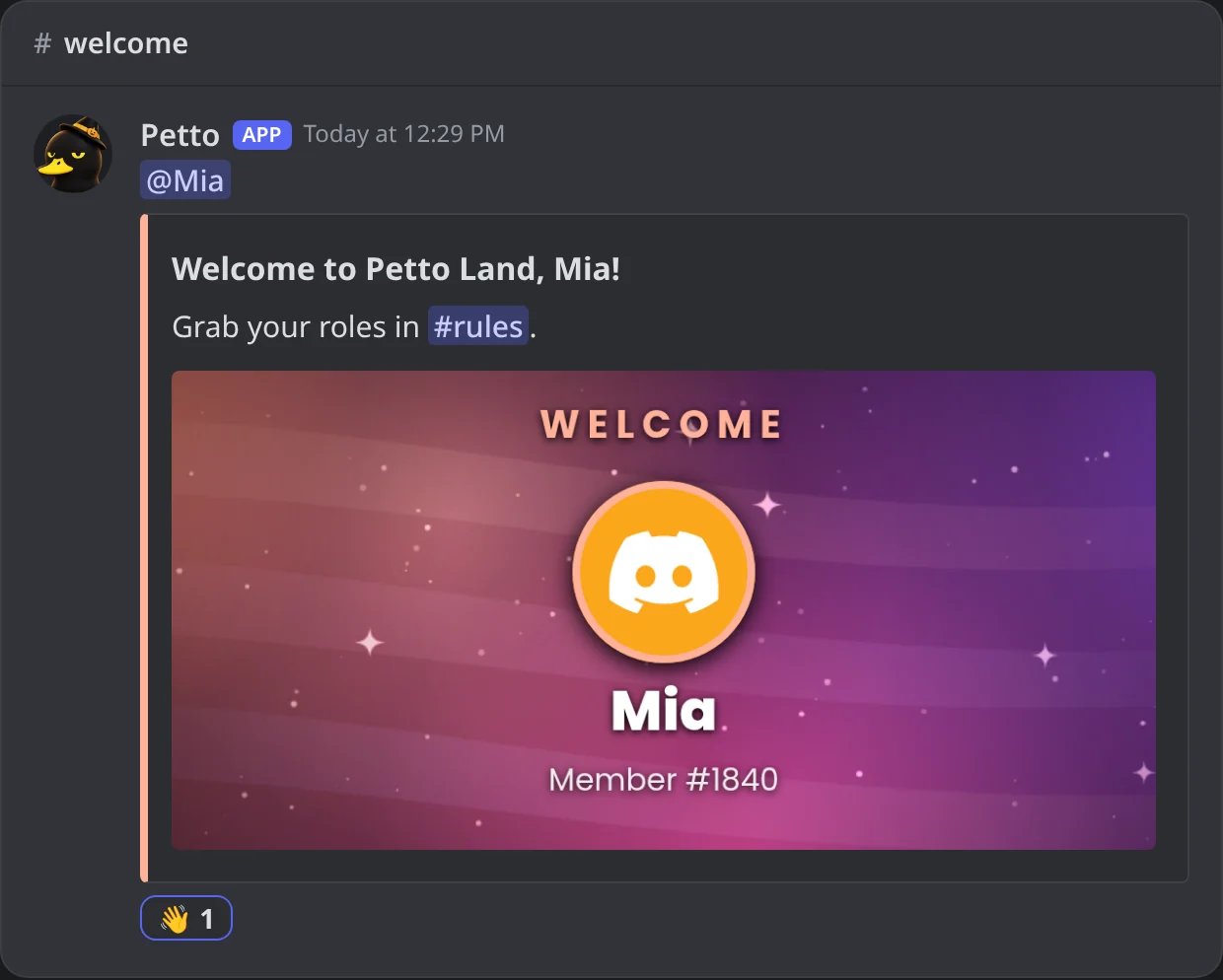
{imgcard:name} is removed from the text and turns into the image card of the message. {reactreply:emoji} is removed and becomes a reaction on the sent message.
In Discord: {imgcard:welcome} became the card of the embed and {reactreply:👋} a reaction.
2
Functions run
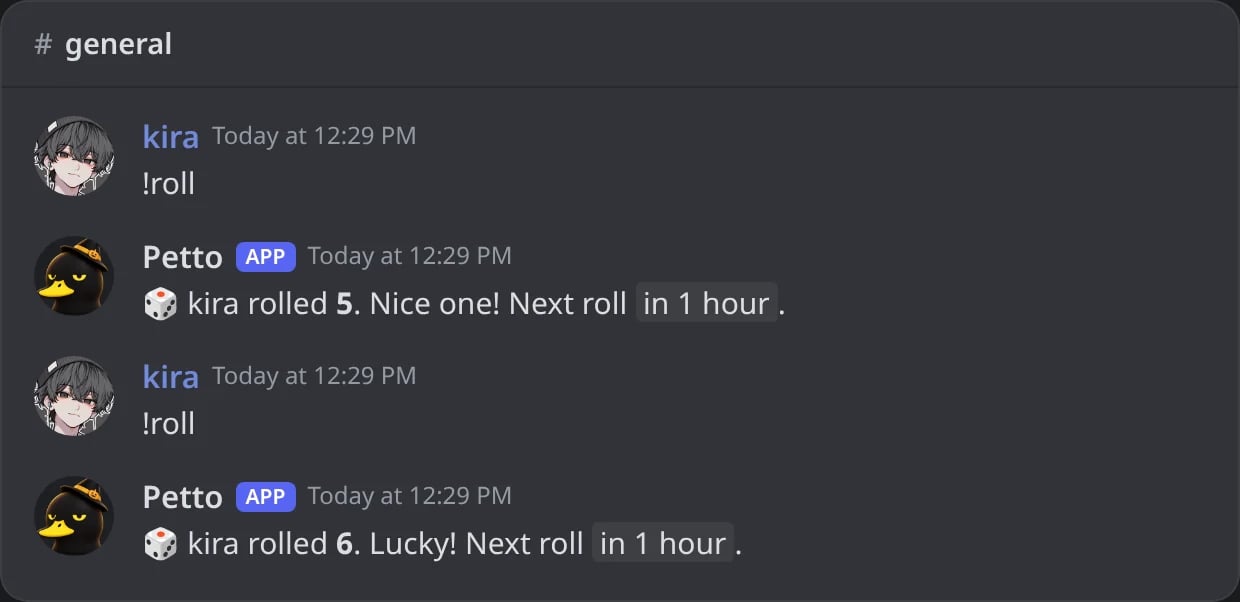
{choose:a|b|c}, {timestamp:<when>|<style>}, {range:1-100}, {arg1} … {arg10} and {args_from:N} are worked out, fresh every time. The same saved message gives a different {choose:…} or {range:…} each time it is sent.
In Discord: the same command twice: {range} and {choose} are picked again each time.
3
Everything else is looked up in one pass
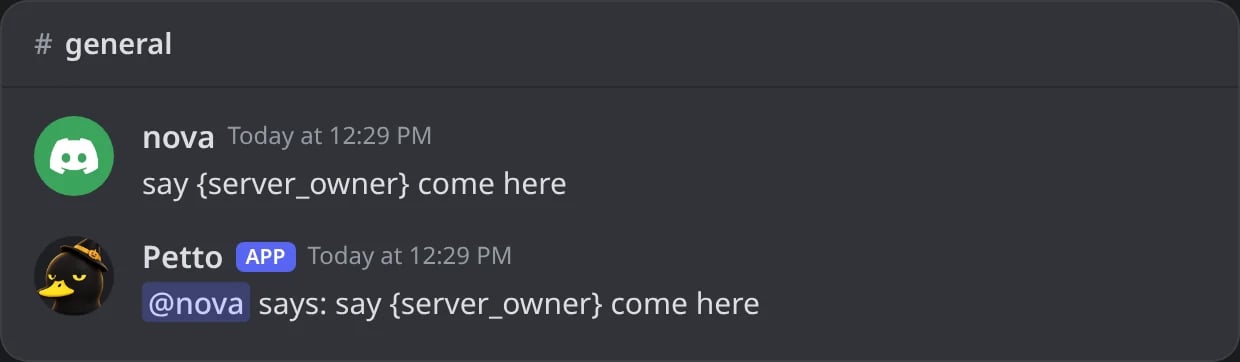
Each remaining {name} is matched, ignoring case and spaces inside the braces, against Petto’s list and then against the names other bots use. What a variable gives is never read again, so a member who writes {server_owner} in a message doesn’t make {message_content} ping the owner.
In Discord: {server_owner} written by a member stays text inside {message_content}.
Because functions run first, a function can’t contain other variables: in {choose:Hi {user}|Hey} the first } closes the function early. Write {choose:Hi|Hey} {user} instead.
A variable Petto knows but without data in this event
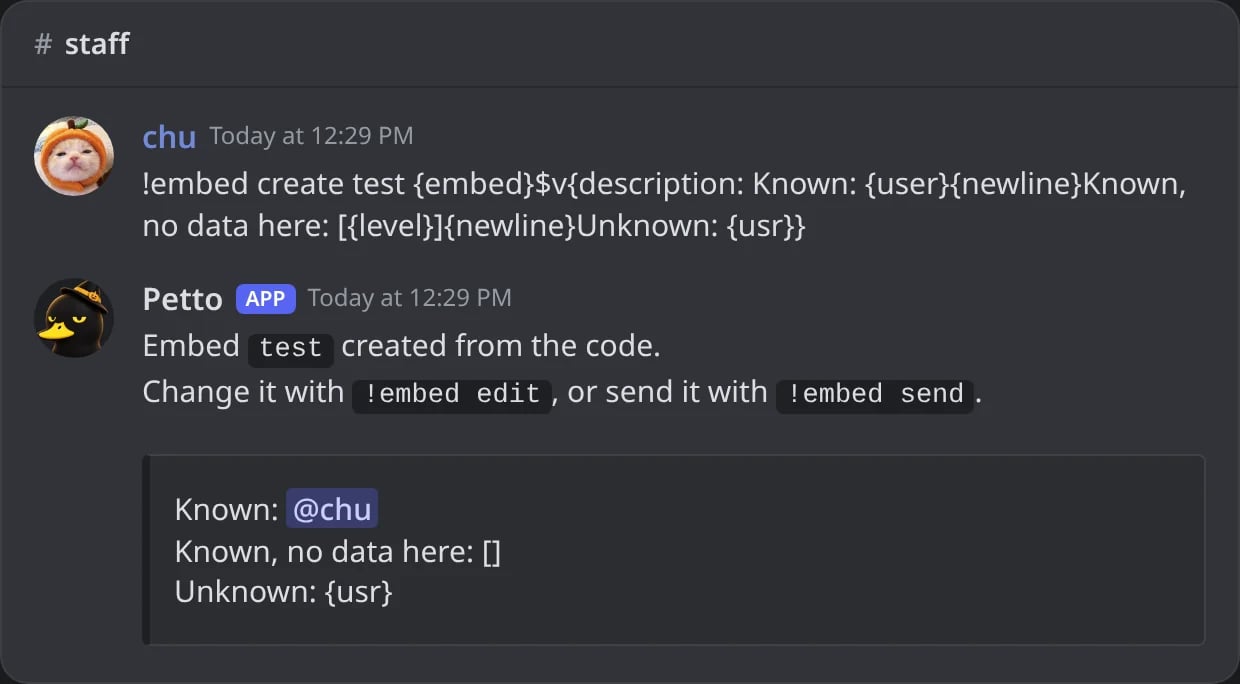
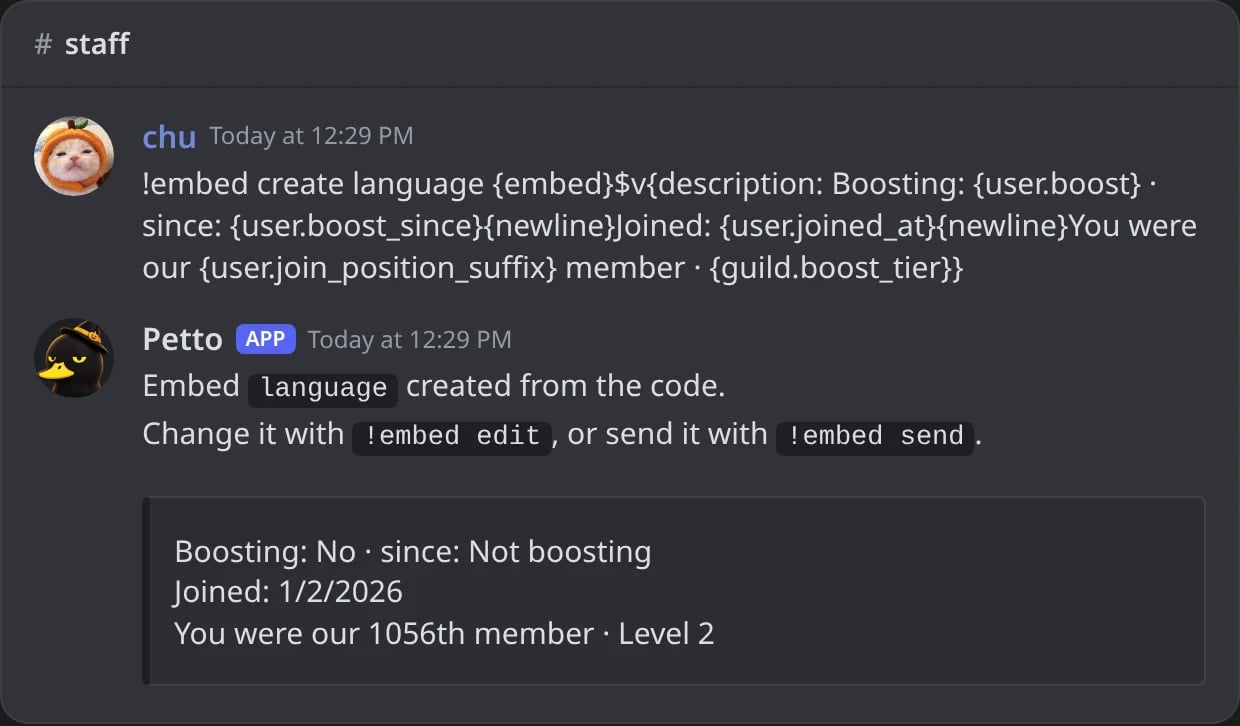
Empty: {level} in a welcome message disappears. A few say why instead: N/A, Unknown, Never, Not boosting
Something Petto doesn’t know
Left exactly as written: {usr} stays {usr}, so typos stand out
In Discord: a known variable, a known one without data here, and an unknown one.
This is why the Leveling variables only make sense in the level-up message and {gw.*} only in giveaway messages. Using them elsewhere is harmless, they just give nothing.
{user_name} and {user.name} resolve identically. The underscore style is the original set, the dot style was added for readability and matches {guild.*}, {channel.*} and the rest. Neither is going away, use whichever reads better.
The words Petto itself writes into a variable (Yes, Never, Level 2, Not boosting), dates like {user.joined_at} and the ordinal endings (1st, 1.º, 1º) follow the server’s language. Your own text, names and the server’s data are never translated. {date} uses Colombia time (GMT-5); for a time that shows in each reader’s own time zone use the {timestamp…} variables.
In Discord: the words, dates and ordinal endings that Petto writes, in the server's language.
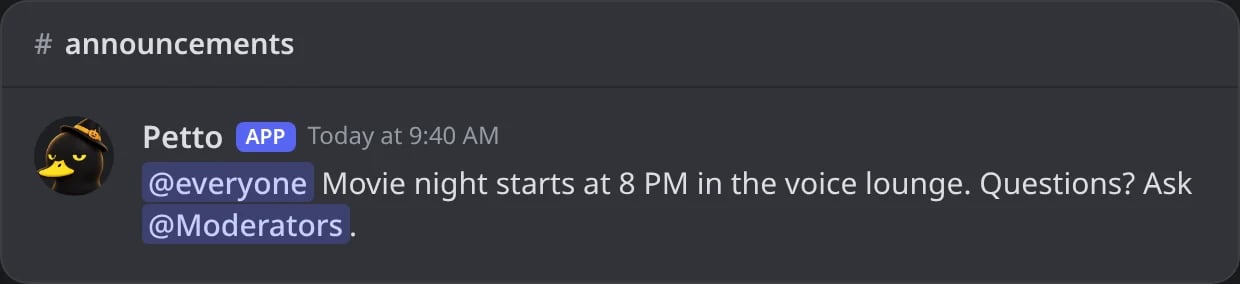
Put a ! right before a mention and it shows as the normal blue mention, but nobody is notified. Without the !, the mention works as always. It works in any message Petto sends, so you can write who a message is about without waking them.
In Discord: the message was written with !@everyone and !@Moderators. Both show as mentions and nobody gets a notification.
The ! goes at the start of the text or after a space, a new line or punctuation. Hello !@here and (!@here) are silent, hello!@here is not.
To show the characters !@everyone as plain text, write \!@everyone.
It matters in plain messages and in Components V2 text, which are where a mention can notify. In the title, description, fields and footer of a classic embed a mention never notifies, so the ! is only removed there.
A message with silent and normal mentions notifies only the normal ones.
The one limit: a silent @everyone next to a normal @everyone in the same message does notify, because Discord decides it once per message. Use one kind in a message.
The ! only ever removes notifications. A feature that never pings (timers and feeds, for example) does not ping with or without it.
The previews of the dashboard draw a silent mention as a normal mention, without the !.
Use it when a message should show who it is about or who to ask, without waking anyone: an announcement that names !@everyone or !@Moderators as text, a welcome that says Ask !@Moderators if you need help, or a giveaway message that names the winners’ role. For a real ping, write the mention as always.
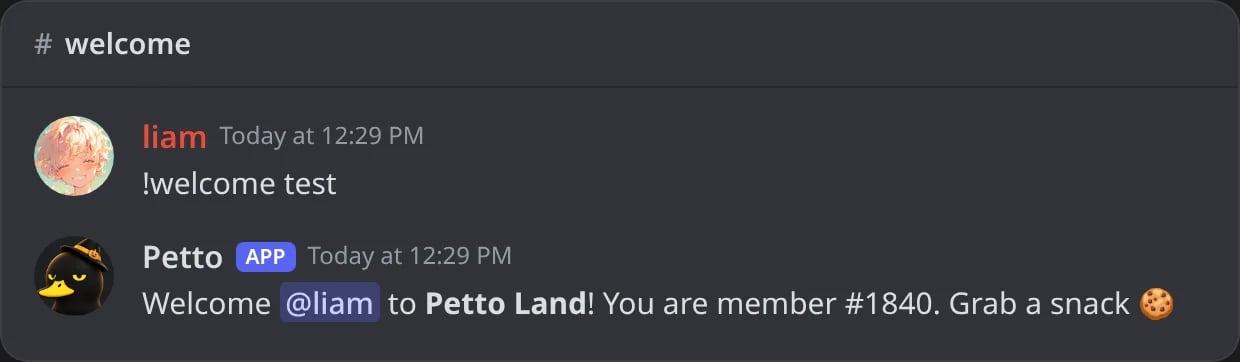
!welcome test, !leave test, !boost test and !dmonjoin test send the message with your own account as the member.
!embed preview <name> builds a saved embed with you as the member and the current channel, so variables are filled in.
The dashboard previews fill variables with sample data (a member called Liam, a server with 1,204 members), and a test message sent from the dashboard uses your real account and server.
In Discord: a welcome text tested with !welcome test, every variable filled in.
Variables of one event (a case number, a giveaway prize, a level) stay empty in a preview, because there is no event yet.
Welcome, leave, boost, DM on join and birthday messages, autoresponders, custom commands, level-ups, giveaways, bump messages, sanction messages, starboard and monkeyboard, suggestions, confessions, polls, partners, requests, forms, honeypot messages, counter milestone embeds, verification, Vanity and Server Tag messages, Quest and Rollout alerts, auto-thread names, button responders, the uploads welcome, and every field of a saved embed or image card.A few texts have their own short placeholders instead and don’t run this resolver: counter names, ticket channel names and welcome texts, quick replies, ticket staff hours, appeal messages, VoiceMaster names, suggestion thread names, command aliases and the plain text of sticky messages. Timers send their text as written. See Placeholders of one feature.For conditions, loops or saved data, use Petto Code, documented at code.petto.sbs.
Was this page helpful?
{"docsConfig":{"theme":"mint","$schema":"https://mintlify.com/docs.json","name":"Petto","colors":{"primary":"#f0a88f","light":"#bd5136","dark":"#f0a88f"},"logo":{"light":"https://mintcdn.com/wikipetto/INzCWFMm_YlwlYMb/favicon.png?fit=max\u0026auto=format\u0026n=INzCWFMm_YlwlYMb\u0026q=85\u0026s=c885753c51d1e387b16145091d7f5210","dark":"https://mintcdn.com/wikipetto/INzCWFMm_YlwlYMb/favicon.png?fit=max\u0026auto=format\u0026n=INzCWFMm_YlwlYMb\u0026q=85\u0026s=c885753c51d1e387b16145091d7f5210"},"favicon":"https://mintcdn.com/wikipetto/INzCWFMm_YlwlYMb/favicon.png?fit=max\u0026auto=format\u0026n=INzCWFMm_YlwlYMb\u0026q=85\u0026s=c885753c51d1e387b16145091d7f5210","appearance":{"default":"dark","strict":true},"background":{"color":{"light":"#ffffff","dark":"#111214"}},"navbar":{"links":[{"href":"https://petto.sbs/support","label":"Support Server"}],"primary":{"type":"button","label":"Add Petto","href":"https://petto.sbs/invite"}},"footer":{"socials":{"discord":"https://petto.sbs/support"}},"seo":{"metatags":{"theme-color":"#111214","og:site_name":"wiki.petto.sbs","twitter:card":"summary_large_image"},"indexing":"navigable"},"styling":{"latex":false},"navigation":{"languages":[{"language":"en","href":"overview/introduction"},{"language":"es","href":"es/overview/introduction"},{"language":"pt-BR","href":"pt-br/overview/introduction"}]}},"deployment":{"deploymentMetadataValue":{"subdomain":"wikipetto","hasAudioNarration":false,"actualSubdomain":"wikipetto","customDomains":["wiki.petto.sbs"],"gitSource":{"type":"github","owner":"pettobot","repo":"petto-wiki-docs","deployBranch":"main","contentDirectory":"","isPrivate":true,"mountPath":"","label":""},"chroma":{"latestBuiltDeploymentHistoryId":"6ae81e996e6e556c3ab64fca","collectionId":"2ffbed51-8c88-40d8-9e28-c350f89e2d0d","liveDeploymentHistoryId":"6ae81e996e6e556c3ab64fca","schemaVersion":"v3"},"feedback":{"thumbs":true},"entitlements":{"AI_CHAT":{"status":"DISABLED"}},"buildId":"6ae8e2462fb019ec32ec24ca","clientVersion":"0.0.4045","searchFilterCounts":[{"language":"en","tag":"Community","count":24},{"language":"es","tag":"Comunidad","count":24},{"language":"pt-BR","tag":"Comunidade","count":24},{"language":"en","tag":"Automation","count":20},{"language":"es","tag":"Automatización","count":20},{"language":"pt-BR","tag":"Automação","count":20},{"language":"en","tag":"Setup","count":13},{"language":"es","tag":"Configuración","count":13},{"language":"pt-BR","tag":"Configuração","count":13},{"language":"en","tag":"Moderation","count":11},{"language":"es","tag":"Moderación","count":11},{"language":"pt-BR","tag":"Moderação","count":11},{"language":"en","tag":"Miscellaneous","count":9},{"language":"es","tag":"Varios","count":9},{"language":"pt-BR","tag":"Diversos","count":9},{"language":"en","tag":"Members","count":8},{"language":"en","tag":"Onboarding","count":8},{"language":"es","tag":"Miembros","count":8},{"language":"es","tag":"Bienvenida","count":8},{"language":"pt-BR","tag":"Membros","count":8},{"language":"pt-BR","tag":"Boas-vindas","count":8},{"language":"en","tag":"Engagement","count":7},{"language":"en","tag":"Protection","count":7},{"language":"es","tag":"Participación","count":7},{"language":"es","tag":"Protección","count":7},{"language":"pt-BR","tag":"Engajamento","count":7},{"language":"pt-BR","tag":"Proteção","count":7},{"language":"en","tag":"Guides","count":6},{"language":"es","tag":"Guías","count":6},{"language":"pt-BR","tag":"Guias","count":6},{"language":"default","tag":"Changelog","count":1}]},"assistantConfig":{"enableAskAiButton":false,"enableStarterQuestions":false,"enableContextualStarterQuestions":false,"enableAskAiSearchBar":true},"basePath":"","hasChatPermissions":false,"hasWebMcpPermissions":false,"toggles":[{"name":"kill-isr","enabled":true,"variant":{"name":"disabled","enabled":false,"feature_enabled":true},"impressionData":false},{"name":"agent-mintlify-slack","enabled":true,"variant":{"name":"disabled","enabled":false,"feature_enabled":true},"impressionData":false},{"name":"agent-integrations-settings","enabled":true,"variant":{"name":"disabled","enabled":false,"feature_enabled":true},"impressionData":false},{"name":"automations-pr-grouping","enabled":true,"variant":{"name":"disabled","enabled":false,"feature_enabled":true},"impressionData":false},{"name":"custom-prefix","enabled":true,"variant":{"name":"disabled","enabled":false,"feature_enabled":true},"impressionData":false},{"name":"analytics-v7","enabled":true,"variant":{"name":"disabled","enabled":false,"feature_enabled":true},"impressionData":false},{"name":"user-flows-analytics","enabled":true,"variant":{"name":"disabled","enabled":false,"feature_enabled":true},"impressionData":false},{"name":"no-publish-flow","enabled":true,"variant":{"name":"disabled","enabled":false,"feature_enabled":true},"impressionData":false},{"name":"workos-onboarding","enabled":true,"variant":{"name":"disabled","enabled":false,"feature_enabled":true},"impressionData":false},{"name":"llms-txt-v2","enabled":true,"variant":{"name":"disabled","enabled":false,"feature_enabled":true},"impressionData":false},{"name":"snapshot-serving-live","enabled":true,"variant":{"name":"disabled","enabled":false,"feature_enabled":true},"impressionData":false},{"name":"stripTemperatureMiddleware","enabled":true,"variant":{"name":"disabled","enabled":false,"feature_enabled":true},"impressionData":false},{"name":"support-platform-pylon-zendesk","enabled":true,"variant":{"name":"disabled","enabled":false,"feature_enabled":true},"impressionData":false},{"name":"snapshot-serving","enabled":true,"variant":{"name":"disabled","enabled":false,"feature_enabled":true},"impressionData":false},{"name":"instant-rollback","enabled":true,"variant":{"name":"disabled","enabled":false,"feature_enabled":true},"impressionData":false},{"name":"granular-notifications-server","enabled":true,"variant":{"name":"disabled","enabled":false,"feature_enabled":true},"impressionData":false},{"name":"granular-notifications","enabled":true,"variant":{"name":"disabled","enabled":false,"feature_enabled":true},"impressionData":false},{"name":"automations-fable","enabled":true,"variant":{"name":"disabled","enabled":false,"feature_enabled":true},"impressionData":false},{"name":"fixed-ai-action-pricing","enabled":true,"variant":{"name":"disabled","enabled":false,"feature_enabled":true},"impressionData":false},{"name":"automation-resolve-merge-conflict","enabled":true,"variant":{"name":"disabled","enabled":false,"feature_enabled":true},"impressionData":false},{"name":"scoped-publishing","enabled":true,"variant":{"name":"disabled","enabled":false,"feature_enabled":true},"impressionData":false},{"name":"mintql","enabled":true,"variant":{"name":"disabled","enabled":false,"feature_enabled":true},"impressionData":false},{"name":"page-level-analytics","enabled":true,"variant":{"name":"disabled","enabled":false,"feature_enabled":true},"impressionData":false},{"name":"editor-version-history-v2","enabled":true,"variant":{"name":"disabled","enabled":false,"feature_enabled":true},"impressionData":false},{"name":"billing-page-v2","enabled":true,"variant":{"name":"disabled","enabled":false,"feature_enabled":true},"impressionData":false},{"name":"full-page-search","enabled":true,"variant":{"name":"disabled","enabled":false,"feature_enabled":true},"impressionData":false},{"name":"workspace-projects","enabled":true,"variant":{"name":"disabled","enabled":false,"feature_enabled":true},"impressionData":false},{"name":"assistant-v5","enabled":true,"variant":{"name":"disabled","enabled":false,"feature_enabled":true},"impressionData":false},{"name":"byok-sep-25","enabled":true,"variant":{"name":"disabled","enabled":false,"feature_enabled":true},"impressionData":false},{"name":"fork-pr-previews","enabled":true,"variant":{"name":"disabled","enabled":false,"feature_enabled":true},"impressionData":false},{"name":"revalidation-jwt","enabled":true,"variant":{"name":"disabled","enabled":false,"feature_enabled":true},"impressionData":false},{"name":"vite-origin","enabled":true,"variant":{"name":"disabled","enabled":false,"feature_enabled":true},"impressionData":false},{"name":"billing-updated-9-15","enabled":true,"variant":{"name":"disabled","enabled":false,"feature_enabled":true},"impressionData":false},{"name":"workos-sso-scim","enabled":true,"variant":{"name":"disabled","enabled":false,"feature_enabled":true},"impressionData":false},{"name":"hobby-abuse-scan","enabled":true,"variant":{"name":"disabled","enabled":false,"feature_enabled":true},"impressionData":false},{"name":"dashboard-inbox","enabled":true,"variant":{"name":"disabled","enabled":false,"feature_enabled":true},"impressionData":false},{"name":"workos-signup","enabled":true,"variant":{"name":"disabled","enabled":false,"feature_enabled":true},"impressionData":false},{"name":"turbopuffer-dual-write","enabled":true,"variant":{"name":"disabled","enabled":false,"feature_enabled":true},"impressionData":false},{"name":"workos-enabled","enabled":true,"variant":{"name":"disabled","enabled":false,"feature_enabled":true},"impressionData":false},{"name":"approve-review-flow","enabled":true,"variant":{"name":"disabled","enabled":false,"feature_enabled":true},"impressionData":false},{"name":"sso-setup-deadline-banner","enabled":true,"variant":{"name":"disabled","enabled":false,"feature_enabled":true},"impressionData":false}],"googleFontsInlined":false},"customCss":[],"page":{"pagePath":"concepts/variables-engine","slug":"/concepts/variables-engine","pageMetadata":{"title":"How Variables Resolve","description":"What happens when a {variable} becomes real text: the order of the steps, what unknown or empty variables do, the language of the words and how to test a message.","icon":"wand-magic-sparkles","href":"/concepts/variables-engine"},"description":{"compiledSource":"\"use strict\";\nconst {jsx: _jsx, jsxs: _jsxs} = arguments[0];\nconst {useMDXComponents: _provideComponents} = arguments[0];\nfunction _createMdxContent(props) {\n const _components = {\n p: \"p\",\n ..._provideComponents(),\n ...props.components\n };\n return _jsxs(_components.p, {\n children: [\"What happens when a \", \" becomes real text: the order of the steps, what unknown or empty variables do, the language of the words and how to test a message.\"]\n });\n}\nfunction MDXContent(props = {}) {\n const {wrapper: MDXLayout} = {\n ..._provideComponents(),\n ...props.components\n };\n return MDXLayout ? _jsx(MDXLayout, {\n ...props,\n children: _jsx(_createMdxContent, {\n ...props\n })\n }) : _createMdxContent(props);\n}\nreturn {\n default: MDXContent\n};\n","frontmatter":{},"scope":{}},"pageType":"default","mdx":{"mdxSource":{"compiledSource":"\"use strict\";const{Fragment:_Fragment,jsx:_jsx,jsxs:_jsxs}=arguments[0];const{useMDXComponents:_provideComponents}=arguments[0];function _createMdxContent(props){const _components={a:`a`,code:`code`,li:`li`,p:`p`,pre:`pre`,span:`span`,strong:`strong`,tbody:`tbody`,td:`td`,th:`th`,thead:`thead`,tr:`tr`,ul:`ul`,..._provideComponents(),...props.components},{CodeBlock,Frame,Heading,OptimizedImage,Step,Steps,Table}=_components;if(!CodeBlock)_missingMdxReference(`CodeBlock`,true);if(!Frame)_missingMdxReference(`Frame`,true);if(!Heading)_missingMdxReference(`Heading`,true);if(!OptimizedImage)_missingMdxReference(`OptimizedImage`,true);if(!Step)_missingMdxReference(`Step`,true);if(!Steps)_missingMdxReference(`Steps`,true);if(!Table)_missingMdxReference(`Table`,true);return _jsxs(_Fragment,{children:[_jsx(Heading,{level:`2`,id:`the-short-version`,children:`The short version`}),`\n`,_jsxs(_components.p,{children:[`Almost every place that accepts `,_jsx(_components.a,{href:`/resources/scripting/variables`,children:`variables`}),` runs the same resolver: it takes your text, finds every `,_jsx(_components.code,{children:`{variable}`}),` in it and swaps it for data from whatever set the message off (the member who joined, the giveaway that ended, the message that matched an autoresponder). The data it has depends on that event, the rules don’t.`]}),`\n`,_jsx(Heading,{level:`2`,id:`the-order-of-the-steps`,children:`The order of the steps`}),`\n`,_jsxs(Steps,{children:[_jsxs(Step,{title:`Pictures and reactions are taken out`,children:[_jsxs(_components.p,{children:[_jsx(_components.code,{children:`{imgcard:name}`}),` is removed from the text and turns into the `,_jsx(_components.a,{href:`/resources/image-cards`,children:`image card`}),` of the message. `,_jsx(_components.code,{children:`{reactreply:emoji}`}),` is removed and becomes a reaction on the sent message.`]}),_jsx(Frame,{caption:`In Discord: {imgcard:welcome} became the card of the embed and {reactreply:👋} a reaction.`,children:_jsx(OptimizedImage,{src:`https://mintcdn.com/wikipetto/aURko5p8En80OELa/images/discord/concepts/variables-engine-step-1-card.webp?fit=max\u0026auto=format\u0026n=aURko5p8En80OELa\u0026q=85\u0026s=e13437c4cb87de3014c2f65a106ff6ae`,alt:`Petto welcomes Mia with an embed whose picture is the welcome card with her name and member number, and a 👋 reaction under it`,\"data-og-width\":`1240`,width:`1240`,\"data-og-height\":`994`,height:`994`,\"data-path\":`images/discord/concepts/variables-engine-step-1-card.webp`,\"data-optimize\":`true`,\"data-opv\":`3`,srcset:`https://mintcdn.com/wikipetto/aURko5p8En80OELa/images/discord/concepts/variables-engine-step-1-card.webp?w=280\u0026fit=max\u0026auto=format\u0026n=aURko5p8En80OELa\u0026q=85\u0026s=273e72e87c967362a092644b6fe28203 280w, https://mintcdn.com/wikipetto/aURko5p8En80OELa/images/discord/concepts/variables-engine-step-1-card.webp?w=560\u0026fit=max\u0026auto=format\u0026n=aURko5p8En80OELa\u0026q=85\u0026s=0ed22a17e9283f920663a3574dd7e296 560w, https://mintcdn.com/wikipetto/aURko5p8En80OELa/images/discord/concepts/variables-engine-step-1-card.webp?w=840\u0026fit=max\u0026auto=format\u0026n=aURko5p8En80OELa\u0026q=85\u0026s=59da85259a323a034a897b9dc8d44c33 840w, https://mintcdn.com/wikipetto/aURko5p8En80OELa/images/discord/concepts/variables-engine-step-1-card.webp?w=1100\u0026fit=max\u0026auto=format\u0026n=aURko5p8En80OELa\u0026q=85\u0026s=d43f4522f194ef9af8c89e1fb781b5a0 1100w, https://mintcdn.com/wikipetto/aURko5p8En80OELa/images/discord/concepts/variables-engine-step-1-card.webp?w=1650\u0026fit=max\u0026auto=format\u0026n=aURko5p8En80OELa\u0026q=85\u0026s=e8ac27f6108b71a53c423b357605b87c 1650w, https://mintcdn.com/wikipetto/aURko5p8En80OELa/images/discord/concepts/variables-engine-step-1-card.webp?w=2500\u0026fit=max\u0026auto=format\u0026n=aURko5p8En80OELa\u0026q=85\u0026s=70990580e0847a6bc555064efa48ac20 2500w`})})]}),_jsxs(Step,{title:`Functions run`,children:[_jsxs(_components.p,{children:[_jsx(_components.code,{children:`{choose:a|b|c}`}),`, `,_jsx(_components.code,{children:`{timestamp:\u003cwhen>|\u003cstyle>}`}),`, `,_jsx(_components.code,{children:`{range:1-100}`}),`, `,_jsx(_components.code,{children:`{arg1}`}),` … `,_jsx(_components.code,{children:`{arg10}`}),` and `,_jsx(_components.code,{children:`{args_from:N}`}),` are worked out, fresh every time. The same saved message gives a different `,_jsx(_components.code,{children:`{choose:…}`}),` or `,_jsx(_components.code,{children:`{range:…}`}),` each time it is sent.`]}),_jsx(Frame,{caption:`In Discord: the same command twice: {range} and {choose} are picked again each time.`,children:_jsx(OptimizedImage,{src:`https://mintcdn.com/wikipetto/aURko5p8En80OELa/images/discord/concepts/variables-engine-step-2-functions.webp?fit=max\u0026auto=format\u0026n=aURko5p8En80OELa\u0026q=85\u0026s=f4c51388cdfd4448b7558b4abb81f99d`,alt:`kira runs !roll twice and gets a different number and a different line each time`,\"data-og-width\":`1240`,width:`1240`,\"data-og-height\":`602`,height:`602`,\"data-path\":`images/discord/concepts/variables-engine-step-2-functions.webp`,\"data-optimize\":`true`,\"data-opv\":`3`,srcset:`https://mintcdn.com/wikipetto/aURko5p8En80OELa/images/discord/concepts/variables-engine-step-2-functions.webp?w=280\u0026fit=max\u0026auto=format\u0026n=aURko5p8En80OELa\u0026q=85\u0026s=509489f75d432c04f56980b681208cad 280w, https://mintcdn.com/wikipetto/aURko5p8En80OELa/images/discord/concepts/variables-engine-step-2-functions.webp?w=560\u0026fit=max\u0026auto=format\u0026n=aURko5p8En80OELa\u0026q=85\u0026s=98f2ca09086647d2a3f780d7f4a47d32 560w, https://mintcdn.com/wikipetto/aURko5p8En80OELa/images/discord/concepts/variables-engine-step-2-functions.webp?w=840\u0026fit=max\u0026auto=format\u0026n=aURko5p8En80OELa\u0026q=85\u0026s=379cd5637fd097f4afb52828ebe65800 840w, https://mintcdn.com/wikipetto/aURko5p8En80OELa/images/discord/concepts/variables-engine-step-2-functions.webp?w=1100\u0026fit=max\u0026auto=format\u0026n=aURko5p8En80OELa\u0026q=85\u0026s=cb5e2efa91c8b925b77bfc6e7253d91e 1100w, https://mintcdn.com/wikipetto/aURko5p8En80OELa/images/discord/concepts/variables-engine-step-2-functions.webp?w=1650\u0026fit=max\u0026auto=format\u0026n=aURko5p8En80OELa\u0026q=85\u0026s=b9eda69d2d8b98398f35156b9211f2b3 1650w, https://mintcdn.com/wikipetto/aURko5p8En80OELa/images/discord/concepts/variables-engine-step-2-functions.webp?w=2500\u0026fit=max\u0026auto=format\u0026n=aURko5p8En80OELa\u0026q=85\u0026s=da048cf214bff28f3e460d7eb8e9aa69 2500w`})})]}),_jsxs(Step,{title:`Everything else is looked up in one pass`,children:[_jsxs(_components.p,{children:[`Each remaining `,_jsx(_components.code,{children:`{name}`}),` is matched, ignoring case and spaces inside the braces, against Petto’s list and then against the `,_jsx(_components.a,{href:`/resources/scripting/variables#writing-variables`,children:`names other bots use`}),`. What a variable gives is never read again, so a member who writes `,_jsx(_components.code,{children:`{server_owner}`}),` in a message doesn’t make `,_jsx(_components.code,{children:`{message_content}`}),` ping the owner.`]}),_jsx(Frame,{caption:`In Discord: {server_owner} written by a member stays text inside {message_content}.`,children:_jsx(OptimizedImage,{src:`https://mintcdn.com/wikipetto/aURko5p8En80OELa/images/discord/concepts/variables-engine-step-3-one-pass.webp?fit=max\u0026auto=format\u0026n=aURko5p8En80OELa\u0026q=85\u0026s=3f911f74052c8f89243c14598ecd1e6e`,alt:`nova writes {server_owner} in a message and Petto's answer repeats it as text, without mentioning the owner`,\"data-og-width\":`1240`,width:`1240`,\"data-og-height\":`362`,height:`362`,\"data-path\":`images/discord/concepts/variables-engine-step-3-one-pass.webp`,\"data-optimize\":`true`,\"data-opv\":`3`,srcset:`https://mintcdn.com/wikipetto/aURko5p8En80OELa/images/discord/concepts/variables-engine-step-3-one-pass.webp?w=280\u0026fit=max\u0026auto=format\u0026n=aURko5p8En80OELa\u0026q=85\u0026s=090a2fffa474378b92fccf91ccbbad3f 280w, https://mintcdn.com/wikipetto/aURko5p8En80OELa/images/discord/concepts/variables-engine-step-3-one-pass.webp?w=560\u0026fit=max\u0026auto=format\u0026n=aURko5p8En80OELa\u0026q=85\u0026s=17a7bfec672c9a0c05152155089f5274 560w, https://mintcdn.com/wikipetto/aURko5p8En80OELa/images/discord/concepts/variables-engine-step-3-one-pass.webp?w=840\u0026fit=max\u0026auto=format\u0026n=aURko5p8En80OELa\u0026q=85\u0026s=d6a48aaec915e999370b7f5b3ee3e7d8 840w, https://mintcdn.com/wikipetto/aURko5p8En80OELa/images/discord/concepts/variables-engine-step-3-one-pass.webp?w=1100\u0026fit=max\u0026auto=format\u0026n=aURko5p8En80OELa\u0026q=85\u0026s=b037fee5cff3f85544c0b9f0ee2d0882 1100w, https://mintcdn.com/wikipetto/aURko5p8En80OELa/images/discord/concepts/variables-engine-step-3-one-pass.webp?w=1650\u0026fit=max\u0026auto=format\u0026n=aURko5p8En80OELa\u0026q=85\u0026s=6f2dc7fcf34d9c53d8fb04c4fc0549b4 1650w, https://mintcdn.com/wikipetto/aURko5p8En80OELa/images/discord/concepts/variables-engine-step-3-one-pass.webp?w=2500\u0026fit=max\u0026auto=format\u0026n=aURko5p8En80OELa\u0026q=85\u0026s=a423adf2f0c3e51198c6eebca8bcc80c 2500w`})})]})]}),`\n`,_jsxs(_components.p,{children:[`Because functions run first, a function can’t contain other variables: in `,_jsx(_components.code,{children:`{choose:Hi {user}|Hey}`}),` the first `,_jsx(_components.code,{children:`}`}),` closes the function early. Write `,_jsx(_components.code,{children:`{choose:Hi|Hey} {user}`}),` instead.`]}),`\n`,_jsx(Heading,{level:`2`,id:`known-unknown-and-empty`,children:`Known, unknown and empty`}),`\n`,_jsxs(Table,{children:[_jsx(_components.thead,{children:_jsxs(_components.tr,{children:[_jsx(_components.th,{children:`You write`}),_jsx(_components.th,{children:`What happens`})]})}),_jsxs(_components.tbody,{children:[_jsxs(_components.tr,{children:[_jsx(_components.td,{children:`A variable that has data here`}),_jsxs(_components.td,{children:[`Replaced by the data: `,_jsx(_components.code,{children:`{user}`}),` → @Liam`]})]}),_jsxs(_components.tr,{children:[_jsx(_components.td,{children:`A variable Petto knows but without data in this event`}),_jsxs(_components.td,{children:[`Empty: `,_jsx(_components.code,{children:`{level}`}),` in a welcome message disappears. A few say why instead: `,_jsx(_components.code,{children:`N/A`}),`, `,_jsx(_components.code,{children:`Unknown`}),`, `,_jsx(_components.code,{children:`Never`}),`, `,_jsx(_components.code,{children:`Not boosting`})]})]}),_jsxs(_components.tr,{children:[_jsx(_components.td,{children:`Something Petto doesn’t know`}),_jsxs(_components.td,{children:[`Left exactly as written: `,_jsx(_components.code,{children:`{usr}`}),` stays `,_jsx(_components.code,{children:`{usr}`}),`, so typos stand out`]})]})]})]}),`\n`,_jsx(Frame,{caption:`In Discord: a known variable, a known one without data here, and an unknown one.`,children:_jsx(OptimizedImage,{src:`https://mintcdn.com/wikipetto/aURko5p8En80OELa/images/discord/concepts/variables-engine-known-unknown.webp?fit=max\u0026auto=format\u0026n=aURko5p8En80OELa\u0026q=85\u0026s=a435d986544e585723cca1cbb9150897`,alt:`Petto fills {user} with chu, leaves {level} empty between the brackets and keeps {usr} as it was written`,\"data-og-width\":`1240`,width:`1240`,\"data-og-height\":`684`,height:`684`,\"data-path\":`images/discord/concepts/variables-engine-known-unknown.webp`,\"data-optimize\":`true`,\"data-opv\":`3`,srcset:`https://mintcdn.com/wikipetto/aURko5p8En80OELa/images/discord/concepts/variables-engine-known-unknown.webp?w=280\u0026fit=max\u0026auto=format\u0026n=aURko5p8En80OELa\u0026q=85\u0026s=289abe465a4efa6d44d1388d22ba17eb 280w, https://mintcdn.com/wikipetto/aURko5p8En80OELa/images/discord/concepts/variables-engine-known-unknown.webp?w=560\u0026fit=max\u0026auto=format\u0026n=aURko5p8En80OELa\u0026q=85\u0026s=7437203efc97d1c96b496af638f16093 560w, https://mintcdn.com/wikipetto/aURko5p8En80OELa/images/discord/concepts/variables-engine-known-unknown.webp?w=840\u0026fit=max\u0026auto=format\u0026n=aURko5p8En80OELa\u0026q=85\u0026s=5900a5d944bd77d0bec47202604ba4f9 840w, https://mintcdn.com/wikipetto/aURko5p8En80OELa/images/discord/concepts/variables-engine-known-unknown.webp?w=1100\u0026fit=max\u0026auto=format\u0026n=aURko5p8En80OELa\u0026q=85\u0026s=2ff739e0f90452d82df11d77c39b348a 1100w, https://mintcdn.com/wikipetto/aURko5p8En80OELa/images/discord/concepts/variables-engine-known-unknown.webp?w=1650\u0026fit=max\u0026auto=format\u0026n=aURko5p8En80OELa\u0026q=85\u0026s=c84afd4894d78f6988b20dae50960704 1650w, https://mintcdn.com/wikipetto/aURko5p8En80OELa/images/discord/concepts/variables-engine-known-unknown.webp?w=2500\u0026fit=max\u0026auto=format\u0026n=aURko5p8En80OELa\u0026q=85\u0026s=8f7c41160d317a8bbf781a0d9d17e7d7 2500w`})}),`\n`,_jsxs(_components.p,{children:[`This is why the Leveling variables only make sense in the level-up message and `,_jsx(_components.code,{children:`{gw.*}`}),` only in giveaway messages. Using them elsewhere is harmless, they just give nothing.`]}),`\n`,_jsx(Heading,{level:`2`,id:`two-naming-styles-same-result`,children:`Two naming styles, same result`}),`\n`,_jsxs(_components.p,{children:[_jsx(_components.code,{children:`{user_name}`}),` and `,_jsx(_components.code,{children:`{user.name}`}),` resolve identically. The underscore style is the original set, the dot style was added for readability and matches `,_jsx(_components.code,{children:`{guild.*}`}),`, `,_jsx(_components.code,{children:`{channel.*}`}),` and the rest. Neither is going away, use whichever reads better.`]}),`\n`,_jsx(Heading,{level:`2`,id:`words-and-dates-follow-the-server’s-language`,children:`Words and dates follow the server’s language`}),`\n`,_jsxs(_components.p,{children:[`The words Petto itself writes into a variable (`,_jsx(_components.code,{children:`Yes`}),`, `,_jsx(_components.code,{children:`Never`}),`, `,_jsx(_components.code,{children:`Level 2`}),`, `,_jsx(_components.code,{children:`Not boosting`}),`), dates like `,_jsx(_components.code,{children:`{user.joined_at}`}),` and the ordinal endings (`,_jsx(_components.code,{children:`1st`}),`, `,_jsx(_components.code,{children:`1.º`}),`, `,_jsx(_components.code,{children:`1º`}),`) follow the server’s `,_jsx(_components.a,{href:`/setup/language`,children:`language`}),`. Your own text, names and the server’s data are never translated. `,_jsx(_components.code,{children:`{date}`}),` uses Colombia time (GMT-5); for a time that shows in each reader’s own time zone use the `,_jsx(_components.code,{children:`{timestamp…}`}),` variables.`]}),`\n`,_jsx(Frame,{caption:`In Discord: the words, dates and ordinal endings that Petto writes, in the server's language.`,children:_jsx(OptimizedImage,{src:`https://mintcdn.com/wikipetto/aURko5p8En80OELa/images/discord/concepts/variables-engine-language.webp?fit=max\u0026auto=format\u0026n=aURko5p8En80OELa\u0026q=85\u0026s=c1f45374d8bbbe5ca38a21da09c9f7c4`,alt:`Petto fills {user.boost}, {user.boost_since}, {user.joined_at}, {user.join_position_suffix} and {guild.boost_tier} for chu`,\"data-og-width\":`1240`,width:`1240`,\"data-og-height\":`726`,height:`726`,\"data-path\":`images/discord/concepts/variables-engine-language.webp`,\"data-optimize\":`true`,\"data-opv\":`3`,srcset:`https://mintcdn.com/wikipetto/aURko5p8En80OELa/images/discord/concepts/variables-engine-language.webp?w=280\u0026fit=max\u0026auto=format\u0026n=aURko5p8En80OELa\u0026q=85\u0026s=506991a07f177a9d4ced11cbebffea4c 280w, https://mintcdn.com/wikipetto/aURko5p8En80OELa/images/discord/concepts/variables-engine-language.webp?w=560\u0026fit=max\u0026auto=format\u0026n=aURko5p8En80OELa\u0026q=85\u0026s=98560b86a42274b5adc6361fb86e578c 560w, https://mintcdn.com/wikipetto/aURko5p8En80OELa/images/discord/concepts/variables-engine-language.webp?w=840\u0026fit=max\u0026auto=format\u0026n=aURko5p8En80OELa\u0026q=85\u0026s=9c880e6db766ade57bc335ca65b767df 840w, https://mintcdn.com/wikipetto/aURko5p8En80OELa/images/discord/concepts/variables-engine-language.webp?w=1100\u0026fit=max\u0026auto=format\u0026n=aURko5p8En80OELa\u0026q=85\u0026s=64d0404baf858a6da61497dadcec0b94 1100w, https://mintcdn.com/wikipetto/aURko5p8En80OELa/images/discord/concepts/variables-engine-language.webp?w=1650\u0026fit=max\u0026auto=format\u0026n=aURko5p8En80OELa\u0026q=85\u0026s=a338f0544cb6d03bab11f0866a8d6085 1650w, https://mintcdn.com/wikipetto/aURko5p8En80OELa/images/discord/concepts/variables-engine-language.webp?w=2500\u0026fit=max\u0026auto=format\u0026n=aURko5p8En80OELa\u0026q=85\u0026s=519873739301a5717b0e985a2458c7ed 2500w`})}),`\n`,_jsx(Heading,{level:`2`,id:`silent-mentions`,children:`Silent mentions`}),`\n`,_jsxs(_components.p,{children:[`Put a `,_jsx(_components.code,{children:`!`}),` right before a mention and it shows as the normal blue mention, but nobody is notified. Without the `,_jsx(_components.code,{children:`!`}),`, the mention works as always. It works in any message Petto sends, so you can write who a message is about without waking them.`]}),`\n`,_jsx(Frame,{caption:`In Discord: the message was written with !@everyone and !@Moderators. Both show as mentions and nobody gets a notification.`,children:_jsx(OptimizedImage,{src:`https://mintcdn.com/wikipetto/eojafFVcTfRMMMhR/images/discord/concepts/silent-mentions.webp?fit=max\u0026auto=format\u0026n=eojafFVcTfRMMMhR\u0026q=85\u0026s=922e37127be29602d1ed7b82ade7572c`,alt:`Petto posts in announcements: @everyone Movie night starts at 8 PM in the voice lounge. Questions? Ask @Moderators. Both mentions show as blue pills`,\"data-og-width\":`1240`,width:`1240`,\"data-og-height\":`284`,height:`284`,\"data-path\":`images/discord/concepts/silent-mentions.webp`,\"data-optimize\":`true`,\"data-opv\":`3`,srcset:`https://mintcdn.com/wikipetto/eojafFVcTfRMMMhR/images/discord/concepts/silent-mentions.webp?w=280\u0026fit=max\u0026auto=format\u0026n=eojafFVcTfRMMMhR\u0026q=85\u0026s=3e6ace3627b70ccf8540645157e9bbdc 280w, https://mintcdn.com/wikipetto/eojafFVcTfRMMMhR/images/discord/concepts/silent-mentions.webp?w=560\u0026fit=max\u0026auto=format\u0026n=eojafFVcTfRMMMhR\u0026q=85\u0026s=03af3f3400d96565a7a896ee941409a1 560w, https://mintcdn.com/wikipetto/eojafFVcTfRMMMhR/images/discord/concepts/silent-mentions.webp?w=840\u0026fit=max\u0026auto=format\u0026n=eojafFVcTfRMMMhR\u0026q=85\u0026s=31c7a55e2b19c2b853a63dec1dc36184 840w, https://mintcdn.com/wikipetto/eojafFVcTfRMMMhR/images/discord/concepts/silent-mentions.webp?w=1100\u0026fit=max\u0026auto=format\u0026n=eojafFVcTfRMMMhR\u0026q=85\u0026s=7e87d638498dfd8596905ec3b91a80d4 1100w, https://mintcdn.com/wikipetto/eojafFVcTfRMMMhR/images/discord/concepts/silent-mentions.webp?w=1650\u0026fit=max\u0026auto=format\u0026n=eojafFVcTfRMMMhR\u0026q=85\u0026s=ffe91d8dc773e8753f19fcd97d1e8d2f 1650w, https://mintcdn.com/wikipetto/eojafFVcTfRMMMhR/images/discord/concepts/silent-mentions.webp?w=2500\u0026fit=max\u0026auto=format\u0026n=eojafFVcTfRMMMhR\u0026q=85\u0026s=752f5743ed807c177622ea23b561bbb5 2500w`})}),`\n`,_jsx(Heading,{level:`3`,id:`the-forms`,children:`The forms`}),`\n`,_jsxs(Table,{children:[_jsx(_components.thead,{children:_jsxs(_components.tr,{children:[_jsx(_components.th,{children:`You write`}),_jsx(_components.th,{children:`What it shows`})]})}),_jsxs(_components.tbody,{children:[_jsxs(_components.tr,{children:[_jsxs(_components.td,{children:[_jsx(_components.code,{children:`!@everyone`}),` and `,_jsx(_components.code,{children:`!@here`})]}),_jsxs(_components.td,{children:[_jsx(_components.code,{children:`@everyone`}),` and `,_jsx(_components.code,{children:`@here`})]})]}),_jsxs(_components.tr,{children:[_jsx(_components.td,{children:_jsx(_components.code,{children:`!@Moderators`})}),_jsx(_components.td,{children:`The role of the server with that name, ignoring case`})]}),_jsxs(_components.tr,{children:[_jsx(_components.td,{children:_jsx(_components.code,{children:`!@\"Staff Team\"`})}),_jsx(_components.td,{children:`A role whose name has spaces`})]}),_jsxs(_components.tr,{children:[_jsx(_components.td,{children:_jsx(_components.code,{children:`!\u003c@\u0026123456789012345678>`})}),_jsx(_components.td,{children:`A role by its ID`})]}),_jsxs(_components.tr,{children:[_jsxs(_components.td,{children:[_jsx(_components.code,{children:`!\u003c@123456789012345678>`}),` and `,_jsx(_components.code,{children:`!\u003c@!123456789012345678>`})]}),_jsx(_components.td,{children:`A member by their ID`})]}),_jsxs(_components.tr,{children:[_jsx(_components.td,{\"data-numeric\":`true`,children:_jsx(_components.code,{children:`!\u003c#123456789012345678>`})}),_jsxs(_components.td,{children:[`A channel. A channel mention never notifies, so the `,_jsx(_components.code,{children:`!`}),` is only removed`]})]}),_jsxs(_components.tr,{children:[_jsxs(_components.td,{children:[_jsx(_components.code,{children:`!{user.mention}`}),` and `,_jsx(_components.code,{children:`!{role.mention}`})]}),_jsxs(_components.td,{children:[`The `,_jsx(_components.a,{href:`/resources/scripting/variables`,children:`variables`}),` that mention a member or a role, without the notification`]})]})]})]}),`\n`,_jsx(CodeBlock,{filename:`Example`,numberOfLines:`2`,language:`text`,children:_jsx(_components.pre,{className:`shiki shiki-themes github-light-default dark-plus`,style:{backgroundColor:`#ffffff`,\"--shiki-dark-bg\":`#0B0C0E`,color:`#1f2328`,\"--shiki-dark\":`#D4D4D4`},language:`text`,children:_jsxs(_components.code,{language:`text`,numberOfLines:`2`,children:[_jsx(_components.span,{className:`line`,children:_jsx(_components.span,{children:`!@everyone Movie night starts at 8 PM. Questions? Ask !@Moderators or !{user.mention}.`})}),`\n`,_jsx(_components.span,{className:`line`,children:_jsx(_components.span,{})})]})})}),`\n`,_jsx(Heading,{level:`3`,id:`the-rules`,children:`The rules`}),`\n`,_jsxs(_components.ul,{children:[`\n`,_jsxs(_components.li,{children:[`The `,_jsx(_components.code,{children:`!`}),` goes at the start of the text or after a space, a new line or punctuation. `,_jsx(_components.code,{children:`Hello !@here`}),` and `,_jsx(_components.code,{children:`(!@here)`}),` are silent, `,_jsx(_components.code,{children:`hello!@here`}),` is not.`]}),`\n`,_jsxs(_components.li,{children:[`To show the characters `,_jsx(_components.code,{children:`!@everyone`}),` as plain text, write `,_jsx(_components.code,{children:`\\\\!@everyone`}),`.`]}),`\n`,_jsxs(_components.li,{children:[`It matters in plain messages and in Components V2 text, which are where a mention can notify. In the title, description, fields and footer of a classic embed a mention never notifies, so the `,_jsx(_components.code,{children:`!`}),` is only removed there.`]}),`\n`,_jsx(_components.li,{children:`A message with silent and normal mentions notifies only the normal ones.`}),`\n`,_jsxs(_components.li,{children:[`The one limit: a silent `,_jsx(_components.code,{children:`@everyone`}),` next to a normal `,_jsx(_components.code,{children:`@everyone`}),` in the same message does notify, because Discord decides it once per message. Use one kind in a message.`]}),`\n`,_jsxs(_components.li,{children:[`The `,_jsx(_components.code,{children:`!`}),` only ever removes notifications. A feature that never pings (timers and feeds, for example) does not ping with or without it.`]}),`\n`,_jsxs(_components.li,{children:[`The previews of the dashboard draw a silent mention as a normal mention, without the `,_jsx(_components.code,{children:`!`}),`.`]}),`\n`]}),`\n`,_jsx(Heading,{level:`3`,id:`when-to-use-it`,children:`When to use it`}),`\n`,_jsxs(_components.p,{children:[`Use it when a message should show who it is about or who to ask, without waking anyone: an announcement that names `,_jsx(_components.code,{children:`!@everyone`}),` or `,_jsx(_components.code,{children:`!@Moderators`}),` as text, a welcome that says `,_jsx(_components.code,{children:`Ask !@Moderators if you need help`}),`, or a giveaway message that names the winners’ role. For a real ping, write the mention as always.`]}),`\n`,_jsx(Heading,{level:`2`,id:`testing-a-message`,children:`Testing a message`}),`\n`,_jsx(_components.p,{children:`You don’t need a real event to see the result:`}),`\n`,_jsxs(_components.ul,{children:[`\n`,_jsxs(_components.li,{children:[_jsx(_components.code,{children:`!welcome test`}),`, `,_jsx(_components.code,{children:`!leave test`}),`, `,_jsx(_components.code,{children:`!boost test`}),` and `,_jsx(_components.code,{children:`!dmonjoin test`}),` send the message with your own account as the member.`]}),`\n`,_jsxs(_components.li,{children:[_jsx(_components.code,{children:`!embed preview \u003cname>`}),` builds a saved embed with you as the member and the current channel, so variables are filled in.`]}),`\n`,_jsxs(_components.li,{children:[`The `,_jsx(_components.a,{href:`https://petto.sbs/dash`,children:`dashboard`}),` previews fill variables with sample data (a member called Liam, a server with 1,204 members), and a test message sent from the dashboard uses your real account and server.`]}),`\n`]}),`\n`,_jsx(Frame,{caption:`In Discord: a welcome text tested with !welcome test, every variable filled in.`,children:_jsx(OptimizedImage,{src:`https://mintcdn.com/wikipetto/aURko5p8En80OELa/images/discord/concepts/variables.webp?fit=max\u0026auto=format\u0026n=aURko5p8En80OELa\u0026q=85\u0026s=be5f10526cfdb53c88a8c57493a1de48`,alt:`liam runs !welcome test and Petto writes the welcome with liam as the member, the server name, the member count and one of the two choices`,\"data-og-width\":`1240`,width:`1240`,\"data-og-height\":`362`,height:`362`,\"data-path\":`images/discord/concepts/variables.webp`,\"data-optimize\":`true`,\"data-opv\":`3`,srcset:`https://mintcdn.com/wikipetto/aURko5p8En80OELa/images/discord/concepts/variables.webp?w=280\u0026fit=max\u0026auto=format\u0026n=aURko5p8En80OELa\u0026q=85\u0026s=4e496bcb6ae04a30d38514c3f620215c 280w, https://mintcdn.com/wikipetto/aURko5p8En80OELa/images/discord/concepts/variables.webp?w=560\u0026fit=max\u0026auto=format\u0026n=aURko5p8En80OELa\u0026q=85\u0026s=dca667a2489e8b6ced77312e5c825f08 560w, https://mintcdn.com/wikipetto/aURko5p8En80OELa/images/discord/concepts/variables.webp?w=840\u0026fit=max\u0026auto=format\u0026n=aURko5p8En80OELa\u0026q=85\u0026s=21175fc3a595ae5ca626ea98857070f8 840w, https://mintcdn.com/wikipetto/aURko5p8En80OELa/images/discord/concepts/variables.webp?w=1100\u0026fit=max\u0026auto=format\u0026n=aURko5p8En80OELa\u0026q=85\u0026s=df691797f110f90437878a9d1de00033 1100w, https://mintcdn.com/wikipetto/aURko5p8En80OELa/images/discord/concepts/variables.webp?w=1650\u0026fit=max\u0026auto=format\u0026n=aURko5p8En80OELa\u0026q=85\u0026s=aba61cb03147dfaa6c4a815a06b3a2b5 1650w, https://mintcdn.com/wikipetto/aURko5p8En80OELa/images/discord/concepts/variables.webp?w=2500\u0026fit=max\u0026auto=format\u0026n=aURko5p8En80OELa\u0026q=85\u0026s=c718625b77728166ba751fe426d76cda 2500w`})}),`\n`,_jsx(_components.p,{children:`Variables of one event (a case number, a giveaway prize, a level) stay empty in a preview, because there is no event yet.`}),`\n`,_jsx(Heading,{level:`2`,id:`where-this-resolver-is-used`,children:`Where this resolver is used`}),`\n`,_jsxs(_components.p,{children:[`Welcome, leave, boost, DM on join and birthday messages, autoresponders, custom commands, level-ups, giveaways, bump messages, sanction messages, starboard and monkeyboard, suggestions, confessions, polls, partners, requests, forms, honeypot messages, counter milestone embeds, verification, Vanity and Server Tag messages, Quest and Rollout alerts, auto-thread names, button responders, the uploads welcome, and every field of a saved `,_jsx(_components.a,{href:`/resources/scripting/embeds`,children:`embed`}),` or `,_jsx(_components.a,{href:`/resources/image-cards`,children:`image card`}),`.`]}),`\n`,_jsxs(_components.p,{children:[`A few texts have `,_jsx(_components.strong,{children:`their own short placeholders`}),` instead and don’t run this resolver: counter names, ticket channel names and welcome texts, quick replies, ticket staff hours, appeal messages, VoiceMaster names, suggestion thread names, command aliases and the plain text of sticky messages. `,_jsx(_components.a,{href:`/automation/timers`,children:`Timers`}),` send their text as written. See `,_jsx(_components.a,{href:`/resources/scripting/variables#placeholders-of-one-feature`,children:`Placeholders of one feature`}),`.`]}),`\n`,_jsxs(_components.p,{children:[`For conditions, loops or saved data, use `,_jsx(_components.a,{href:`/automation/petto-code`,children:`Petto Code`}),`, documented at `,_jsx(_components.a,{href:`https://code.petto.sbs`,children:`code.petto.sbs`}),`.`]})]})}function MDXContent(props={}){const{wrapper:MDXLayout}={..._provideComponents(),...props.components};return MDXLayout?_jsx(MDXLayout,{...props,children:_jsx(_createMdxContent,{...props})}):_createMdxContent(props)}return{default:MDXContent};function _missingMdxReference(id,component){throw new Error(`Expected `+(component?`component`:`object`)+\" `\"+id+\"` to be defined: you likely forgot to import, pass, or provide it.\")}","frontmatter":{},"scope":{"config":{},"pageMetadata":{"title":"How Variables Resolve","description":"What happens when a {variable} becomes real text: the order of the steps, what unknown or empty variables do, the language of the words and how to test a message.","icon":"wand-magic-sparkles","href":"/concepts/variables-engine"}}},"mdxSourceWithNoJs":null},"mdxExtracts":{"tableOfContents":[{"title":"The short version","slug":"the-short-version","depth":2,"children":[]},{"title":"The order of the steps","slug":"the-order-of-the-steps","depth":2,"children":[]},{"title":"Known, unknown and empty","slug":"known-unknown-and-empty","depth":2,"children":[]},{"title":"Two naming styles, same result","slug":"two-naming-styles-same-result","depth":2,"children":[]},{"title":"Words and dates follow the server’s language","slug":"words-and-dates-follow-the-server’s-language","depth":2,"children":[]},{"title":"Silent mentions","slug":"silent-mentions","depth":2,"children":[{"title":"The forms","slug":"the-forms","depth":3,"children":[]},{"title":"The rules","slug":"the-rules","depth":3,"children":[]},{"title":"When to use it","slug":"when-to-use-it","depth":3,"children":[]}]},{"title":"Testing a message","slug":"testing-a-message","depth":2,"children":[]},{"title":"Where this resolver is used","slug":"where-this-resolver-is-used","depth":2,"children":[]}],"codeExamples":{}},"jsLinks":["/_mintlify/custom/wikipetto/c83e687cc7f8558b/scripts/make-og-image.js"],"subdomain":"wikipetto","siteName":"Petto","title":"How Variables Resolve - Petto","navMaps":{"firstHrefInVersion":{},"firstHrefInLanguage":{"en":{"href":"/concepts/variables-engine","matchLevel":0},"es":{"href":"/es/concepts/variables-engine","matchLevel":1},"pt-BR":{"href":"/pt-br/concepts/variables-engine","matchLevel":1}}},"lastModified":"2026-10-30T15:27:16.909Z","originalFileLocation":"concepts/variables-engine.mdx","locale":"en"},"headHtml":"\u003cscript data-mint-head>(function(){var d=document.documentElement,p=\"dark\";if(!p){try{p=localStorage.getItem(\"isDarkMode\")}catch(e){}if(p==='true')p='dark';else if(p==='false')p='light';if(p!=='light'\u0026\u0026p!=='dark'\u0026\u0026p!=='system')p=\"dark\"}var r=p==='system'?(matchMedia(\"(prefers-color-scheme: dark)\").matches?'dark':'light'):p;d.classList.remove(r==='dark'?'light':'dark');d.classList.add(r);d.setAttribute(\"data-theme-preference\",p)})();\u003c/script>\u003cmeta data-mint-head name=\"description\" content=\"What happens when a {variable} becomes real text: the order of the steps, what unknown or empty variables do, the language of the words and how to test a message.\">\u003cmeta data-mint-head name=\"application-name\" content=\"Petto\">\u003cmeta data-mint-head name=\"generator\" content=\"Mintlify\">\u003clink data-mint-head rel=\"apple-touch-icon\" type=\"image/png\" sizes=\"180x180\" href=\"https://mintcdn.com/wikipetto/INzCWFMm_YlwlYMb/favicon.png?fit=max\u0026amp;auto=format\u0026amp;n=INzCWFMm_YlwlYMb\u0026amp;q=85\u0026amp;s=c885753c51d1e387b16145091d7f5210\">\u003clink data-mint-head rel=\"icon\" type=\"image/png\" sizes=\"32x32\" href=\"https://mintcdn.com/wikipetto/INzCWFMm_YlwlYMb/favicon.png?fit=max\u0026amp;auto=format\u0026amp;n=INzCWFMm_YlwlYMb\u0026amp;q=85\u0026amp;s=c885753c51d1e387b16145091d7f5210\">\u003clink data-mint-head rel=\"icon\" type=\"image/png\" sizes=\"16x16\" href=\"https://mintcdn.com/wikipetto/INzCWFMm_YlwlYMb/favicon.png?fit=max\u0026amp;auto=format\u0026amp;n=INzCWFMm_YlwlYMb\u0026amp;q=85\u0026amp;s=c885753c51d1e387b16145091d7f5210\">\u003clink data-mint-head rel=\"shortcut icon\" type=\"image/png\" href=\"https://mintcdn.com/wikipetto/INzCWFMm_YlwlYMb/favicon.png?fit=max\u0026amp;auto=format\u0026amp;n=INzCWFMm_YlwlYMb\u0026amp;q=85\u0026amp;s=c885753c51d1e387b16145091d7f5210\">\u003cmeta data-mint-head property=\"og:title\" content=\"How Variables Resolve - Petto\">\u003cmeta data-mint-head property=\"og:description\" content=\"What happens when a {variable} becomes real text: the order of the steps, what unknown or empty variables do, the language of the words and how to test a message.\">\u003cmeta data-mint-head property=\"og:site_name\" content=\"wiki.petto.sbs\">\u003cmeta data-mint-head property=\"og:url\" content=\"https://wiki.petto.sbs/concepts/variables-engine\">\u003cmeta data-mint-head property=\"og:type\" content=\"website\">\u003cmeta data-mint-head property=\"og:image\" content=\"https://wikipetto.mintlify.app/_mintlify/api/og/v2?division=Concepts\u0026amp;title=How+Variables+Resolve\u0026amp;description=What+happens+when+a+%7Bvariable%7D+becomes+real+text%3A+the+order+of+the+steps%2C+what+unknown+or+empty+variables+do%2C+the+language+of+the+words+and+how+to+test+a+messag\u0026amp;theme=bb8afea9878da8b85b43aaf1\u0026amp;signature=39ec175e6064efb753891e0a879e9025185154e7c383362771b31535ed443577\">\u003cmeta data-mint-head property=\"og:image:width\" content=\"1200\">\u003cmeta data-mint-head property=\"og:image:height\" content=\"630\">\u003cmeta data-mint-head name=\"twitter:card\" content=\"summary_large_image\">\u003cmeta data-mint-head name=\"twitter:title\" content=\"How Variables Resolve - Petto\">\u003cmeta data-mint-head name=\"twitter:description\" content=\"What happens when a {variable} becomes real text: the order of the steps, what unknown or empty variables do, the language of the words and how to test a message.\">\u003cmeta data-mint-head name=\"twitter:image\" content=\"https://wikipetto.mintlify.app/_mintlify/api/og/v2?division=Concepts\u0026amp;title=How+Variables+Resolve\u0026amp;description=What+happens+when+a+%7Bvariable%7D+becomes+real+text%3A+the+order+of+the+steps%2C+what+unknown+or+empty+variables+do%2C+the+language+of+the+words+and+how+to+test+a+messag\u0026amp;theme=bb8afea9878da8b85b43aaf1\u0026amp;signature=39ec175e6064efb753891e0a879e9025185154e7c383362771b31535ed443577\">\u003cmeta data-mint-head name=\"twitter:image:width\" content=\"1200\">\u003cmeta data-mint-head name=\"twitter:image:height\" content=\"630\">\u003cmeta data-mint-head name=\"msapplication-config\" content=\"https://mintlify.s3.us-west-1.amazonaws.com/wikipetto/_generated/favicon/browserconfig.xml?v=3\">\u003cmeta data-mint-head name=\"apple-mobile-web-app-title\" content=\"Petto\">\u003cmeta data-mint-head name=\"msapplication-TileColor\" content=\"#f0a88f\">\u003cmeta data-mint-head name=\"theme-color\" content=\"#111214\">\u003clink data-mint-head rel=\"canonical\" href=\"https://wiki.petto.sbs/concepts/variables-engine\">\u003clink data-mint-head rel=\"alternate\" type=\"application/xml\" href=\"/sitemap.xml\">\u003clink data-mint-head rel=\"alternate\" type=\"text/markdown\" href=\"/concepts/variables-engine.md\">\u003clink data-mint-head rel=\"alternate\" hreflang=\"en\" href=\"https://wiki.petto.sbs/concepts/variables-engine\">\u003clink data-mint-head rel=\"alternate\" hreflang=\"es\" href=\"https://wiki.petto.sbs/es/concepts/variables-engine\">\u003clink data-mint-head rel=\"alternate\" hreflang=\"pt-BR\" href=\"https://wiki.petto.sbs/pt-br/concepts/variables-engine\">\u003clink data-mint-head rel=\"alternate\" hreflang=\"x-default\" href=\"https://wiki.petto.sbs/concepts/variables-engine\">\u003cscript data-mint-head type=\"application/ld+json\">{\"@context\":\"https://schema.org\",\"@graph\":[{\"@type\":\"Organization\",\"@id\":\"https://wiki.petto.sbs/#organization\",\"name\":\"Petto\",\"url\":\"https://wiki.petto.sbs\",\"logo\":{\"@type\":\"ImageObject\",\"url\":\"https://mintcdn.com/wikipetto/INzCWFMm_YlwlYMb/favicon.png?fit=max\u0026auto=format\u0026n=INzCWFMm_YlwlYMb\u0026q=85\u0026s=c885753c51d1e387b16145091d7f5210\"}},{\"@type\":\"WebSite\",\"@id\":\"https://wiki.petto.sbs#website\",\"name\":\"Petto\",\"url\":\"https://wiki.petto.sbs\",\"publisher\":{\"@id\":\"https://wiki.petto.sbs/#organization\"}},{\"@type\":\"WebPage\",\"@id\":\"https://wiki.petto.sbs/concepts/variables-engine#webpage\",\"url\":\"https://wiki.petto.sbs/concepts/variables-engine\",\"name\":\"How Variables Resolve\",\"description\":\"What happens when a {variable} becomes real text: the order of the steps, what unknown or empty variables do, the language of the words and how to test a message.\",\"dateModified\":\"2026-10-30T15:27:16.909Z\",\"isPartOf\":{\"@id\":\"https://wiki.petto.sbs#website\"},\"breadcrumb\":{\"@id\":\"https://wiki.petto.sbs/concepts/variables-engine#breadcrumb\"}},{\"@type\":\"BreadcrumbList\",\"@id\":\"https://wiki.petto.sbs/concepts/variables-engine#breadcrumb\",\"itemListElement\":[{\"@type\":\"ListItem\",\"position\":1,\"name\":\"Concepts\",\"item\":\"https://wiki.petto.sbs/concepts/cases\"},{\"@type\":\"ListItem\",\"position\":2,\"name\":\"How Variables Resolve\",\"item\":\"https://wiki.petto.sbs/concepts/variables-engine\"}]},{\"@type\":[\"Article\",\"TechArticle\"],\"@id\":\"https://wiki.petto.sbs/concepts/variables-engine#article\",\"headline\":\"How Variables Resolve\",\"name\":\"How Variables Resolve\",\"description\":\"What happens when a {variable} becomes real text: the order of the steps, what unknown or empty variables do, the language of the words and how to test a message.\",\"url\":\"https://wiki.petto.sbs/concepts/variables-engine\",\"mainEntityOfPage\":{\"@id\":\"https://wiki.petto.sbs/concepts/variables-engine#webpage\"},\"dateModified\":\"2026-10-30T15:27:16.909Z\",\"publisher\":{\"@id\":\"https://wiki.petto.sbs/#organization\"},\"isPartOf\":{\"@id\":\"https://wiki.petto.sbs#website\"}}]}\u003c/script>\u003cscript data-mint-head type=\"application/ld+json\">{\"@context\":\"https://schema.org\",\"@type\":\"WebSite\",\"name\":\"Petto\",\"creator\":{\"@type\":\"Organization\",\"name\":\"Mintlify\",\"url\":\"https://mintlify.com\"}}\u003c/script>","siteName":"Petto","nav":{"global":null,"languages":[{"language":"en","groups":[{"group":"Overview","pages":[{"title":"Introduction","icon":"book-open-reader","href":"/overview/introduction"},{"title":"Getting Started","icon":"rocket","href":"/overview/getting-started"},{"title":"Premium","icon":"gem","href":"/overview/premium"}]},{"group":"Guides","pages":[{"title":"Your First Server Setup","icon":"map","href":"/guides/first-server-setup"},{"title":"Saved Embeds Everywhere","icon":"palette","href":"/guides/saved-embeds-everywhere"},{"title":"Vanity \u0026 Server Tags","icon":"id-card","href":"/guides/vanity-tag-bot"},{"title":"Petto Vault","icon":"vault","href":"/guides/petto-vault"},{"title":"Setting Up a Ticket System","icon":"ticket","href":"/guides/ticket-system-setup"},{"title":"Migrating From Another Bot","icon":"route","href":"/guides/migrating-from-another-bot"}]},{"group":"Concepts","pages":[{"title":"Moderation Cases","description":"How Petto records every sanction as a numbered case per server: what a case holds, how temporary ones expire, and what editing or deleting changes.","icon":"folder-open","href":"/concepts/cases"},{"title":"How Variables Resolve","icon":"wand-magic-sparkles","href":"/concepts/variables-engine"},{"title":"Permissions \u0026 Role Hierarchy","description":"Why Petto sometimes cannot act: the role hierarchy, server and channel permissions, the member's own permission and the optional command levels.","icon":"sitemap","href":"/concepts/permissions-and-hierarchy"}]},{"group":"Moderation","pages":[{"group":"Commands \u0026 cases","icon":"gavel","expanded":false,"pages":[{"title":"Moderation","icon":"shield-check","href":"/moderation/moderation"},{"title":"Jail","icon":"lock","href":"/moderation/jail"}]},{"group":"Protection","icon":"shield-halved","expanded":false,"pages":[{"title":"Automod","icon":"shield-halved","href":"/moderation/automod"},{"title":"Anti-Nuke","icon":"bomb","href":"/moderation/anti-nuke"},{"title":"Anti scam","icon":"shield-exclamation","href":"/moderation/anti-scam"},{"title":"Honeypot","icon":"jar","href":"/moderation/honeypot"},{"title":"Lockdown","icon":"lock","href":"/moderation/lockdown"},{"title":"Security Center","icon":"shield-check","href":"/moderation/security"},{"title":"DMs from Petto","icon":"envelope","href":"/moderation/dms-from-petto"}]},{"group":"Appeals \u0026 logs","icon":"scroll","expanded":false,"pages":[{"title":"Appeals","icon":"scale-balanced","href":"/moderation/appeals"},{"title":"Logging","icon":"notebook","href":"/moderation/logging"}]}]},{"group":"Automation","pages":[{"group":"Commands \u0026 code","icon":"code","expanded":false,"pages":[{"title":"Custom Commands","icon":"square-terminal","href":"/automation/custom-commands"},{"title":"Petto Code","icon":"code","href":"/automation/petto-code"},{"title":"Petto Code Generator","icon":"wand-magic-sparkles","href":"/automation/petto-code-generator"},{"title":"Buttons and Panels","icon":"hand-pointer","href":"/automation/button-responders"},{"title":"Disable Commands","icon":"ban","href":"/automation/disable-commands"}]},{"group":"Messages","icon":"message","expanded":false,"pages":[{"title":"Autoresponder","icon":"reply","href":"/automation/autoresponder"},{"title":"Sticky Messages","icon":"thumbtack","href":"/automation/sticky-messages"},{"title":"Auto Thread","icon":"comments","href":"/automation/autothread"},{"title":"Media channels","icon":"image","tag":"New","href":"/automation/media-channels"},{"title":"Timers","icon":"clock","href":"/automation/timers"}]},{"group":"Roles \u0026 reactions","icon":"face-smile","expanded":false,"pages":[{"title":"Reaction Roles","icon":"face-smile","href":"/automation/reaction-roles"},{"title":"Role Commands and Bulk Roles","icon":"users-gear","href":"/automation/role-commands"},{"title":"Reaction Triggers","icon":"face-smile","href":"/automation/reaction-triggers"},{"title":"Sticky Roles","icon":"user-tag","href":"/automation/sticky-roles"}]},{"group":"Boards","icon":"star","expanded":false,"pages":[{"title":"Starboard","icon":"star","href":"/automation/starboard"},{"title":"Monkeyboard","icon":"face-grin-tongue","tag":"New","href":"/automation/monkeyboard"},{"title":"Clownboard","icon":"face-grin-tears","tag":"New","href":"/automation/clownboard"}]},{"group":"Voice \u0026 alerts","icon":"bell","expanded":false,"pages":[{"title":"VoiceMaster","icon":"microphone","href":"/automation/voicemaster"},{"title":"Quest Alerts","icon":"trophy","href":"/automation/quests"},{"title":"Feeds","icon":"bell","href":"/automation/feeds"},{"title":"Rollout Alerts","icon":"flask","href":"/automation/rollouts"}]}]},{"group":"Community","pages":[{"group":"Tickets \u0026 forms","icon":"ticket","expanded":false,"pages":[{"title":"Tickets","icon":"ticket","href":"/community/tickets"},{"title":"Forum support","icon":"comments","href":"/community/forum-support"},{"title":"Forms","icon":"clipboard-list","href":"/community/forms"},{"title":"Reports","icon":"flag","href":"/community/reports"},{"title":"Requests","icon":"inbox","href":"/community/requests"}]},{"group":"Leveling \u0026 rewards","icon":"chart-line","expanded":false,"pages":[{"title":"Leveling","icon":"chart-line","href":"/community/leveling"},{"title":"Level Rewards","icon":"trophy","href":"/community/leveling-rewards"}]},{"group":"Giveaways","icon":"gift","expanded":false,"pages":[{"title":"Giveaways","icon":"gift","href":"/community/giveaways"},{"title":"Bonus-Entry Presets","icon":"star","href":"/community/giveaway-presets"}]},{"group":"Engagement","icon":"comments","expanded":false,"pages":[{"title":"Suggestions","icon":"lightbulb","tag":"New","href":"/community/suggestions"},{"title":"Confessions","icon":"mask","tag":"New","href":"/community/confessions"},{"title":"Polls","icon":"square-poll-vertical","href":"/community/polls"},{"title":"Counting","icon":"hashtag","tag":"New","href":"/community/counting"},{"title":"Message link embeds","icon":"link","href":"/community/message-link-embeds"},{"title":"Partners","icon":"handshake","href":"/community/partners"},{"title":"Uploads","icon":"cloud-arrow-up","href":"/community/uploads"}]},{"group":"Members","icon":"users","expanded":false,"pages":[{"title":"AFK","icon":"moon","href":"/community/afk"},{"title":"Birthdays","icon":"cake-candles","tag":"New","href":"/community/birthdays"},{"title":"Reminders","icon":"bell","href":"/community/reminders"},{"title":"Reputation","icon":"thumbs-up","href":"/community/reputation"},{"title":"Booster Roles","icon":"sparkles","href":"/community/boosterrole"},{"title":"Invites","icon":"user-plus","href":"/community/invites"},{"title":"Reviews and Profiles","icon":"star","href":"/community/reviews-profiles"},{"title":"Profile history","icon":"clock-rotate-left","tag":"New","href":"/community/profile-history"}]}]},{"group":"Roleplay","pages":[{"title":"Roleplay","icon":"heart","href":"/roleplay/roleplay"}]},{"group":"Miscellaneous","pages":[{"group":"Fun \u0026 images","icon":"dice","expanded":false,"pages":[{"title":"Fun","icon":"dice","href":"/miscellaneous/fun"},{"title":"Quotes and Images","icon":"image","href":"/miscellaneous/images"}]},{"group":"AI","icon":"robot","expanded":false,"pages":[{"title":"Ask (AI)","icon":"robot","tag":"BETA","href":"/miscellaneous/ask"}]},{"group":"Server tools","icon":"toolbox","expanded":false,"pages":[{"title":"Webhook","icon":"webhook","href":"/miscellaneous/webhook"},{"title":"Counters","icon":"chart-line","href":"/miscellaneous/counters"}]},{"group":"Petto","icon":"paw","expanded":false,"pages":[{"title":"Statistics","icon":"chart-simple","tag":"New","href":"/miscellaneous/statistics"},{"title":"Global Stats","icon":"chart-line","href":"/miscellaneous/global-stats"},{"title":"Votes","icon":"thumbs-up","href":"/miscellaneous/votes"},{"title":"Feedback Board","icon":"comments","href":"/miscellaneous/feedback"}]}]},{"group":"Onboarding","pages":[{"group":"Welcome \u0026 leave","icon":"door-open","expanded":false,"pages":[{"title":"Welcome Messages","icon":"hand-wave","href":"/onboarding/welcome"},{"title":"Leave Messages","icon":"door-open","href":"/onboarding/leave"},{"title":"DM on Join","icon":"envelope","href":"/onboarding/dm-on-join"},{"title":"Ping on Join","icon":"at","href":"/onboarding/ping-on-join"}]},{"group":"Roles \u0026 verification","icon":"user-check","expanded":false,"pages":[{"title":"Join Roles","icon":"user-plus","href":"/onboarding/join-roles"},{"title":"Verification","icon":"circle-check","href":"/onboarding/verification"}]},{"group":"Boosts \u0026 bumps","icon":"rocket","expanded":false,"pages":[{"title":"Boost Messages","icon":"sparkles","href":"/onboarding/boost"},{"title":"Bump Reminder","icon":"arrow-up","href":"/onboarding/bump-reminder"}]}]},{"group":"Setup","pages":[{"group":"Basics","icon":"sliders","expanded":false,"pages":[{"title":"Prefix","icon":"terminal","href":"/setup/prefix"},{"title":"Your own prefix","icon":"at","href":"/setup/user-prefix"},{"title":"Time","icon":"clock","href":"/setup/time"},{"title":"Language","icon":"language","href":"/setup/language"},{"title":"Aliases","icon":"link","href":"/setup/aliases"},{"title":"Short aliases","icon":"bolt","href":"/setup/short-aliases"}]},{"group":"Look","icon":"palette","expanded":false,"pages":[{"title":"Message Look","icon":"user-pen","href":"/setup/message-look"},{"title":"Bot Appearance","icon":"palette","href":"/setup/bot-appearance"},{"title":"Config Cards","icon":"sliders","href":"/setup/config-cards"}]},{"group":"Dashboard \u0026 access","icon":"lock","expanded":false,"pages":[{"title":"The dashboard","icon":"table-columns","href":"/setup/dashboard"},{"title":"Dashboard access","icon":"user-gear","href":"/setup/dashboard-access"},{"title":"Command permissions","icon":"key","href":"/setup/permissions"},{"title":"Config Export \u0026 Reset","icon":"download","href":"/setup/config-export"}]}]},{"group":"Resources","pages":[{"group":"Scripting","icon":"scroll","pages":[{"title":"Variables","icon":"signature","href":"/resources/scripting/variables"},{"title":"Embeds","icon":"code","href":"/resources/scripting/embeds"},{"title":"Pagination","icon":"book-open","href":"/resources/scripting/pagination"}]},{"title":"Image Cards","icon":"image","href":"/resources/image-cards"},{"title":"Info \u0026 Utility","icon":"magnifying-glass","href":"/resources/utility-commands"}]},{"group":"Common Issues","pages":[{"title":"FAQ","icon":"circle-question","href":"/common-issues/faq"},{"title":"Permission Issues","icon":"triangle-exclamation","href":"/common-issues/permissions"},{"title":"Dashboard Issues","icon":"browser","href":"/common-issues/dashboard-issues"}]},{"group":"Changelog","pages":[{"title":"Priority changelog","icon":"bullhorn","href":"/priority-changelog"},{"title":"Changelog","icon":"clock-rotate-left","mode":"wide","href":"/changelog"}]}]},{"language":"es","pages":[{"title":"es","href":"/es/concepts/variables-engine"}]},{"language":"pt-BR","pages":[{"title":"pt-BR","href":"/pt-br/concepts/variables-engine"}]}]},"basePath":"","title":"How Variables Resolve - Petto","buildId":"dpl_36EDyZCDfRuoUD9af5CH4M1bqY2h","deploymentId":"dpl_36EDyZCDfRuoUD9af5CH4M1bqY2h","dynamics":["07c022d89b","a74be98ba7","a9bb46feb3"],"chunks":["Frame-DW6UFrUy.js","DynamicMarkdown-B62XqCSI.js","zoom-image-lightbox-eHyQ0tlO.js","lightbox-handle-r17bVUz3.js","Markdown-BOgQCTwD.js","clsx-BIWXJmsZ.js","lib-DuNMoZ05.js","lib-B8HbPgcC.js","html-void-elements-mCSPHezU.js","dist-DKZWslLH.js","katex-YMM-FMeD.js","marked.esm-CZWythHk.js","AssistantPageLink-UDqbR6xh.js"]}