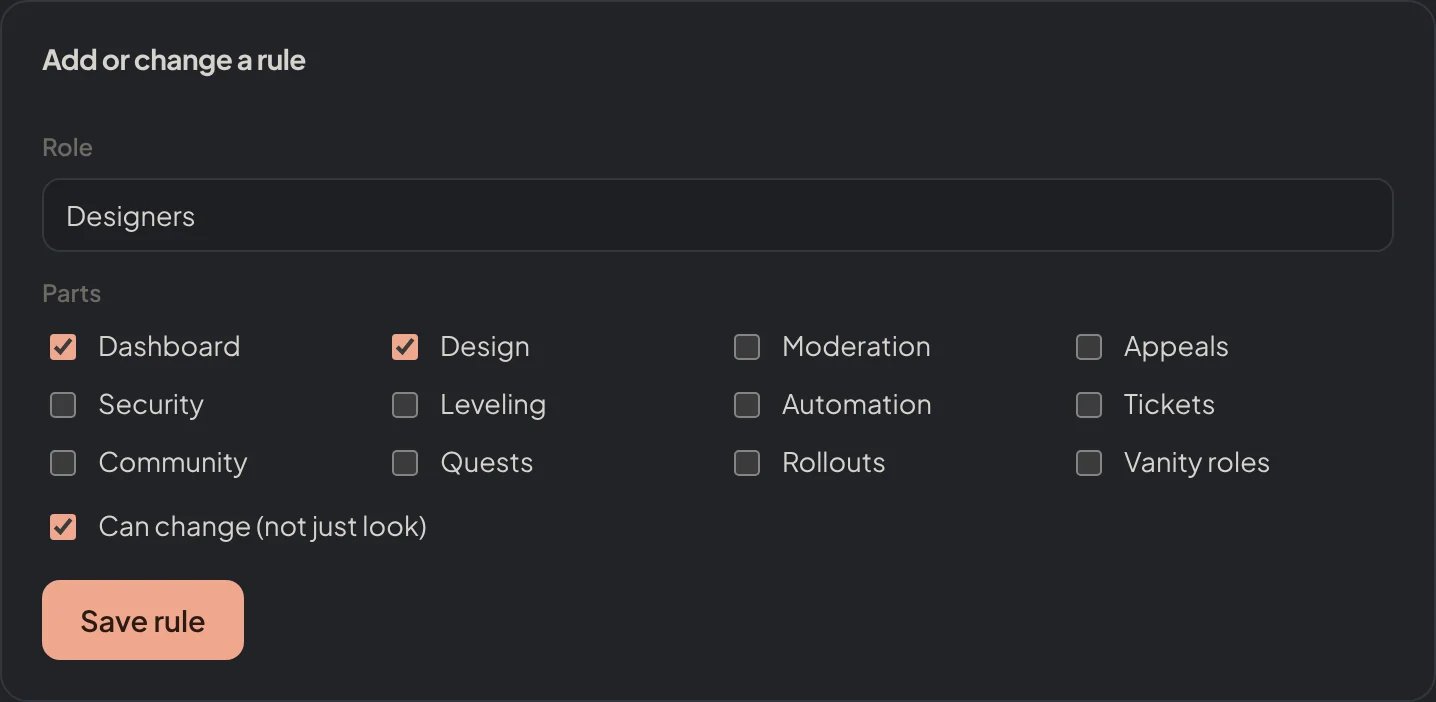
Let the members of a role into the whole dashboard or only into some parts, to look or to change, so helpers and moderators can work without Manage Server.
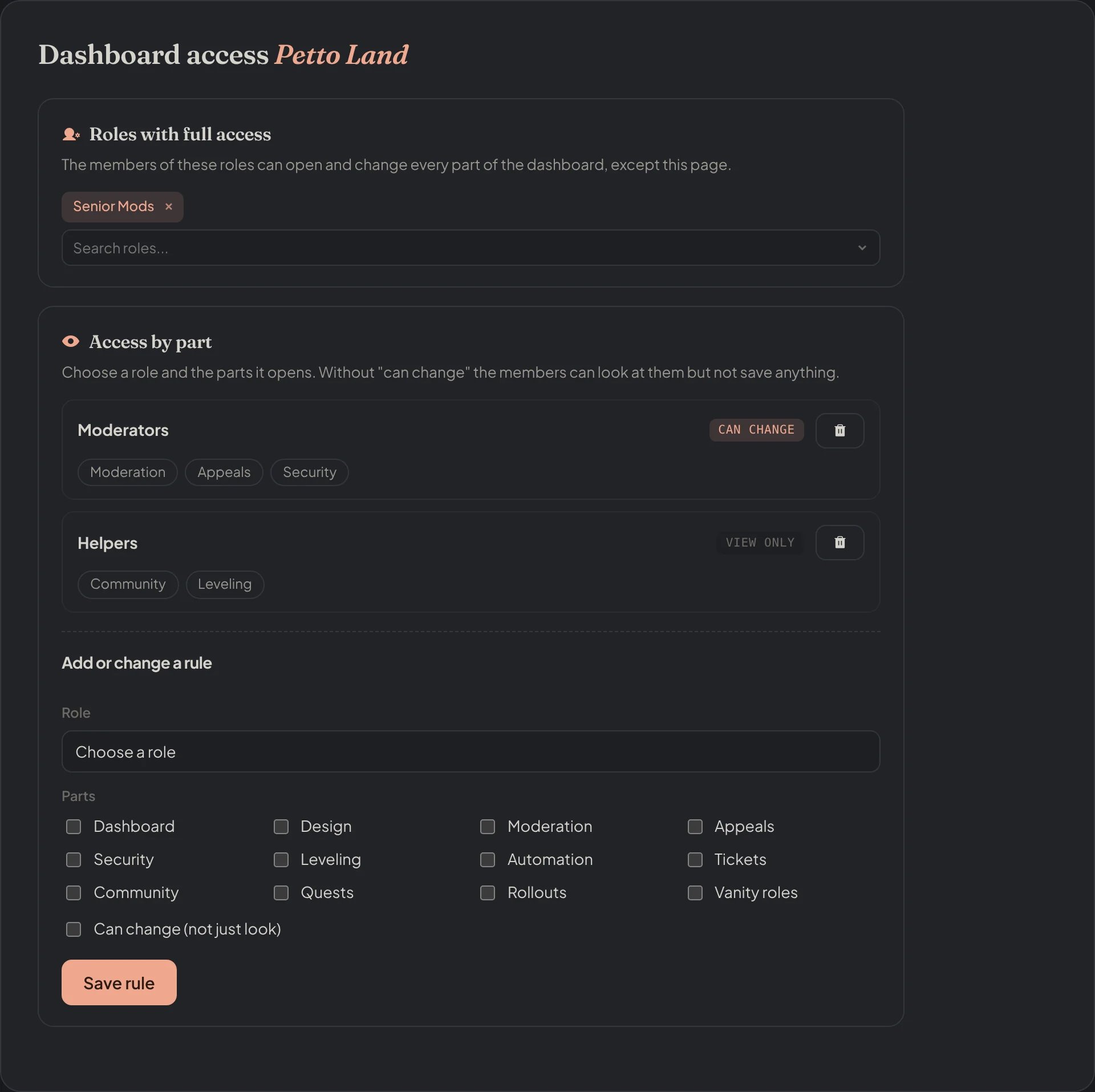
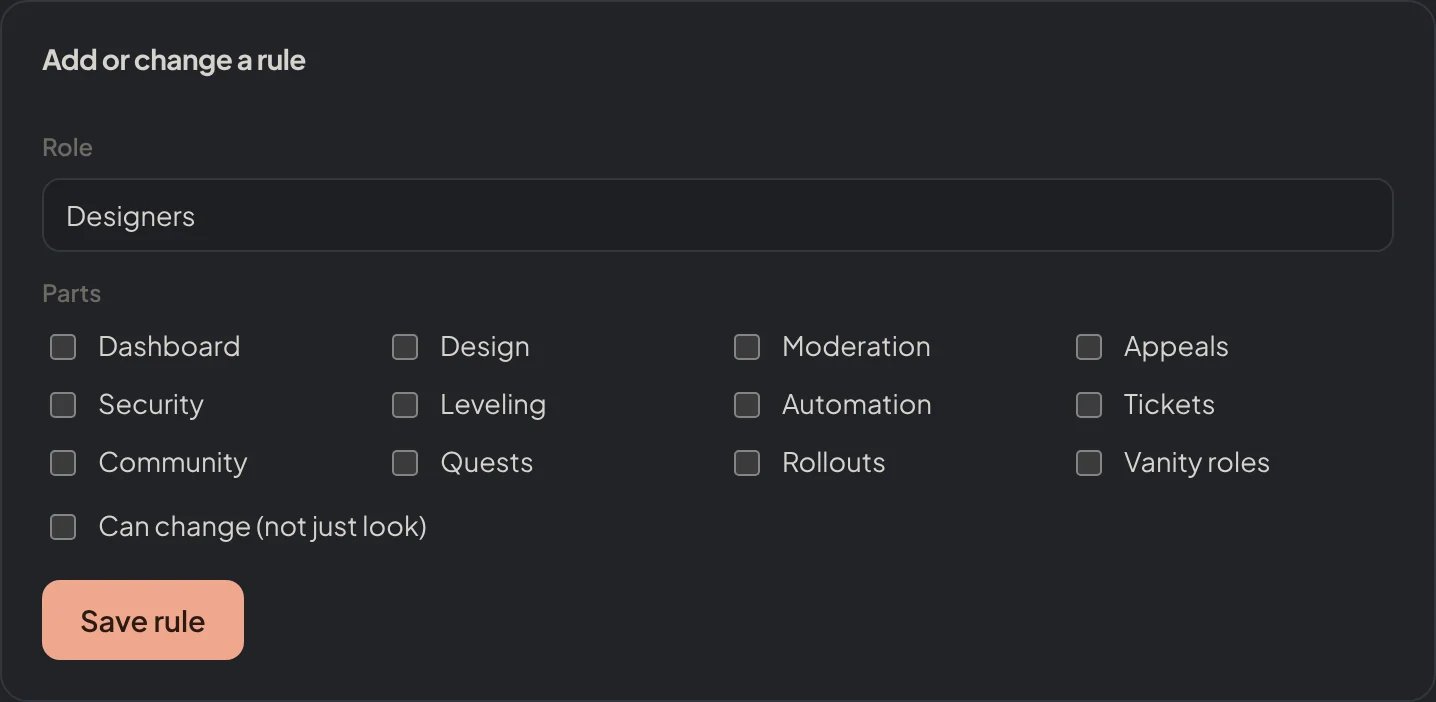
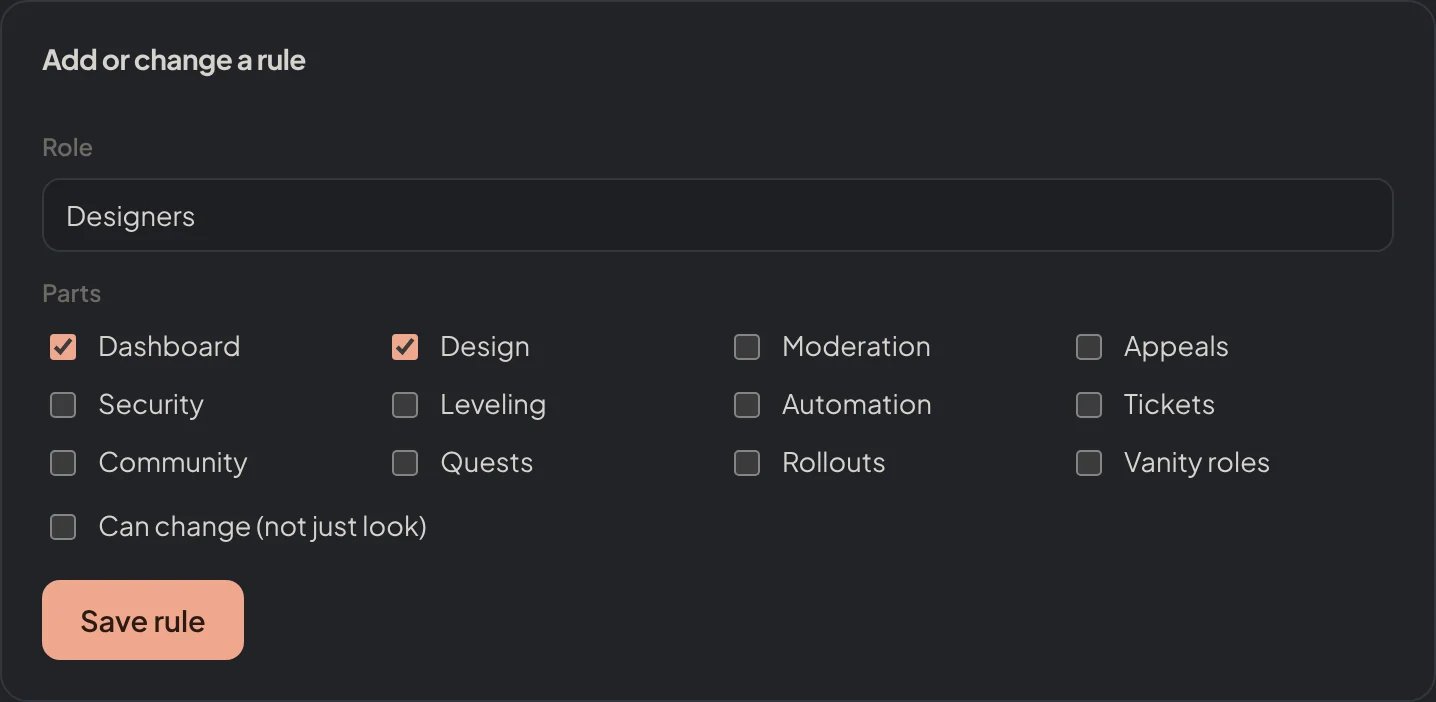
Whoever manages the server (Manage Server or Administrator) can always open all of the dashboard. Dashboard access lets you open it to more people by role: a support team that only runs tickets and forms, a designer who only edits embeds and image cards, or moderators who can look at the logs without changing them.Find it in Dashboard → Security → Dashboard access. Only whoever manages the server sees this page, and a role that was let in can never open it.
Dashboard → Security → Dashboard access: Senior Mods has full access; Moderators can change Moderation, Appeals and Security; Helpers can only look at Community and Leveling.
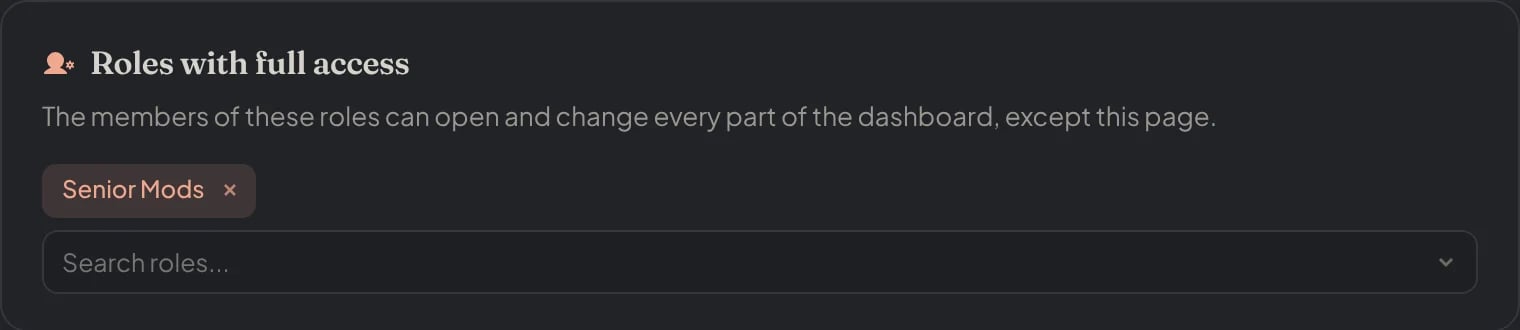
Roles with full access can open and change every part of the dashboard, except the Dashboard access page itself. Pick the roles and press Save changes.
Dashboard → Security → Dashboard access: Senior Mods has full access.
A member gets everything that any of their roles allows. If one role can look at Tickets and another can change it, they can change it.
The roles of the visitor are read from Discord each time, never from their browser, so taking the role away closes the access within seconds.
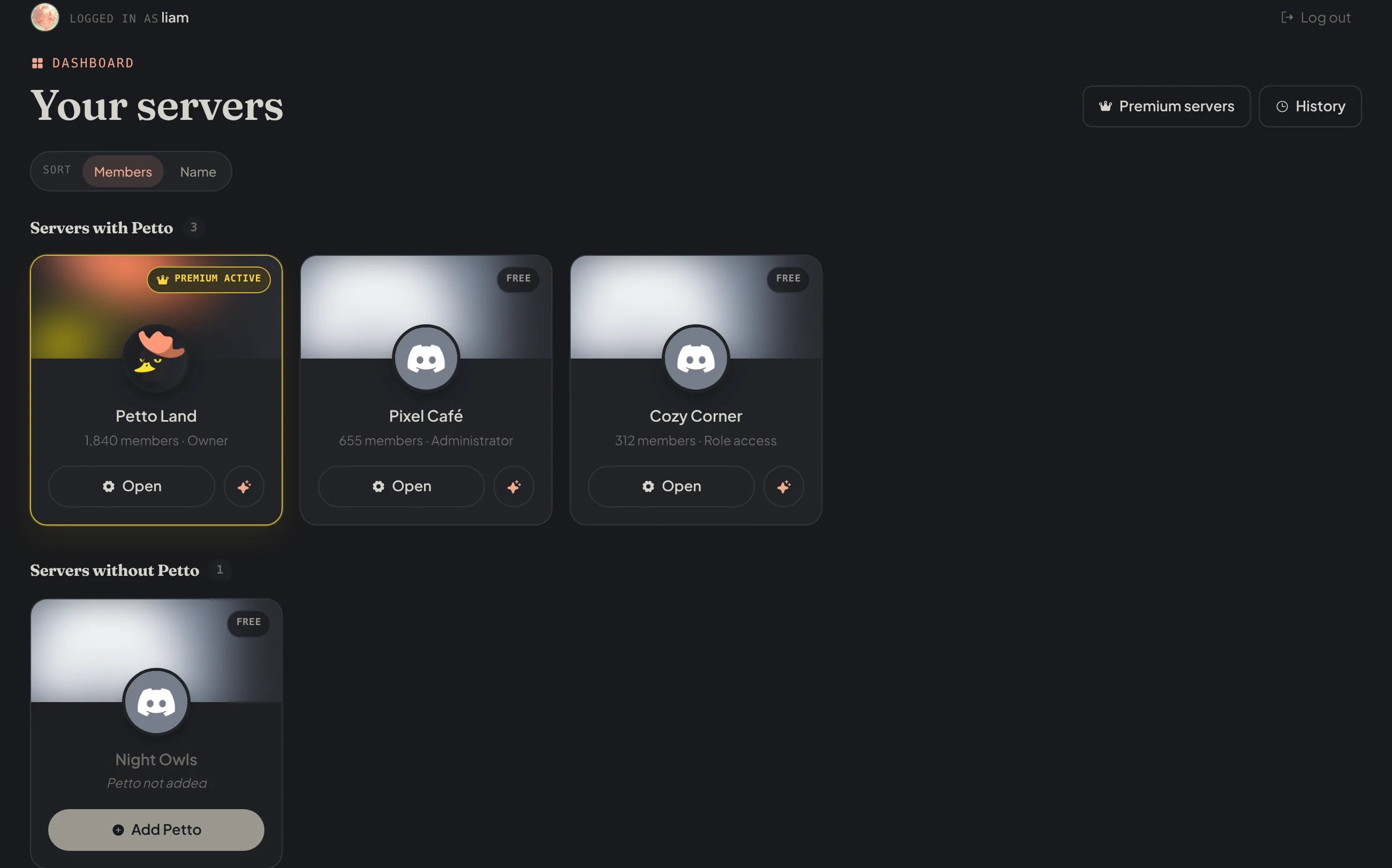
A server where you have access by role shows in your list of servers with the tag Role access.
petto.sbs/dash/manage: Cozy Corner shows with the tag Role access.
Some actions are done by the bot, not by the website: setting up and refreshing counters, accepting and denying forms, posting panels. On the Counters and Forms pages the bot checks the same rules and your roles itself, so they work for members with access by role. A role that can only look cannot use them.
Access to the dashboard is not a Discord permission. A member who can change the Moderation part can change how Petto moderates, so give it only to roles you trust. To control who can use commands in Discord, see Command permissions.
{"docsConfig":{"theme":"mint","$schema":"https://mintlify.com/docs.json","name":"Petto","colors":{"primary":"#f0a88f","light":"#bd5136","dark":"#f0a88f"},"logo":{"light":"https://mintcdn.com/wikipetto/INzCWFMm_YlwlYMb/favicon.png?fit=max\u0026auto=format\u0026n=INzCWFMm_YlwlYMb\u0026q=85\u0026s=c885753c51d1e387b16145091d7f5210","dark":"https://mintcdn.com/wikipetto/INzCWFMm_YlwlYMb/favicon.png?fit=max\u0026auto=format\u0026n=INzCWFMm_YlwlYMb\u0026q=85\u0026s=c885753c51d1e387b16145091d7f5210"},"favicon":"https://mintcdn.com/wikipetto/INzCWFMm_YlwlYMb/favicon.png?fit=max\u0026auto=format\u0026n=INzCWFMm_YlwlYMb\u0026q=85\u0026s=c885753c51d1e387b16145091d7f5210","appearance":{"default":"dark","strict":true},"background":{"color":{"light":"#ffffff","dark":"#111214"}},"navbar":{"links":[{"href":"https://petto.sbs/support","label":"Support Server"}],"primary":{"type":"button","label":"Add Petto","href":"https://petto.sbs/invite"}},"footer":{"socials":{"discord":"https://petto.sbs/support"}},"seo":{"metatags":{"theme-color":"#111214","og:site_name":"wiki.petto.sbs","twitter:card":"summary_large_image"},"indexing":"navigable"},"styling":{"latex":false},"navigation":{"languages":[{"language":"en","href":"overview/introduction"},{"language":"es","href":"es/overview/introduction"},{"language":"pt-BR","href":"pt-br/overview/introduction"}]}},"deployment":{"deploymentMetadataValue":{"subdomain":"wikipetto","hasAudioNarration":false,"actualSubdomain":"wikipetto","customDomains":["wiki.petto.sbs"],"gitSource":{"type":"github","owner":"pettobot","repo":"petto-wiki-docs","deployBranch":"main","contentDirectory":"","isPrivate":true,"mountPath":"","label":""},"chroma":{"latestBuiltDeploymentHistoryId":"6ae81e996e6e556c3ab64fca","collectionId":"2ffbed51-8c88-40d8-9e28-c350f89e2d0d","liveDeploymentHistoryId":"6ae81e996e6e556c3ab64fca","schemaVersion":"v3"},"feedback":{"thumbs":true},"entitlements":{"AI_CHAT":{"status":"DISABLED"}},"buildId":"6ae8e2462fb019ec32ec24ca","clientVersion":"0.0.4045","searchFilterCounts":[{"language":"en","tag":"Community","count":24},{"language":"es","tag":"Comunidad","count":24},{"language":"pt-BR","tag":"Comunidade","count":24},{"language":"en","tag":"Automation","count":20},{"language":"es","tag":"Automatización","count":20},{"language":"pt-BR","tag":"Automação","count":20},{"language":"en","tag":"Setup","count":13},{"language":"es","tag":"Configuración","count":13},{"language":"pt-BR","tag":"Configuração","count":13},{"language":"en","tag":"Moderation","count":11},{"language":"es","tag":"Moderación","count":11},{"language":"pt-BR","tag":"Moderação","count":11},{"language":"en","tag":"Miscellaneous","count":9},{"language":"es","tag":"Varios","count":9},{"language":"pt-BR","tag":"Diversos","count":9},{"language":"en","tag":"Members","count":8},{"language":"en","tag":"Onboarding","count":8},{"language":"es","tag":"Miembros","count":8},{"language":"es","tag":"Bienvenida","count":8},{"language":"pt-BR","tag":"Membros","count":8},{"language":"pt-BR","tag":"Boas-vindas","count":8},{"language":"en","tag":"Engagement","count":7},{"language":"en","tag":"Protection","count":7},{"language":"es","tag":"Participación","count":7},{"language":"es","tag":"Protección","count":7},{"language":"pt-BR","tag":"Engajamento","count":7},{"language":"pt-BR","tag":"Proteção","count":7},{"language":"en","tag":"Guides","count":6},{"language":"es","tag":"Guías","count":6},{"language":"pt-BR","tag":"Guias","count":6},{"language":"default","tag":"Changelog","count":1}]},"assistantConfig":{"enableAskAiButton":false,"enableStarterQuestions":false,"enableContextualStarterQuestions":false,"enableAskAiSearchBar":true},"basePath":"","hasChatPermissions":false,"hasWebMcpPermissions":false,"toggles":[{"name":"kill-isr","enabled":true,"variant":{"name":"disabled","enabled":false,"feature_enabled":true},"impressionData":false},{"name":"agent-mintlify-slack","enabled":true,"variant":{"name":"disabled","enabled":false,"feature_enabled":true},"impressionData":false},{"name":"agent-integrations-settings","enabled":true,"variant":{"name":"disabled","enabled":false,"feature_enabled":true},"impressionData":false},{"name":"automations-pr-grouping","enabled":true,"variant":{"name":"disabled","enabled":false,"feature_enabled":true},"impressionData":false},{"name":"custom-prefix","enabled":true,"variant":{"name":"disabled","enabled":false,"feature_enabled":true},"impressionData":false},{"name":"analytics-v7","enabled":true,"variant":{"name":"disabled","enabled":false,"feature_enabled":true},"impressionData":false},{"name":"user-flows-analytics","enabled":true,"variant":{"name":"disabled","enabled":false,"feature_enabled":true},"impressionData":false},{"name":"no-publish-flow","enabled":true,"variant":{"name":"disabled","enabled":false,"feature_enabled":true},"impressionData":false},{"name":"workos-onboarding","enabled":true,"variant":{"name":"disabled","enabled":false,"feature_enabled":true},"impressionData":false},{"name":"llms-txt-v2","enabled":true,"variant":{"name":"disabled","enabled":false,"feature_enabled":true},"impressionData":false},{"name":"snapshot-serving-live","enabled":true,"variant":{"name":"disabled","enabled":false,"feature_enabled":true},"impressionData":false},{"name":"stripTemperatureMiddleware","enabled":true,"variant":{"name":"disabled","enabled":false,"feature_enabled":true},"impressionData":false},{"name":"support-platform-pylon-zendesk","enabled":true,"variant":{"name":"disabled","enabled":false,"feature_enabled":true},"impressionData":false},{"name":"snapshot-serving","enabled":true,"variant":{"name":"disabled","enabled":false,"feature_enabled":true},"impressionData":false},{"name":"instant-rollback","enabled":true,"variant":{"name":"disabled","enabled":false,"feature_enabled":true},"impressionData":false},{"name":"granular-notifications-server","enabled":true,"variant":{"name":"disabled","enabled":false,"feature_enabled":true},"impressionData":false},{"name":"granular-notifications","enabled":true,"variant":{"name":"disabled","enabled":false,"feature_enabled":true},"impressionData":false},{"name":"automations-fable","enabled":true,"variant":{"name":"disabled","enabled":false,"feature_enabled":true},"impressionData":false},{"name":"fixed-ai-action-pricing","enabled":true,"variant":{"name":"disabled","enabled":false,"feature_enabled":true},"impressionData":false},{"name":"automation-resolve-merge-conflict","enabled":true,"variant":{"name":"disabled","enabled":false,"feature_enabled":true},"impressionData":false},{"name":"scoped-publishing","enabled":true,"variant":{"name":"disabled","enabled":false,"feature_enabled":true},"impressionData":false},{"name":"mintql","enabled":true,"variant":{"name":"disabled","enabled":false,"feature_enabled":true},"impressionData":false},{"name":"page-level-analytics","enabled":true,"variant":{"name":"disabled","enabled":false,"feature_enabled":true},"impressionData":false},{"name":"editor-version-history-v2","enabled":true,"variant":{"name":"disabled","enabled":false,"feature_enabled":true},"impressionData":false},{"name":"billing-page-v2","enabled":true,"variant":{"name":"disabled","enabled":false,"feature_enabled":true},"impressionData":false},{"name":"full-page-search","enabled":true,"variant":{"name":"disabled","enabled":false,"feature_enabled":true},"impressionData":false},{"name":"workspace-projects","enabled":true,"variant":{"name":"disabled","enabled":false,"feature_enabled":true},"impressionData":false},{"name":"assistant-v5","enabled":true,"variant":{"name":"disabled","enabled":false,"feature_enabled":true},"impressionData":false},{"name":"byok-sep-25","enabled":true,"variant":{"name":"disabled","enabled":false,"feature_enabled":true},"impressionData":false},{"name":"fork-pr-previews","enabled":true,"variant":{"name":"disabled","enabled":false,"feature_enabled":true},"impressionData":false},{"name":"revalidation-jwt","enabled":true,"variant":{"name":"disabled","enabled":false,"feature_enabled":true},"impressionData":false},{"name":"vite-origin","enabled":true,"variant":{"name":"disabled","enabled":false,"feature_enabled":true},"impressionData":false},{"name":"billing-updated-9-15","enabled":true,"variant":{"name":"disabled","enabled":false,"feature_enabled":true},"impressionData":false},{"name":"workos-sso-scim","enabled":true,"variant":{"name":"disabled","enabled":false,"feature_enabled":true},"impressionData":false},{"name":"hobby-abuse-scan","enabled":true,"variant":{"name":"disabled","enabled":false,"feature_enabled":true},"impressionData":false},{"name":"dashboard-inbox","enabled":true,"variant":{"name":"disabled","enabled":false,"feature_enabled":true},"impressionData":false},{"name":"workos-signup","enabled":true,"variant":{"name":"disabled","enabled":false,"feature_enabled":true},"impressionData":false},{"name":"turbopuffer-dual-write","enabled":true,"variant":{"name":"disabled","enabled":false,"feature_enabled":true},"impressionData":false},{"name":"workos-enabled","enabled":true,"variant":{"name":"disabled","enabled":false,"feature_enabled":true},"impressionData":false},{"name":"approve-review-flow","enabled":true,"variant":{"name":"disabled","enabled":false,"feature_enabled":true},"impressionData":false},{"name":"sso-setup-deadline-banner","enabled":true,"variant":{"name":"disabled","enabled":false,"feature_enabled":true},"impressionData":false}],"googleFontsInlined":false},"customCss":[],"page":{"pagePath":"setup/dashboard-access","slug":"/setup/dashboard-access","pageMetadata":{"title":"Dashboard access","description":"Let the members of a role into the whole dashboard or only into some parts, to look or to change, so helpers and moderators can work without Manage Server.","icon":"user-gear","href":"/setup/dashboard-access"},"description":{"compiledSource":"\"use strict\";\nconst {jsx: _jsx} = arguments[0];\nconst {useMDXComponents: _provideComponents} = arguments[0];\nfunction _createMdxContent(props) {\n const _components = {\n p: \"p\",\n ..._provideComponents(),\n ...props.components\n };\n return _jsx(_components.p, {\n children: \"Let the members of a role into the whole dashboard or only into some parts, to look or to change, so helpers and moderators can work without Manage Server.\"\n });\n}\nfunction MDXContent(props = {}) {\n const {wrapper: MDXLayout} = {\n ..._provideComponents(),\n ...props.components\n };\n return MDXLayout ? _jsx(MDXLayout, {\n ...props,\n children: _jsx(_createMdxContent, {\n ...props\n })\n }) : _createMdxContent(props);\n}\nreturn {\n default: MDXContent\n};\n","frontmatter":{},"scope":{}},"pageType":"default","mdx":{"mdxSource":{"compiledSource":"\"use strict\";const{Fragment:_Fragment,jsx:_jsx,jsxs:_jsxs}=arguments[0];const{useMDXComponents:_provideComponents}=arguments[0];function _createMdxContent(props){const _components={a:`a`,code:`code`,li:`li`,p:`p`,strong:`strong`,tbody:`tbody`,td:`td`,th:`th`,thead:`thead`,tr:`tr`,ul:`ul`,..._provideComponents(),...props.components},{Frame,Heading,Note,OptimizedImage,Step,Steps,Table,Warning}=_components;if(!Frame)_missingMdxReference(`Frame`,true);if(!Heading)_missingMdxReference(`Heading`,true);if(!Note)_missingMdxReference(`Note`,true);if(!OptimizedImage)_missingMdxReference(`OptimizedImage`,true);if(!Step)_missingMdxReference(`Step`,true);if(!Steps)_missingMdxReference(`Steps`,true);if(!Table)_missingMdxReference(`Table`,true);if(!Warning)_missingMdxReference(`Warning`,true);return _jsxs(_Fragment,{children:[_jsx(Heading,{level:`2`,id:`overview`,children:`Overview`}),`\n`,_jsxs(_components.p,{children:[`Whoever manages the server (`,_jsx(_components.strong,{children:`Manage Server`}),` or `,_jsx(_components.strong,{children:`Administrator`}),`) can always open all of the dashboard. `,_jsx(_components.strong,{children:`Dashboard access`}),` lets you open it to more people by role: a support team that only runs tickets and forms, a designer who only edits embeds and image cards, or moderators who can look at the logs without changing them.`]}),`\n`,_jsxs(_components.p,{children:[`Find it in `,_jsx(_components.strong,{children:`Dashboard → Security → Dashboard access`}),`. Only whoever manages the server sees this page, and a role that was let in can never open it.`]}),`\n`,_jsx(Frame,{caption:`Dashboard → Security → Dashboard access: Senior Mods has full access; Moderators can change Moderation, Appeals and Security; Helpers can only look at Community and Leveling.`,children:_jsx(OptimizedImage,{src:`https://mintcdn.com/wikipetto/NNb0rgWpeffY0EDH/images/dashboard/setup/dashboard-access.webp?fit=max\u0026auto=format\u0026n=NNb0rgWpeffY0EDH\u0026q=85\u0026s=c450e8d8ae343a35e021c238996a9474`,alt:`The Dashboard access page with Senior Mods in full access, Moderators able to change three parts, Helpers only able to look at two, and the form to add a rule`,\"data-og-width\":`1920`,width:`1920`,\"data-og-height\":`1914`,height:`1914`,\"data-path\":`images/dashboard/setup/dashboard-access.webp`,\"data-optimize\":`true`,\"data-opv\":`3`,srcset:`https://mintcdn.com/wikipetto/NNb0rgWpeffY0EDH/images/dashboard/setup/dashboard-access.webp?w=280\u0026fit=max\u0026auto=format\u0026n=NNb0rgWpeffY0EDH\u0026q=85\u0026s=2fe3787000ab8f641c65f72738ff68e6 280w, https://mintcdn.com/wikipetto/NNb0rgWpeffY0EDH/images/dashboard/setup/dashboard-access.webp?w=560\u0026fit=max\u0026auto=format\u0026n=NNb0rgWpeffY0EDH\u0026q=85\u0026s=4d0a453a34acee35b740cfc4d2816c5e 560w, https://mintcdn.com/wikipetto/NNb0rgWpeffY0EDH/images/dashboard/setup/dashboard-access.webp?w=840\u0026fit=max\u0026auto=format\u0026n=NNb0rgWpeffY0EDH\u0026q=85\u0026s=417fd6546e3fffcee6b80541ed7a5719 840w, https://mintcdn.com/wikipetto/NNb0rgWpeffY0EDH/images/dashboard/setup/dashboard-access.webp?w=1100\u0026fit=max\u0026auto=format\u0026n=NNb0rgWpeffY0EDH\u0026q=85\u0026s=b95ad52fb6bd01809b6d7750742b10cf 1100w, https://mintcdn.com/wikipetto/NNb0rgWpeffY0EDH/images/dashboard/setup/dashboard-access.webp?w=1650\u0026fit=max\u0026auto=format\u0026n=NNb0rgWpeffY0EDH\u0026q=85\u0026s=43938f34ecf28eb48abb4aea7687cce6 1650w, https://mintcdn.com/wikipetto/NNb0rgWpeffY0EDH/images/dashboard/setup/dashboard-access.webp?w=2500\u0026fit=max\u0026auto=format\u0026n=NNb0rgWpeffY0EDH\u0026q=85\u0026s=3b3a53f1cd361daecd513292bbca6e4c 2500w`})}),`\n`,_jsx(Heading,{level:`2`,id:`full-access`,children:`Full access`}),`\n`,_jsxs(_components.p,{children:[_jsx(_components.strong,{children:`Roles with full access`}),` can open and change every part of the dashboard, except the Dashboard access page itself. Pick the roles and press `,_jsx(_components.strong,{children:`Save changes`}),`.`]}),`\n`,_jsx(Frame,{caption:`Dashboard → Security → Dashboard access: Senior Mods has full access.`,children:_jsx(OptimizedImage,{src:`https://mintcdn.com/wikipetto/NNb0rgWpeffY0EDH/images/dashboard/setup/dashboard-access-full.webp?fit=max\u0026auto=format\u0026n=NNb0rgWpeffY0EDH\u0026q=85\u0026s=5a2e390518654de88c185a2e459ac5b7`,alt:`The Roles with full access card with the role Senior Mods picked and the search to add more roles`,\"data-og-width\":`1520`,width:`1520`,\"data-og-height\":`330`,height:`330`,\"data-path\":`images/dashboard/setup/dashboard-access-full.webp`,\"data-optimize\":`true`,\"data-opv\":`3`,srcset:`https://mintcdn.com/wikipetto/NNb0rgWpeffY0EDH/images/dashboard/setup/dashboard-access-full.webp?w=280\u0026fit=max\u0026auto=format\u0026n=NNb0rgWpeffY0EDH\u0026q=85\u0026s=9d1d26a9c04a5ec353e5a36f6f547f75 280w, https://mintcdn.com/wikipetto/NNb0rgWpeffY0EDH/images/dashboard/setup/dashboard-access-full.webp?w=560\u0026fit=max\u0026auto=format\u0026n=NNb0rgWpeffY0EDH\u0026q=85\u0026s=41af754ee50cbed67577d956eff3f96e 560w, https://mintcdn.com/wikipetto/NNb0rgWpeffY0EDH/images/dashboard/setup/dashboard-access-full.webp?w=840\u0026fit=max\u0026auto=format\u0026n=NNb0rgWpeffY0EDH\u0026q=85\u0026s=c8a81e3ebcc82762e35631a69ff4d697 840w, https://mintcdn.com/wikipetto/NNb0rgWpeffY0EDH/images/dashboard/setup/dashboard-access-full.webp?w=1100\u0026fit=max\u0026auto=format\u0026n=NNb0rgWpeffY0EDH\u0026q=85\u0026s=e4b83931a99ee66cf47eb77e9605da73 1100w, https://mintcdn.com/wikipetto/NNb0rgWpeffY0EDH/images/dashboard/setup/dashboard-access-full.webp?w=1650\u0026fit=max\u0026auto=format\u0026n=NNb0rgWpeffY0EDH\u0026q=85\u0026s=ebee9d925c0c78ced03bf3fe5db28b12 1650w, https://mintcdn.com/wikipetto/NNb0rgWpeffY0EDH/images/dashboard/setup/dashboard-access-full.webp?w=2500\u0026fit=max\u0026auto=format\u0026n=NNb0rgWpeffY0EDH\u0026q=85\u0026s=1b2117b62c4497b56771c67a2b9bb456 2500w`})}),`\n`,_jsx(Heading,{level:`2`,id:`access-by-part`,children:`Access by part`}),`\n`,_jsxs(_components.p,{children:[_jsx(_components.strong,{children:`Access by part`}),` gives a role only some parts of the dashboard:`]}),`\n`,_jsxs(Steps,{children:[_jsxs(Step,{title:`Choose a role`,children:[_jsxs(_components.p,{children:[`Pick it from the list. `,_jsx(_components.code,{children:`@everyone`}),` is not in the list, it would open the dashboard to the whole server.`]}),_jsx(Frame,{caption:`Add or change a rule: the role Designers picked.`,children:_jsx(OptimizedImage,{src:`https://mintcdn.com/wikipetto/NNb0rgWpeffY0EDH/images/dashboard/setup/dashboard-access-step-1-role.webp?fit=max\u0026auto=format\u0026n=NNb0rgWpeffY0EDH\u0026q=85\u0026s=f5b92fb7844036e5d7174ebe9acc19ef`,alt:`The form to add a rule with Designers in the Role list and no part ticked yet`,\"data-og-width\":`1436`,width:`1436`,\"data-og-height\":`702`,height:`702`,\"data-path\":`images/dashboard/setup/dashboard-access-step-1-role.webp`,\"data-optimize\":`true`,\"data-opv\":`3`,srcset:`https://mintcdn.com/wikipetto/NNb0rgWpeffY0EDH/images/dashboard/setup/dashboard-access-step-1-role.webp?w=280\u0026fit=max\u0026auto=format\u0026n=NNb0rgWpeffY0EDH\u0026q=85\u0026s=308312439019f603cbdebde223115912 280w, https://mintcdn.com/wikipetto/NNb0rgWpeffY0EDH/images/dashboard/setup/dashboard-access-step-1-role.webp?w=560\u0026fit=max\u0026auto=format\u0026n=NNb0rgWpeffY0EDH\u0026q=85\u0026s=5e1570e13f2edac6eba30246d834f036 560w, https://mintcdn.com/wikipetto/NNb0rgWpeffY0EDH/images/dashboard/setup/dashboard-access-step-1-role.webp?w=840\u0026fit=max\u0026auto=format\u0026n=NNb0rgWpeffY0EDH\u0026q=85\u0026s=c9446ed49d6701dc58c73889b89e254c 840w, https://mintcdn.com/wikipetto/NNb0rgWpeffY0EDH/images/dashboard/setup/dashboard-access-step-1-role.webp?w=1100\u0026fit=max\u0026auto=format\u0026n=NNb0rgWpeffY0EDH\u0026q=85\u0026s=f4c78939a7e22718b4183efd96fcc283 1100w, https://mintcdn.com/wikipetto/NNb0rgWpeffY0EDH/images/dashboard/setup/dashboard-access-step-1-role.webp?w=1650\u0026fit=max\u0026auto=format\u0026n=NNb0rgWpeffY0EDH\u0026q=85\u0026s=9fb3c0a2ef90edcda8694c66454af64f 1650w, https://mintcdn.com/wikipetto/NNb0rgWpeffY0EDH/images/dashboard/setup/dashboard-access-step-1-role.webp?w=2500\u0026fit=max\u0026auto=format\u0026n=NNb0rgWpeffY0EDH\u0026q=85\u0026s=c1bc1815859dfd92baa5fe37f63e387c 2500w`})})]}),_jsxs(Step,{title:`Choose the parts`,children:[_jsx(_components.p,{children:`Tick one or more parts. Each part opens the pages of the same group of the menu.`}),_jsx(Frame,{caption:`Add or change a rule: the parts Dashboard and Design ticked.`,children:_jsx(OptimizedImage,{src:`https://mintcdn.com/wikipetto/NNb0rgWpeffY0EDH/images/dashboard/setup/dashboard-access-step-2-parts.webp?fit=max\u0026auto=format\u0026n=NNb0rgWpeffY0EDH\u0026q=85\u0026s=c21156411b8e6d1a6647a98d7638d376`,alt:`The same form with Dashboard and Design ticked among the twelve parts`,\"data-og-width\":`1436`,width:`1436`,\"data-og-height\":`702`,height:`702`,\"data-path\":`images/dashboard/setup/dashboard-access-step-2-parts.webp`,\"data-optimize\":`true`,\"data-opv\":`3`,srcset:`https://mintcdn.com/wikipetto/NNb0rgWpeffY0EDH/images/dashboard/setup/dashboard-access-step-2-parts.webp?w=280\u0026fit=max\u0026auto=format\u0026n=NNb0rgWpeffY0EDH\u0026q=85\u0026s=0618af95434f3a78676cf99711ae7b2d 280w, https://mintcdn.com/wikipetto/NNb0rgWpeffY0EDH/images/dashboard/setup/dashboard-access-step-2-parts.webp?w=560\u0026fit=max\u0026auto=format\u0026n=NNb0rgWpeffY0EDH\u0026q=85\u0026s=aeccefa3969eade765a062bdd1dbf343 560w, https://mintcdn.com/wikipetto/NNb0rgWpeffY0EDH/images/dashboard/setup/dashboard-access-step-2-parts.webp?w=840\u0026fit=max\u0026auto=format\u0026n=NNb0rgWpeffY0EDH\u0026q=85\u0026s=09abac7c52f425c75f4ec55ba3fe1c8f 840w, https://mintcdn.com/wikipetto/NNb0rgWpeffY0EDH/images/dashboard/setup/dashboard-access-step-2-parts.webp?w=1100\u0026fit=max\u0026auto=format\u0026n=NNb0rgWpeffY0EDH\u0026q=85\u0026s=f3dc12532e13932010f708db31190213 1100w, https://mintcdn.com/wikipetto/NNb0rgWpeffY0EDH/images/dashboard/setup/dashboard-access-step-2-parts.webp?w=1650\u0026fit=max\u0026auto=format\u0026n=NNb0rgWpeffY0EDH\u0026q=85\u0026s=8752ce4f1aeb98f62e91a3202655eb72 1650w, https://mintcdn.com/wikipetto/NNb0rgWpeffY0EDH/images/dashboard/setup/dashboard-access-step-2-parts.webp?w=2500\u0026fit=max\u0026auto=format\u0026n=NNb0rgWpeffY0EDH\u0026q=85\u0026s=2f31cb14f3764966b74aab2f72d62a69 2500w`})})]}),_jsxs(Step,{title:`Look or change`,children:[_jsxs(_components.p,{children:[`Tick `,_jsx(_components.strong,{children:`Can change (not just look)`}),` to let them save. Without it, the members of the role can open the pages but not save anything.`]}),_jsx(Frame,{caption:`Add or change a rule: Can change ticked, ready for Save rule.`,children:_jsx(OptimizedImage,{src:`https://mintcdn.com/wikipetto/NNb0rgWpeffY0EDH/images/dashboard/setup/dashboard-access-step-3-change.webp?fit=max\u0026auto=format\u0026n=NNb0rgWpeffY0EDH\u0026q=85\u0026s=310fff94aba0a2b3672d996013412b1b`,alt:`The same form with Can change (not just look) ticked and the Save rule button`,\"data-og-width\":`1436`,width:`1436`,\"data-og-height\":`702`,height:`702`,\"data-path\":`images/dashboard/setup/dashboard-access-step-3-change.webp`,\"data-optimize\":`true`,\"data-opv\":`3`,srcset:`https://mintcdn.com/wikipetto/NNb0rgWpeffY0EDH/images/dashboard/setup/dashboard-access-step-3-change.webp?w=280\u0026fit=max\u0026auto=format\u0026n=NNb0rgWpeffY0EDH\u0026q=85\u0026s=9c3f4078eebc56238f8e3c0156f8ae6d 280w, https://mintcdn.com/wikipetto/NNb0rgWpeffY0EDH/images/dashboard/setup/dashboard-access-step-3-change.webp?w=560\u0026fit=max\u0026auto=format\u0026n=NNb0rgWpeffY0EDH\u0026q=85\u0026s=a74085792aa448d2e2534e0a56d8cd16 560w, https://mintcdn.com/wikipetto/NNb0rgWpeffY0EDH/images/dashboard/setup/dashboard-access-step-3-change.webp?w=840\u0026fit=max\u0026auto=format\u0026n=NNb0rgWpeffY0EDH\u0026q=85\u0026s=7c34798c7c9bd54c2fd4f1130d8f11e3 840w, https://mintcdn.com/wikipetto/NNb0rgWpeffY0EDH/images/dashboard/setup/dashboard-access-step-3-change.webp?w=1100\u0026fit=max\u0026auto=format\u0026n=NNb0rgWpeffY0EDH\u0026q=85\u0026s=e8c0f80a8326ef1c17fd51e476a4e7b4 1100w, https://mintcdn.com/wikipetto/NNb0rgWpeffY0EDH/images/dashboard/setup/dashboard-access-step-3-change.webp?w=1650\u0026fit=max\u0026auto=format\u0026n=NNb0rgWpeffY0EDH\u0026q=85\u0026s=7c8b5df8c91451170112ba4a78322144 1650w, https://mintcdn.com/wikipetto/NNb0rgWpeffY0EDH/images/dashboard/setup/dashboard-access-step-3-change.webp?w=2500\u0026fit=max\u0026auto=format\u0026n=NNb0rgWpeffY0EDH\u0026q=85\u0026s=e44335fb3679241ed1015daa3b809bcb 2500w`})})]})]}),`\n`,_jsxs(Table,{children:[_jsx(_components.thead,{children:_jsxs(_components.tr,{children:[_jsx(_components.th,{children:`Part`}),_jsx(_components.th,{children:`Pages`})]})}),_jsxs(_components.tbody,{children:[_jsxs(_components.tr,{children:[_jsx(_components.td,{children:`Dashboard`}),_jsx(_components.td,{children:`Modules, Statistics, Settings, Config Management, Customize, Backups`})]}),_jsxs(_components.tr,{children:[_jsx(_components.td,{children:`Design`}),_jsx(_components.td,{children:`Embeds, Image cards`})]}),_jsxs(_components.tr,{children:[_jsx(_components.td,{children:`Moderation`}),_jsx(_components.td,{children:`Moderation, Anti-raid \u0026 nuke, Anti scam, Honeypot, AutoMod templates, Lockdown`})]}),_jsxs(_components.tr,{children:[_jsx(_components.td,{children:`Appeals`}),_jsx(_components.td,{children:`Appeals`})]}),_jsxs(_components.tr,{children:[_jsx(_components.td,{children:`Security`}),_jsx(_components.td,{children:`Onboarding and verification, Security, Permissions, Audit Log, Logging`})]}),_jsxs(_components.tr,{children:[_jsx(_components.td,{children:`Leveling`}),_jsx(_components.td,{children:`Leveling`})]}),_jsxs(_components.tr,{children:[_jsx(_components.td,{children:`Automation`}),_jsx(_components.td,{children:`Automation, Commands in code, Roles, Reaction roles, Counters, Boards`})]}),_jsxs(_components.tr,{children:[_jsx(_components.td,{children:`Tickets`}),_jsx(_components.td,{children:`Tickets`})]}),_jsxs(_components.tr,{children:[_jsx(_components.td,{children:`Community`}),_jsx(_components.td,{children:`Giveaways, Community, Birthdays, Confessions, Counting, Partners, Buttons and panels, Message look, Suggestions, Uploads, Requests, Reviews, Forms, Media channels, Feeds`})]}),_jsxs(_components.tr,{children:[_jsx(_components.td,{children:`Quests`}),_jsx(_components.td,{children:`Quest alerts`})]}),_jsxs(_components.tr,{children:[_jsx(_components.td,{children:`Rollouts`}),_jsx(_components.td,{children:`Rollout alerts`})]}),_jsxs(_components.tr,{children:[_jsx(_components.td,{children:`Vanity roles`}),_jsx(_components.td,{children:`Vanity rules, Server Tag rules, messages and logs`})]})]})]}),`\n`,_jsxs(_components.p,{children:[`The `,_jsx(_components.strong,{children:`Overview`}),` of the server opens for anyone with a rule. A server can have up to 50 rules.`]}),`\n`,_jsx(Heading,{level:`2`,id:`how-it-adds-up`,children:`How it adds up`}),`\n`,_jsxs(_components.ul,{children:[`\n`,_jsxs(_components.li,{children:[`A member gets everything that `,_jsx(_components.strong,{children:`any`}),` of their roles allows. If one role can look at Tickets and another can change it, they can change it.`]}),`\n`,_jsx(_components.li,{children:`The roles of the visitor are read from Discord each time, never from their browser, so taking the role away closes the access within seconds.`}),`\n`,_jsxs(_components.li,{children:[`A server where you have access by role shows in your list of servers with the tag `,_jsx(_components.strong,{children:`Role access`}),`.`]}),`\n`]}),`\n`,_jsx(Frame,{caption:`petto.sbs/dash/manage: Cozy Corner shows with the tag Role access.`,children:_jsx(OptimizedImage,{src:`https://mintcdn.com/wikipetto/NNb0rgWpeffY0EDH/images/dashboard/setup/dashboard-access-servers.webp?fit=max\u0026auto=format\u0026n=NNb0rgWpeffY0EDH\u0026q=85\u0026s=b42e3320437028642ec5074d44b903fd`,alt:`The list of servers of liam: Petto Land as owner, Pixel Café as administrator, Cozy Corner opened by a role, and Night Owls without Petto`,\"data-og-width\":`2600`,width:`2600`,\"data-og-height\":`1622`,height:`1622`,\"data-path\":`images/dashboard/setup/dashboard-access-servers.webp`,\"data-optimize\":`true`,\"data-opv\":`3`,srcset:`https://mintcdn.com/wikipetto/NNb0rgWpeffY0EDH/images/dashboard/setup/dashboard-access-servers.webp?w=280\u0026fit=max\u0026auto=format\u0026n=NNb0rgWpeffY0EDH\u0026q=85\u0026s=a35bcb35f07c8d76637ec6ee47fcd8af 280w, https://mintcdn.com/wikipetto/NNb0rgWpeffY0EDH/images/dashboard/setup/dashboard-access-servers.webp?w=560\u0026fit=max\u0026auto=format\u0026n=NNb0rgWpeffY0EDH\u0026q=85\u0026s=b2325cf9c60c8cdc3714eea9a2a91518 560w, https://mintcdn.com/wikipetto/NNb0rgWpeffY0EDH/images/dashboard/setup/dashboard-access-servers.webp?w=840\u0026fit=max\u0026auto=format\u0026n=NNb0rgWpeffY0EDH\u0026q=85\u0026s=0341d77b2c10c4a958299d1ebd9da6f4 840w, https://mintcdn.com/wikipetto/NNb0rgWpeffY0EDH/images/dashboard/setup/dashboard-access-servers.webp?w=1100\u0026fit=max\u0026auto=format\u0026n=NNb0rgWpeffY0EDH\u0026q=85\u0026s=74aaa25717019b03911f66f0e34a25a6 1100w, https://mintcdn.com/wikipetto/NNb0rgWpeffY0EDH/images/dashboard/setup/dashboard-access-servers.webp?w=1650\u0026fit=max\u0026auto=format\u0026n=NNb0rgWpeffY0EDH\u0026q=85\u0026s=2e6f94c8877d143f2fdef58b7a4c08d8 1650w, https://mintcdn.com/wikipetto/NNb0rgWpeffY0EDH/images/dashboard/setup/dashboard-access-servers.webp?w=2500\u0026fit=max\u0026auto=format\u0026n=NNb0rgWpeffY0EDH\u0026q=85\u0026s=3c6eeeb10154c439d39e7a355c3e3190 2500w`})}),`\n`,_jsx(Note,{children:_jsxs(_components.p,{children:[`Some actions are done by the bot, not by the website: setting up and refreshing counters, accepting and denying forms, posting panels. On the `,_jsx(_components.strong,{children:`Counters`}),` and `,_jsx(_components.strong,{children:`Forms`}),` pages the bot checks the same rules and your roles itself, so they work for members with access by role. A role that can only look cannot use them.`]})}),`\n`,_jsx(Warning,{children:_jsxs(_components.p,{children:[`Access to the dashboard is not a Discord permission. A member who can change the `,_jsx(_components.strong,{children:`Moderation`}),` part can change how Petto moderates, so give it only to roles you trust. To control who can use commands in Discord, see `,_jsx(_components.a,{href:`/setup/permissions`,children:`Command permissions`}),`.`]})}),`\n`,_jsx(Heading,{level:`2`,id:`related`,children:`Related`}),`\n`,_jsxs(_components.ul,{children:[`\n`,_jsx(_components.li,{children:_jsx(_components.a,{href:`/setup/dashboard`,children:`The dashboard`})}),`\n`,_jsx(_components.li,{children:_jsx(_components.a,{href:`/common-issues/dashboard-issues`,children:`Dashboard issues`})}),`\n`]})]})}function MDXContent(props={}){const{wrapper:MDXLayout}={..._provideComponents(),...props.components};return MDXLayout?_jsx(MDXLayout,{...props,children:_jsx(_createMdxContent,{...props})}):_createMdxContent(props)}return{default:MDXContent};function _missingMdxReference(id,component){throw new Error(`Expected `+(component?`component`:`object`)+\" `\"+id+\"` to be defined: you likely forgot to import, pass, or provide it.\")}","frontmatter":{},"scope":{"config":{},"pageMetadata":{"title":"Dashboard access","description":"Let the members of a role into the whole dashboard or only into some parts, to look or to change, so helpers and moderators can work without Manage Server.","icon":"user-gear","href":"/setup/dashboard-access"}}},"mdxSourceWithNoJs":null},"mdxExtracts":{"tableOfContents":[{"title":"Overview","slug":"overview","depth":2,"children":[]},{"title":"Full access","slug":"full-access","depth":2,"children":[]},{"title":"Access by part","slug":"access-by-part","depth":2,"children":[]},{"title":"How it adds up","slug":"how-it-adds-up","depth":2,"children":[]},{"title":"Related","slug":"related","depth":2,"children":[]}],"codeExamples":{}},"jsLinks":["/_mintlify/custom/wikipetto/c83e687cc7f8558b/scripts/make-og-image.js"],"subdomain":"wikipetto","siteName":"Petto","title":"Dashboard access - Petto","navMaps":{"firstHrefInVersion":{},"firstHrefInLanguage":{"en":{"href":"/setup/dashboard-access","matchLevel":0},"es":{"href":"/es/setup/dashboard-access","matchLevel":1},"pt-BR":{"href":"/pt-br/setup/dashboard-access","matchLevel":1}}},"lastModified":"2026-10-29T19:37:25.768Z","originalFileLocation":"setup/dashboard-access.mdx","locale":"en"},"headHtml":"\u003cscript data-mint-head>(function(){var d=document.documentElement,p=\"dark\";if(!p){try{p=localStorage.getItem(\"isDarkMode\")}catch(e){}if(p==='true')p='dark';else if(p==='false')p='light';if(p!=='light'\u0026\u0026p!=='dark'\u0026\u0026p!=='system')p=\"dark\"}var r=p==='system'?(matchMedia(\"(prefers-color-scheme: dark)\").matches?'dark':'light'):p;d.classList.remove(r==='dark'?'light':'dark');d.classList.add(r);d.setAttribute(\"data-theme-preference\",p)})();\u003c/script>\u003cmeta data-mint-head name=\"description\" content=\"Let the members of a role into the whole dashboard or only into some parts, to look or to change, so helpers and moderators can work without Manage Server.\">\u003cmeta data-mint-head name=\"application-name\" content=\"Petto\">\u003cmeta data-mint-head name=\"generator\" content=\"Mintlify\">\u003clink data-mint-head rel=\"apple-touch-icon\" type=\"image/png\" sizes=\"180x180\" href=\"https://mintcdn.com/wikipetto/INzCWFMm_YlwlYMb/favicon.png?fit=max\u0026amp;auto=format\u0026amp;n=INzCWFMm_YlwlYMb\u0026amp;q=85\u0026amp;s=c885753c51d1e387b16145091d7f5210\">\u003clink data-mint-head rel=\"icon\" type=\"image/png\" sizes=\"32x32\" href=\"https://mintcdn.com/wikipetto/INzCWFMm_YlwlYMb/favicon.png?fit=max\u0026amp;auto=format\u0026amp;n=INzCWFMm_YlwlYMb\u0026amp;q=85\u0026amp;s=c885753c51d1e387b16145091d7f5210\">\u003clink data-mint-head rel=\"icon\" type=\"image/png\" sizes=\"16x16\" href=\"https://mintcdn.com/wikipetto/INzCWFMm_YlwlYMb/favicon.png?fit=max\u0026amp;auto=format\u0026amp;n=INzCWFMm_YlwlYMb\u0026amp;q=85\u0026amp;s=c885753c51d1e387b16145091d7f5210\">\u003clink data-mint-head rel=\"shortcut icon\" type=\"image/png\" href=\"https://mintcdn.com/wikipetto/INzCWFMm_YlwlYMb/favicon.png?fit=max\u0026amp;auto=format\u0026amp;n=INzCWFMm_YlwlYMb\u0026amp;q=85\u0026amp;s=c885753c51d1e387b16145091d7f5210\">\u003cmeta data-mint-head property=\"og:title\" content=\"Dashboard access - Petto\">\u003cmeta data-mint-head property=\"og:description\" content=\"Let the members of a role into the whole dashboard or only into some parts, to look or to change, so helpers and moderators can work without Manage Server.\">\u003cmeta data-mint-head property=\"og:site_name\" content=\"wiki.petto.sbs\">\u003cmeta data-mint-head property=\"og:url\" content=\"https://wiki.petto.sbs/setup/dashboard-access\">\u003cmeta data-mint-head property=\"og:type\" content=\"website\">\u003cmeta data-mint-head property=\"og:image\" content=\"https://wikipetto.mintlify.app/_mintlify/api/og/v2?division=Dashboard+%26+access\u0026amp;title=Dashboard+access\u0026amp;description=Let+the+members+of+a+role+into+the+whole+dashboard+or+only+into+some+parts%2C+to+look+or+to+change%2C+so+helpers+and+moderators+can+work+without+Manage+Server.\u0026amp;theme=bb8afea9878da8b85b43aaf1\u0026amp;signature=ef630ee35600a3b97817b5c01367f9f948b04cd5ad7be582e9b41f1d78192058\">\u003cmeta data-mint-head property=\"og:image:width\" content=\"1200\">\u003cmeta data-mint-head property=\"og:image:height\" content=\"630\">\u003cmeta data-mint-head name=\"twitter:card\" content=\"summary_large_image\">\u003cmeta data-mint-head name=\"twitter:title\" content=\"Dashboard access - Petto\">\u003cmeta data-mint-head name=\"twitter:description\" content=\"Let the members of a role into the whole dashboard or only into some parts, to look or to change, so helpers and moderators can work without Manage Server.\">\u003cmeta data-mint-head name=\"twitter:image\" content=\"https://wikipetto.mintlify.app/_mintlify/api/og/v2?division=Dashboard+%26+access\u0026amp;title=Dashboard+access\u0026amp;description=Let+the+members+of+a+role+into+the+whole+dashboard+or+only+into+some+parts%2C+to+look+or+to+change%2C+so+helpers+and+moderators+can+work+without+Manage+Server.\u0026amp;theme=bb8afea9878da8b85b43aaf1\u0026amp;signature=ef630ee35600a3b97817b5c01367f9f948b04cd5ad7be582e9b41f1d78192058\">\u003cmeta data-mint-head name=\"twitter:image:width\" content=\"1200\">\u003cmeta data-mint-head name=\"twitter:image:height\" content=\"630\">\u003cmeta data-mint-head name=\"msapplication-config\" content=\"https://mintlify.s3.us-west-1.amazonaws.com/wikipetto/_generated/favicon/browserconfig.xml?v=3\">\u003cmeta data-mint-head name=\"apple-mobile-web-app-title\" content=\"Petto\">\u003cmeta data-mint-head name=\"msapplication-TileColor\" content=\"#f0a88f\">\u003cmeta data-mint-head name=\"theme-color\" content=\"#111214\">\u003clink data-mint-head rel=\"canonical\" href=\"https://wiki.petto.sbs/setup/dashboard-access\">\u003clink data-mint-head rel=\"alternate\" type=\"application/xml\" href=\"/sitemap.xml\">\u003clink data-mint-head rel=\"alternate\" type=\"text/markdown\" href=\"/setup/dashboard-access.md\">\u003clink data-mint-head rel=\"alternate\" hreflang=\"en\" href=\"https://wiki.petto.sbs/setup/dashboard-access\">\u003clink data-mint-head rel=\"alternate\" hreflang=\"es\" href=\"https://wiki.petto.sbs/es/setup/dashboard-access\">\u003clink data-mint-head rel=\"alternate\" hreflang=\"pt-BR\" href=\"https://wiki.petto.sbs/pt-br/setup/dashboard-access\">\u003clink data-mint-head rel=\"alternate\" hreflang=\"x-default\" href=\"https://wiki.petto.sbs/setup/dashboard-access\">\u003cscript data-mint-head type=\"application/ld+json\">{\"@context\":\"https://schema.org\",\"@graph\":[{\"@type\":\"Organization\",\"@id\":\"https://wiki.petto.sbs/#organization\",\"name\":\"Petto\",\"url\":\"https://wiki.petto.sbs\",\"logo\":{\"@type\":\"ImageObject\",\"url\":\"https://mintcdn.com/wikipetto/INzCWFMm_YlwlYMb/favicon.png?fit=max\u0026auto=format\u0026n=INzCWFMm_YlwlYMb\u0026q=85\u0026s=c885753c51d1e387b16145091d7f5210\"}},{\"@type\":\"WebSite\",\"@id\":\"https://wiki.petto.sbs#website\",\"name\":\"Petto\",\"url\":\"https://wiki.petto.sbs\",\"publisher\":{\"@id\":\"https://wiki.petto.sbs/#organization\"}},{\"@type\":\"WebPage\",\"@id\":\"https://wiki.petto.sbs/setup/dashboard-access#webpage\",\"url\":\"https://wiki.petto.sbs/setup/dashboard-access\",\"name\":\"Dashboard access\",\"description\":\"Let the members of a role into the whole dashboard or only into some parts, to look or to change, so helpers and moderators can work without Manage Server.\",\"dateModified\":\"2026-10-29T19:37:25.768Z\",\"isPartOf\":{\"@id\":\"https://wiki.petto.sbs#website\"},\"breadcrumb\":{\"@id\":\"https://wiki.petto.sbs/setup/dashboard-access#breadcrumb\"}},{\"@type\":\"BreadcrumbList\",\"@id\":\"https://wiki.petto.sbs/setup/dashboard-access#breadcrumb\",\"itemListElement\":[{\"@type\":\"ListItem\",\"position\":1,\"name\":\"Setup\",\"item\":\"https://wiki.petto.sbs/setup/prefix\"},{\"@type\":\"ListItem\",\"position\":2,\"name\":\"Dashboard \u0026 access\",\"item\":\"https://wiki.petto.sbs/setup/dashboard\"},{\"@type\":\"ListItem\",\"position\":3,\"name\":\"Dashboard access\",\"item\":\"https://wiki.petto.sbs/setup/dashboard-access\"}]},{\"@type\":[\"Article\",\"TechArticle\"],\"@id\":\"https://wiki.petto.sbs/setup/dashboard-access#article\",\"headline\":\"Dashboard access\",\"name\":\"Dashboard access\",\"description\":\"Let the members of a role into the whole dashboard or only into some parts, to look or to change, so helpers and moderators can work without Manage Server.\",\"url\":\"https://wiki.petto.sbs/setup/dashboard-access\",\"mainEntityOfPage\":{\"@id\":\"https://wiki.petto.sbs/setup/dashboard-access#webpage\"},\"dateModified\":\"2026-10-29T19:37:25.768Z\",\"publisher\":{\"@id\":\"https://wiki.petto.sbs/#organization\"},\"isPartOf\":{\"@id\":\"https://wiki.petto.sbs#website\"}}]}\u003c/script>\u003cscript data-mint-head type=\"application/ld+json\">{\"@context\":\"https://schema.org\",\"@type\":\"WebSite\",\"name\":\"Petto\",\"creator\":{\"@type\":\"Organization\",\"name\":\"Mintlify\",\"url\":\"https://mintlify.com\"}}\u003c/script>","siteName":"Petto","nav":{"global":null,"languages":[{"language":"en","groups":[{"group":"Overview","pages":[{"title":"Introduction","icon":"book-open-reader","href":"/overview/introduction"},{"title":"Getting Started","icon":"rocket","href":"/overview/getting-started"},{"title":"Premium","icon":"gem","href":"/overview/premium"}]},{"group":"Guides","pages":[{"title":"Your First Server Setup","icon":"map","href":"/guides/first-server-setup"},{"title":"Saved Embeds Everywhere","icon":"palette","href":"/guides/saved-embeds-everywhere"},{"title":"Vanity \u0026 Server Tags","icon":"id-card","href":"/guides/vanity-tag-bot"},{"title":"Petto Vault","icon":"vault","href":"/guides/petto-vault"},{"title":"Setting Up a Ticket System","icon":"ticket","href":"/guides/ticket-system-setup"},{"title":"Migrating From Another Bot","icon":"route","href":"/guides/migrating-from-another-bot"}]},{"group":"Concepts","pages":[{"title":"Moderation Cases","icon":"folder-open","href":"/concepts/cases"},{"title":"How Variables Resolve","icon":"wand-magic-sparkles","href":"/concepts/variables-engine"},{"title":"Permissions \u0026 Role Hierarchy","icon":"sitemap","href":"/concepts/permissions-and-hierarchy"}]},{"group":"Moderation","pages":[{"group":"Commands \u0026 cases","icon":"gavel","expanded":false,"pages":[{"title":"Moderation","icon":"shield-check","href":"/moderation/moderation"},{"title":"Jail","icon":"lock","href":"/moderation/jail"}]},{"group":"Protection","icon":"shield-halved","expanded":false,"pages":[{"title":"Automod","icon":"shield-halved","href":"/moderation/automod"},{"title":"Anti-Nuke","icon":"bomb","href":"/moderation/anti-nuke"},{"title":"Anti scam","icon":"shield-exclamation","href":"/moderation/anti-scam"},{"title":"Honeypot","icon":"jar","href":"/moderation/honeypot"},{"title":"Lockdown","icon":"lock","href":"/moderation/lockdown"},{"title":"Security Center","icon":"shield-check","href":"/moderation/security"},{"title":"DMs from Petto","icon":"envelope","href":"/moderation/dms-from-petto"}]},{"group":"Appeals \u0026 logs","icon":"scroll","expanded":false,"pages":[{"title":"Appeals","icon":"scale-balanced","href":"/moderation/appeals"},{"title":"Logging","icon":"notebook","href":"/moderation/logging"}]}]},{"group":"Automation","pages":[{"group":"Commands \u0026 code","icon":"code","expanded":false,"pages":[{"title":"Custom Commands","icon":"square-terminal","href":"/automation/custom-commands"},{"title":"Petto Code","icon":"code","href":"/automation/petto-code"},{"title":"Petto Code Generator","icon":"wand-magic-sparkles","href":"/automation/petto-code-generator"},{"title":"Buttons and Panels","icon":"hand-pointer","href":"/automation/button-responders"},{"title":"Disable Commands","icon":"ban","href":"/automation/disable-commands"}]},{"group":"Messages","icon":"message","expanded":false,"pages":[{"title":"Autoresponder","icon":"reply","href":"/automation/autoresponder"},{"title":"Sticky Messages","icon":"thumbtack","href":"/automation/sticky-messages"},{"title":"Auto Thread","icon":"comments","href":"/automation/autothread"},{"title":"Media channels","icon":"image","tag":"New","href":"/automation/media-channels"},{"title":"Timers","icon":"clock","href":"/automation/timers"}]},{"group":"Roles \u0026 reactions","icon":"face-smile","expanded":false,"pages":[{"title":"Reaction Roles","icon":"face-smile","href":"/automation/reaction-roles"},{"title":"Role Commands and Bulk Roles","icon":"users-gear","href":"/automation/role-commands"},{"title":"Reaction Triggers","icon":"face-smile","href":"/automation/reaction-triggers"},{"title":"Sticky Roles","icon":"user-tag","href":"/automation/sticky-roles"}]},{"group":"Boards","icon":"star","expanded":false,"pages":[{"title":"Starboard","icon":"star","href":"/automation/starboard"},{"title":"Monkeyboard","icon":"face-grin-tongue","tag":"New","href":"/automation/monkeyboard"},{"title":"Clownboard","icon":"face-grin-tears","tag":"New","href":"/automation/clownboard"}]},{"group":"Voice \u0026 alerts","icon":"bell","expanded":false,"pages":[{"title":"VoiceMaster","icon":"microphone","href":"/automation/voicemaster"},{"title":"Quest Alerts","icon":"trophy","href":"/automation/quests"},{"title":"Feeds","icon":"bell","href":"/automation/feeds"},{"title":"Rollout Alerts","icon":"flask","href":"/automation/rollouts"}]}]},{"group":"Community","pages":[{"group":"Tickets \u0026 forms","icon":"ticket","expanded":false,"pages":[{"title":"Tickets","icon":"ticket","href":"/community/tickets"},{"title":"Forum support","icon":"comments","href":"/community/forum-support"},{"title":"Forms","icon":"clipboard-list","href":"/community/forms"},{"title":"Reports","icon":"flag","href":"/community/reports"},{"title":"Requests","icon":"inbox","href":"/community/requests"}]},{"group":"Leveling \u0026 rewards","icon":"chart-line","expanded":false,"pages":[{"title":"Leveling","icon":"chart-line","href":"/community/leveling"},{"title":"Level Rewards","icon":"trophy","href":"/community/leveling-rewards"}]},{"group":"Giveaways","icon":"gift","expanded":false,"pages":[{"title":"Giveaways","icon":"gift","href":"/community/giveaways"},{"title":"Bonus-Entry Presets","icon":"star","href":"/community/giveaway-presets"}]},{"group":"Engagement","icon":"comments","expanded":false,"pages":[{"title":"Suggestions","icon":"lightbulb","tag":"New","href":"/community/suggestions"},{"title":"Confessions","icon":"mask","tag":"New","href":"/community/confessions"},{"title":"Polls","icon":"square-poll-vertical","href":"/community/polls"},{"title":"Counting","icon":"hashtag","tag":"New","href":"/community/counting"},{"title":"Message link embeds","icon":"link","href":"/community/message-link-embeds"},{"title":"Partners","icon":"handshake","href":"/community/partners"},{"title":"Uploads","icon":"cloud-arrow-up","href":"/community/uploads"}]},{"group":"Members","icon":"users","expanded":false,"pages":[{"title":"AFK","icon":"moon","href":"/community/afk"},{"title":"Birthdays","icon":"cake-candles","tag":"New","href":"/community/birthdays"},{"title":"Reminders","icon":"bell","href":"/community/reminders"},{"title":"Reputation","icon":"thumbs-up","href":"/community/reputation"},{"title":"Booster Roles","icon":"sparkles","href":"/community/boosterrole"},{"title":"Invites","icon":"user-plus","href":"/community/invites"},{"title":"Reviews and Profiles","icon":"star","href":"/community/reviews-profiles"},{"title":"Profile history","icon":"clock-rotate-left","tag":"New","href":"/community/profile-history"}]}]},{"group":"Roleplay","pages":[{"title":"Roleplay","icon":"heart","href":"/roleplay/roleplay"}]},{"group":"Miscellaneous","pages":[{"group":"Fun \u0026 images","icon":"dice","expanded":false,"pages":[{"title":"Fun","icon":"dice","href":"/miscellaneous/fun"},{"title":"Quotes and Images","icon":"image","href":"/miscellaneous/images"}]},{"group":"AI","icon":"robot","expanded":false,"pages":[{"title":"Ask (AI)","icon":"robot","tag":"BETA","href":"/miscellaneous/ask"}]},{"group":"Server tools","icon":"toolbox","expanded":false,"pages":[{"title":"Webhook","icon":"webhook","href":"/miscellaneous/webhook"},{"title":"Counters","icon":"chart-line","href":"/miscellaneous/counters"}]},{"group":"Petto","icon":"paw","expanded":false,"pages":[{"title":"Statistics","icon":"chart-simple","tag":"New","href":"/miscellaneous/statistics"},{"title":"Global Stats","icon":"chart-line","href":"/miscellaneous/global-stats"},{"title":"Votes","icon":"thumbs-up","href":"/miscellaneous/votes"},{"title":"Feedback Board","icon":"comments","href":"/miscellaneous/feedback"}]}]},{"group":"Onboarding","pages":[{"group":"Welcome \u0026 leave","icon":"door-open","expanded":false,"pages":[{"title":"Welcome Messages","icon":"hand-wave","href":"/onboarding/welcome"},{"title":"Leave Messages","icon":"door-open","href":"/onboarding/leave"},{"title":"DM on Join","icon":"envelope","href":"/onboarding/dm-on-join"},{"title":"Ping on Join","icon":"at","href":"/onboarding/ping-on-join"}]},{"group":"Roles \u0026 verification","icon":"user-check","expanded":false,"pages":[{"title":"Join Roles","icon":"user-plus","href":"/onboarding/join-roles"},{"title":"Verification","icon":"circle-check","href":"/onboarding/verification"}]},{"group":"Boosts \u0026 bumps","icon":"rocket","expanded":false,"pages":[{"title":"Boost Messages","icon":"sparkles","href":"/onboarding/boost"},{"title":"Bump Reminder","icon":"arrow-up","href":"/onboarding/bump-reminder"}]}]},{"group":"Setup","pages":[{"group":"Basics","icon":"sliders","expanded":false,"pages":[{"title":"Prefix","icon":"terminal","href":"/setup/prefix"},{"title":"Your own prefix","icon":"at","href":"/setup/user-prefix"},{"title":"Time","icon":"clock","href":"/setup/time"},{"title":"Language","icon":"language","href":"/setup/language"},{"title":"Aliases","icon":"link","href":"/setup/aliases"},{"title":"Short aliases","icon":"bolt","href":"/setup/short-aliases"}]},{"group":"Look","icon":"palette","expanded":false,"pages":[{"title":"Message Look","icon":"user-pen","href":"/setup/message-look"},{"title":"Bot Appearance","icon":"palette","href":"/setup/bot-appearance"},{"title":"Config Cards","icon":"sliders","href":"/setup/config-cards"}]},{"group":"Dashboard \u0026 access","icon":"lock","expanded":false,"pages":[{"title":"The dashboard","description":"A tour of the web dashboard: how to get in, the menu, the Settings page, the Modules page with its setup guide, tabs, previews and one Save for every change.","icon":"table-columns","href":"/setup/dashboard"},{"title":"Dashboard access","icon":"user-gear","href":"/setup/dashboard-access"},{"title":"Command permissions","description":"Decide who can run each command with Petto levels from 0 to 100, role restrictions and disabled commands, on top of the Discord permission each action needs.","icon":"key","href":"/setup/permissions"},{"title":"Config Export \u0026 Reset","icon":"download","href":"/setup/config-export"}]}]},{"group":"Resources","pages":[{"group":"Scripting","icon":"scroll","pages":[{"title":"Variables","icon":"signature","href":"/resources/scripting/variables"},{"title":"Embeds","icon":"code","href":"/resources/scripting/embeds"},{"title":"Pagination","icon":"book-open","href":"/resources/scripting/pagination"}]},{"title":"Image Cards","icon":"image","href":"/resources/image-cards"},{"title":"Info \u0026 Utility","icon":"magnifying-glass","href":"/resources/utility-commands"}]},{"group":"Common Issues","pages":[{"title":"FAQ","icon":"circle-question","href":"/common-issues/faq"},{"title":"Permission Issues","icon":"triangle-exclamation","href":"/common-issues/permissions"},{"title":"Dashboard Issues","icon":"browser","href":"/common-issues/dashboard-issues"}]},{"group":"Changelog","pages":[{"title":"Priority changelog","icon":"bullhorn","href":"/priority-changelog"},{"title":"Changelog","icon":"clock-rotate-left","mode":"wide","href":"/changelog"}]}]},{"language":"es","pages":[{"title":"es","href":"/es/setup/dashboard-access"}]},{"language":"pt-BR","pages":[{"title":"pt-BR","href":"/pt-br/setup/dashboard-access"}]}]},"basePath":"","title":"Dashboard access - Petto","buildId":"dpl_36EDyZCDfRuoUD9af5CH4M1bqY2h","deploymentId":"dpl_36EDyZCDfRuoUD9af5CH4M1bqY2h","dynamics":["07c022d89b","a74be98ba7"],"chunks":["Frame-DW6UFrUy.js","DynamicMarkdown-B62XqCSI.js","zoom-image-lightbox-eHyQ0tlO.js","lightbox-handle-r17bVUz3.js"]}